Affichage des articles dont le libellé est brings. Afficher tous les articles

lundi 6 juillet 2015

T-Mobile brings Data Stash to prepaid customers March 22nd


t-mobile-data-stash


T-Mobile’s Data Stash is bringing rollover back in a good way, but there was still a large sector of their customer base who couldn’t even get in on the fun — those on prepaid plans. That will change March 22nd as the carrier has announced Data Stash will be headed to prepaid.


In case you missed it, Data Stash is T-Mobile’s “rollover for data,” promising that any amount of unused data allotted to you can be rolled into your data pool the following month. Data can be stashed for up to 12 months, so even if you go a few months without eating through your plan it will all stack until you use it or until that data has been “stashed” for 12 months.


It’s not perfect, but T-Mobile definitely didn’t have to do it and we’re glad they’ve shaken up the industry as a result. The company’s next Uncarrier announcement happens this Wednesday, so stay tuned for even more awesomeness coming from Magenta.


[via T-Mobile]


HTC Sense Home brings themes, intelligent widget, and more to the One M8/M7


HTC Sense Home


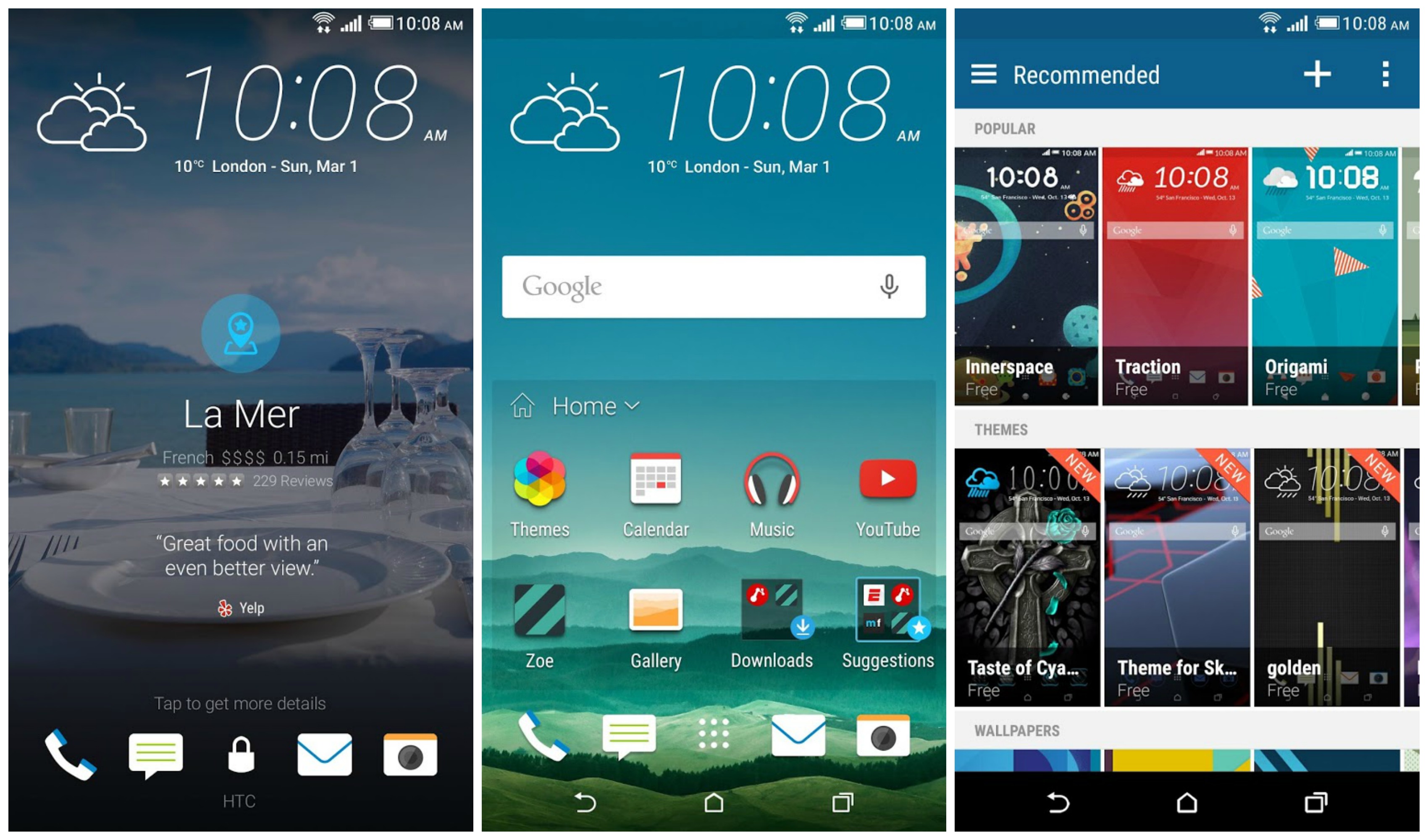
It’s not Sense 7, but HTC is bringing HTC One M8 and M7 owners a taste of some of the new features touted in the HTC One M9. By updating their BlinkFeed app in the Google Play Store — now officially renamed “HTC Sense Home” — HTC is giving the One M8/M7 on Lollipop the ability to apply a handful of themes we took a look at on the One M9.


Not every theme is available, as some require Sense 7 to function, but there’s enough here that it should wet your appetite until a future software update arrives. But you can get started building your own themes on-the-go, even publishing your favorites for others to download, or following your favorite designers. We also recently told you about HTC’s online tool for building your own themes, so you can check that out as well right here.


Aside from themes, HTC’s Sense Home Widget has also been added. Sense Home Widget is a little folder that intelligently delivers commonly used applications based on your location. It even offers suggestions for apps you haven’t downloaded yet.


HTC BlinkFeed has also been updated (One M9/M8/M7), now pulling in Tumblr feeds if you’d like. Oh, and as Android Forums member SolApathy points out, if you don’t like using the stock HTC launcher (Sense Home) but enjoy BlinkFeed, you can create a custom shortcut to quickly access BlinkFeed in most 3rd party launchers. For more details, head to his post right here.


The lock screen has also received some small, Sense 7 like UI tweaks with a different font style and weather widget that mirrors the HTC One M9. All in all a pretty substantial update, one we didn’t see coming. This, foks, is why HTC threw their system apps on the Play Store: no need to wait around for full system updates to enjoy great new software features.


For the HTC One M9, HTC One M8, and HTC One (M7), you can update via the Google Play Store link down below.


Thanks for the M7 confirmation, Ben!


LG G Stylo brings note-taking fun for budget-minded wallets


lg g stylo girls


We were hoping for something a little more… exciting for LG’s first stylus-focused phone of 2015, but this’ll do for now. It’s the LG G Stylo, a 5.7-inch device that boasts just 720p resolution and a 1.2GHz quad-core Qualcomm Snapdragon 410 chipset.


The mid-range specs continue with 1.5GB of RAM, 8GB of internal storage expandable via microSD, an 8 megapixel camera on the rear, a 5 megapixel sensor on the front, a 3,000mAh battery and Android 5.0 Lollipop out of the box.


A big draw will be the device’s included stylus for writing on your display, though the stylus seems to be little more than a capacitive pen the likes of which you can buy for nearly any capacitive touch screen device on Amazon. It won’t equip you with advanced features such as the Samsung Galaxy Note line’s digitized pen which can sense pressure, detect the presence of the pen when it’s hovered over the display and more.


The LG G Stylo is being launched in South Korea to start, though there’s no word on launches planned for other territories in the near future.


[via LG]


Google Play Store 5.4 brings more immersive listings for Lollipop users, rolling out today


Google Play Store 5.4 update hero images resized


It feels like it wasn’t too long ago that the Google Play Store added those fancy colored status bars. It wasn’t that big a deal, just something that was introduced in KitKat. Today, Googler Kirill Grouchnikov is revealing some new changes making their way onto Google Play starting today, but it’s only for users running Lollipop.


Google Play Store listing evolution


Evolution of the Google Play Store’s listings page


Once again, it’s not a big change, just a little something Android fans will get a kick out of. The Play Store now features transparent status bar when viewing listings, going full-on immersive in the latest update (Google Play 5.4). With the hero images for listings slowly inching higher up on your phone’s display, more content can be displayed below without scrolling. And that’s pretty neat.


For those that don’t feel like waiting for the updated Play Store to hit their device, you can download it from us below.


Download: Google Play Store 5.4.10


[Google+]


Android Wear update brings support for WiFi, always-on apps and more


Android Wear update Moto 360 LG G Watch DSC06834


Google has detailed a forthcoming upgrade for Android Wear that allows users to finally break away from their phones. The big change being outed today is full support for WiFi. Whereas before you had to have your Android Wear smart watch connected to your phone via Bluetooth in order to get notifications, you can now instead have your watch connect directly to a WiFi network.


android wear always on apps


This means that if you happen to leave your phone at home, or simply somewhere far from you (such as a locker at work) you can still get notifications, send messages and everything else you do as long as both devices are connected to the internet.


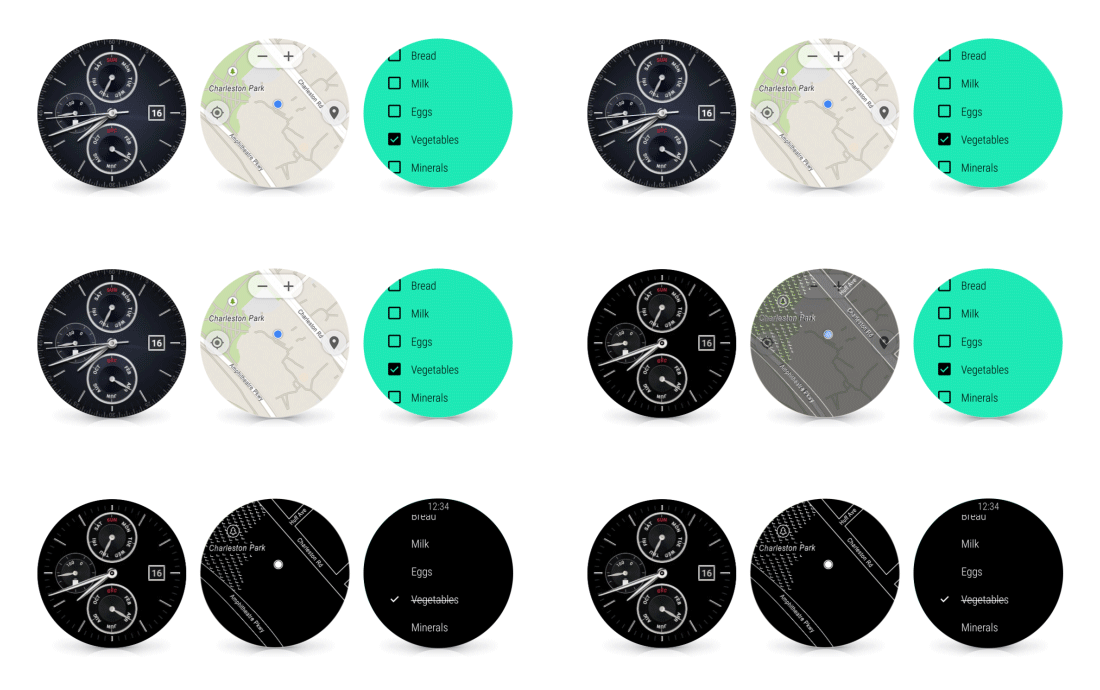
Google is also bringing support for always-on apps for any app on Android Wear. Your watch faces have already had this functionality, but it can now be implemented for any app. There are many reasons one would want to keep an app always at the ready (such as a list of instructions on how to fix, cook or install something) so this is a much welcome change.


android wear wrist gesture


Other changes include the ability to scroll through your notifications timeline by a simple flick of the wrist, an easier and quicker way to gain access to your apps and contacts (simply tap the display) and the ability to draw out emojis instead of having to speak a command. Google says the rollout will happen over the next couple of weeks beginning with the LG Watch Urbane (no real way to buy that yet so we’re not quite sure who that is useful for) so stay on the lookout!


Google Wallet update brings Maps integration and keyword search


Google Wallet tap to pay phone


Google Wallet is adding a few small, but pretty worthwhile new features in the Google Play Store today. Announced on their Google+ page, Wallet won’t just tell you where you bought something, they’ll actually show you. This is done using Google Maps which has now been integrated into the app and viewable in the transaction details.


Google Wallet rich receipt Maps


Now the next feature is even more useful. Imagine it’s several weeks later and you can’t for the life of you remember where it was you had those amazing tacos during a drunken night out with your friends. You could scroll through all your transactions like an animal, keeping an eye out for anything related to Mexican eateries.


Or, like a future-man, you can simply search through your transaction history by merchant name, item of purchase, or any other keywords. Type in “bomb tacos” and you’ll pull up a transaction — now with a handy Maps location — of that amazing hole-in-the-wall.


The update should already be waiting for you in the Google Play Store, so make sure you update and happy shopping.


Nova Launcher 4.0 brings grouped widgets, full Material Design, circular app animations and 25+ other changes


adbtmp.mKmR


Nova’s Material Design update has been a long time coming for those who aren’t particularly crazy about beta testing, but the wait for it to hit the stable channel is finally over. Nova Launcher 4.0 is out on Google Play, and it stands to be one of the biggest updates yet for the premier home screen replacement.


The biggest changes will be a more refined Material Design user interface, including new animations, updated fonts, new material-themed wallpapers and other aesthetic-focused things. The full list is rather large, and rightfully so: this has been in the works for a few months now, with the last version — 3.3 — having been released as far back as December 2014.


adbtmp.2KOw
adbtmp.mKAq
adbtmp.dF1c
adbtmp.7vGx

Here’s a full list of changes you can expect if you haven’t been using the beta:


  • Full Material Design

  • Google Search from the search bar shows as an overlay

  • Edit Shortcut dialog, and quick menu, tinted based on colors of the icon

  • New icon

  • New Nova Action icons

  • Rebased on top of Launcher3

  • Individual icon layout settings (size, font, etc) in Desktop, Drawer, Dock, Folder

  • Max icon size boosted to 150%

  • Widget Search

  • Circular App animations (Settings > Look and Feel > App Animation > Circle)

  • Pull to search (pull down in the drawer to open app or widget search)

  • Widgets given their own drawer, removed from App Drawer

  • Ability to change Page Indicator color

  • Drawer Tab Bar completely optional

  • Support for Android for Work managed profiles (Lollipop)

  • Workaround Expand Notifications Nova Action not working on Samsung Lollipop

  • Requires Android 4.1 or higher (Dropped support for Android 4.0 ICS)

  • Unlimited desktop pages (previously limited to 9)

  • Add/remove of desktop pages by dropping icons on the blank page, or removing all icons from a page

  • Add blank desktop pages (for gestures or live wallpapers) from overview

  • Improved bulk edit of folders (Folder > Menu > Select Apps)

  • Added shadows to unread badges

  • Unread Badge size scales with icon size

  • Allow reordering drawer folders by drag/drop within window

  • Added Roboto-Medium font option

  • Improve handling of apps installed to sdcard


The download is sitting over at Google Play right here so be sure to grab it as soon as possible.


VLC for Android update brings background video playback


vlc-hpep-1024x768


VLC for Android’s latest upgrade should please quite a few people who like listening to videos instead of watching them. You can now have video playback continue in the background even if you leave the app. Why would anyone want to resume playback of a video they aren’t even watching?


For one, it enables folks to listen to music videos that they can’t otherwise listen to. It’s also great for listening to interviews, comedy shows and other content only released on video but are just as effective when simply listening to them.


Here’s a quick list of other changes coming in the latest update:


  • Control over audio delay for videos

  • A new look for the audio player

  • a new album view

  • improved search

  • More Material Design tweaks

  • Simplified video player controller

  • New file browser

  • Fixed hardware acceleration for TS files

  • Support for audio scrobblers

  • Fix for browsing SD cards

  • Improved logging

  • Updated codecs


That’s a lot, so you’ll definitely want to get this thing downloaded as soon as possible. The update is in Google Play right now so be sure to grab it as soon as you can.


Samsung Galaxy S6 and S6 Edge’s latest maintenance update brings improved fingerprint scanner recognition


Samsung Galaxy S6 DSC09415


Samsung’s supposed memory leak update for the Samsung Galaxy S6 and Samsung Galaxy S6 Edge have yet to see the light of day in official capacity, but another important maintenance upgrade seems to be headed out to the handsets. Folks in various Asian and European countries are beginning to see verison XXU1AOE3 pop up.


It’s a relatively light download at 159.29MB, and it brings with it the following changes:


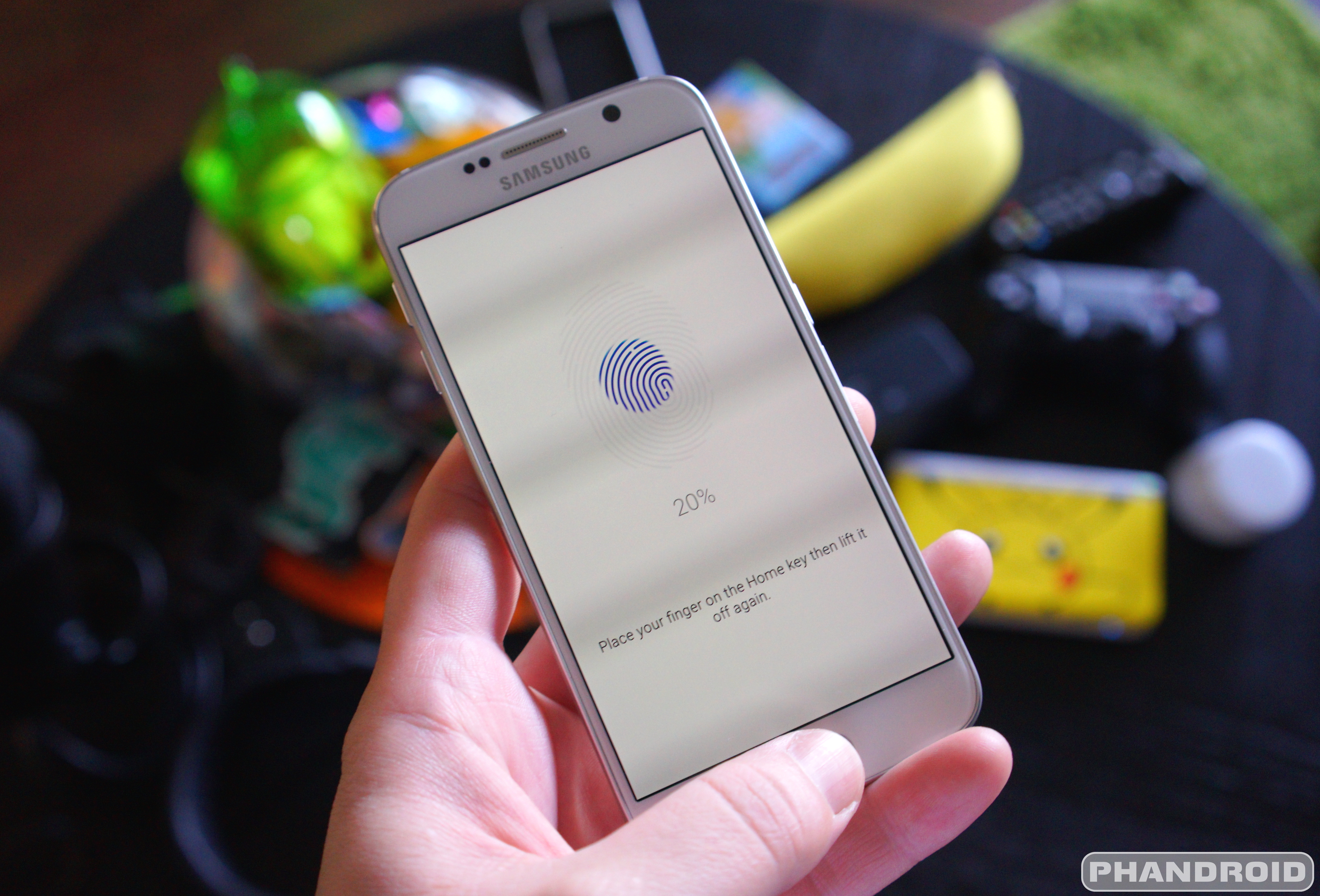
  • Improved fingerprint recognition process

  • New feature in Photo Editor (no word yet on what this new feature is)

  • Improved compatibility with accessories

  • Enhanced user interface for Email, Music, S Planner and other apps


As always, you can expect this thing to roll out in stages, with unlocked devices likely getting the first swing at the new goods. Carrier variants are subject to testing and certification, so it may be a while yet before you’re able to pull it down.


[via SamMobile]


AllCast 2.0 brings a fresh Material design makeover [DOWNLOAD]


AllCast tablet UI


Even when you’re a developer as big as Koushik Dutta, getting your apps up to speed with Google’s Material design isn’t the easiest of tasks. Sometimes you need a little help and he got just that thanks to designer/fellow blogger Liam Spradlin who whipped up a fresh new Material look for AllCast in its new 2.0 update.


It’s not like AllCast was bad looking before, but this brings the app up to speed with Google’s Material guidelines. Small changes to the slide-out navigation menu can be found with slick new icons, along with the gallery view also receiving some love.


AllCast 2.0 update Z (1)
AllCast 2.0 update download
AllCast 2.0 update download (1)
AllCast 2.0 update 9k= (1)

Without a doubt, AllCast is one of those must-have Android apps for Google’s Chromecast owners as it allows you to cast just about anything to the dongle. Whether it’s media stored on your device, or in the cloud, AllCast makes it all possible. The free version of the app caps video viewing at 5 minutes, but there’s also AllCast Premium which will run you .


Twitch for Android update brings support for video on demand


twitch mobile video on demand


Game watchers will be happy to know that the Twitch app has received a huge upgrade over at Google Play. There’s one major highlight within a sea of other under-the-hood improvements and fixes — video on demand.


This means you can now watch past broadcasts and highlights of a channel right from within the app. This functionality was previously only available through Twitch’s desktop site, which doesn’t exactly play too nicely on a mobile browser.


To access the archives of a particular channel, all you’ll need to do is find the video reel icon at the upper left corner whenever the information overlay is visible (you can make it visible by tapping anywhere within the video player). Tap that, and you’ll see a nice full list of videos waiting for you to watch, with the ability to scrub as fast and as far as you want.


Now you won’t have to wake up at the crack of dawn or stay up unreasonable hours to see what your favorite streamers have been up to. Be sure to grab the upgrade from Google Play as soon as possible.


Google Play Store 5.5 brings even more Material design animations and other small tweaks [DOWNLOAD]


Google Play Store


Just because OEMs seemingly never got the “Material design” memo doesn’t mean Google isn’t doing their part to show the world how its done. There’s probably no better place to find well-executed Material design than Google’s very own Play Store app.


Googler Kirill Grouchnikov posted onto his Google+ page about some new changes rolling out in the new Google Play Store update 5.5. It’s nothing too drastic, just some slightly tweaked UI animations and other small changes. But it’s enough to make us wish all our devices were running the most up-to-date version of Android as only those on Android 5.1+ are able to view them. Phooey.


You can either wait days (or even weeks) for the update to finally hit your device, or download the apk download for sideloading. Enjoy.


Download: Google Play Store 5.5.8


Amazon Fire Phone update brings Android 4.4 KitKat and over 10 new features


amazon-fire-phone-books


Amazon Fire Phone owners might not be a plentiful bunch, but those who are rocking the phone as proud as can be will be happy to know a new upgrade is headed your way. The upgrade brings Fire OS’s base platform version up to Android 4.4 KitKat.


It sounds a bit silly to get excited about KitKat when Lollipop is out, but you have to remember that Fire OS is a completely independent platform that Amazon customizes to the bone. Having KitKat vs Lollipop wouldn’t stand to make much of a difference if Amazon is going to customize them to have exactly the same base functionality.


Along with the more recent version of Android, there are over 10 new features on tap. Here’s what to expect:


  • Support for Bluetooth Low Energy: Fire phone now supports Bluetooth Low Energy technology. To learn more, go to Connect to Bluetooth.

  • Change the wallpaper on the Home screen: You can now change the Home screen wallpaper to a different color or use your own image. To learn more, go to Change the Home Screen Wallpaper.

  • Lock screen notification improvements: View previews of new notifications on the lock screen and manage which apps can show previews on the lock screen. To learn more, go to View & Manage Notifications.

  • Additional keyboard options: Amazon’s keyboard now includes color emoji. Choose from hundreds of emoji characters to make your e-mail and multimedia messages fun and personal. You can also change the default keyboard on your Fire phone with another compatible keyboard downloaded from the Amazon Appstore. To learn more, go to Customize Your Language & Keyboard.

  • Convert video clips into lenticular images and set HDR to auto: Record video clips and automatically convert them into a lenticular image to share with others or use on the lock screen. With HDR turned to auto, your phone’s camera also determines whether a scene needs HDR and captures it to create a rich, detailed image. To learn more, go to Take Photos & Personal Videos.

  • Smarter calling options: Manage up to five people on a conference call, delete all previous calls in your history, and more. To learn more, go to Make & Receive Phone Calls.

  • Messaging improvements: Delete or forward multiple messages in a conversation, swipe to delete conversations in your Inbox, and modify your messaging settings with new options, such as the ability to change the text size of your messages. To learn more, go to Send, Read & Manage Messages.

  • Choose different colors for calendar events: If you have multiple e-mail accounts synced with your phone, you can assign a color for each account. When you select a new color for an account, your calendar events appear in that color. To learn more, go to General Settings for Email, Contacts, and Calendar.

  • Print from your Fire phone: You can now print personal documents, e-mails, contact details, and calendar events from your Fire phone to your compatible HP, Epson, or Canon printers. To learn more, go to Print From Your Fire Phone.

  • Enhanced enterprise features: With support for secure work Wi-Fi networks, single sign-on for corporate networks, and AES-256 bit hardware encryption, your Fire phone is ready for more work. To learn more, go to Protect Your Fire Phone with Encryption and Set Up a VPN.

  • Accessibility improvements: Easily manage your closed caption settings across the device and enjoy new Screen Reader features—such as independent volume controls and faster reading speed options—when you use the accessibility options on your Fire phone. To learn more, go to Accessibility Features.

  • Bug fixes and user interface improvements: Dozens of other bug fixes and user interface improvements.’


You can find instructions on how to get your phone updated to the latest version — which is Fire OS 4.6.1right here. And if you’re somehow in the market for one don’t forget you can always buy them pretty cheap from Amazon’s online storefront.


[via Amazon]


Flickr 4.0 brings another major redesign, improved search, Auto-Uploadr, and 1TB of free storage


Flickr new again


In case you haven’t been keeping track, almost every year now Flickr undergoes a dramatic redesign in hopes of enticing fans of photos sharing services like Instagram or even Google+. It was almost 2 years Flickr 2.0 introduced its biggest changes, offering up new Android apps and giving users 1TB of free storage to store all their photos. Around this same time last year, the photo service fine tuned their apps’ design with Flickr 3.0, aiming for something more akin to Instagram (but with much higher quality uploads).


Today, Flickr is announcing another big change, one that sees yet another complete UI overhaul to both their online site and mobile apps. Because Flickr knows you’ve got thousands of photos and videos spread across multiple devices — and 1TB of space to store them — they wanted to make easier than every to store and organize them online.


Flickr 4.0 Android update


That’s why Flickr is introducing their new Auto-Uploadr, a little something built into their new Android and iOS apps (there’s a desktop app too) that simply auto uploads all your photos and videos to Flickr. The photos are all marked private by default, so you don’t have to worry about anyone viewing them (unless you choose to share them). The best part is Flickr’s new editing tools are no longer permanent, meaning the original unedited file is always available.


Once uploaded, Flickr’s new unified search features — which can find photos based on landmarks, location, or even color palette — make it easier than ever to keep everything nice and tidy. They can even detect and avoiding uploading duplicate photos, so don’t worry about backing up everything all over again.


You can find the new Flickr 4.0 update right now on the Google Play Store. As always, it’s completely free to use is a compelling option for those looking to backup and share their photos online.


Gmail update brings Oauth support for Yahoo and Microsoft email accounts


Gmail All Inboxes View tablet


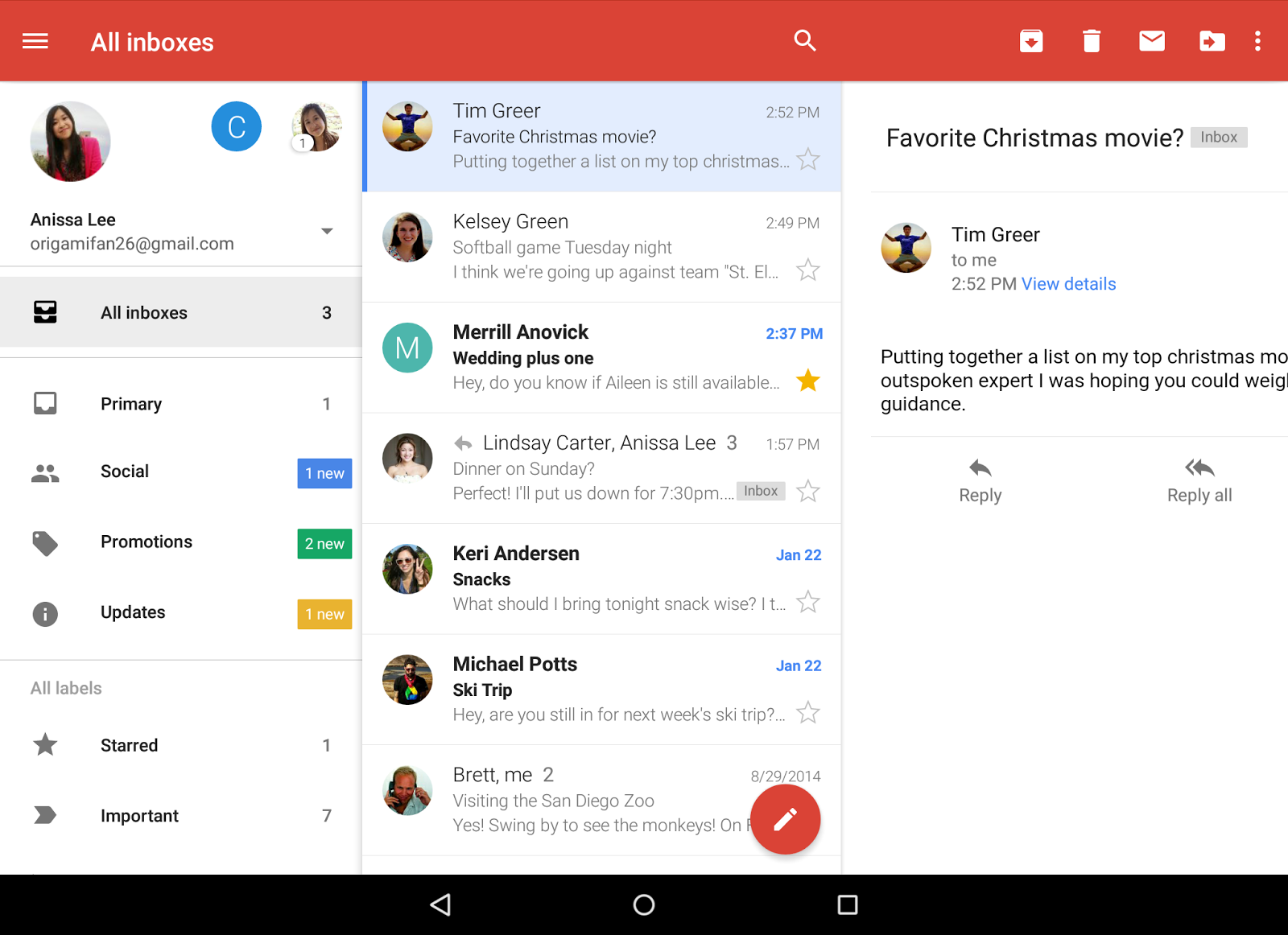
Last year we saw Gmail updated to version 5.0 with the ability to add inboxes from Yahoo, Outlook, or any other POP/IMAP email accounts. It was a pretty big move, but one that may have been a little too light on security for some folks.


Today, Google has announced that they’ve officially brought Oauth support to Yahoo and Microsoft accounts. This means anyone using these can take advantage of added security features like 2-step verification and/or account recovery. It’s already available in the latest Gmail update which is already rolling out on the Google Play Store.


Download link provided below for your convenience.


[Google]


Spotify update finally brings Android Wear support, now available on Google Play


spotify-android-wear-update


It was almost a month ago that Spotify announced their intentions to bring Android Wear support to their application in June. With only a few days left in the month, you may have been wondering where said update was. Earlier today, Spotify was updated on the Google Play Store and yes, it finally brings that smartwatch compatibility you’ve been craving.


It’s pretty straight forward, with the card along with album artwork and pause control only popping up on your smartwatch once you’ve started music playback on your phone. Swiping to the left will bring up the music controls (volume, skip/previous tracks). Swiping again will allow you to browse your music library or playlists, as well as play your saved stations of one of Spotify’s curated playlists. While you can dive into an artist or find a specific album, oddly enough selecting a song isn’t possible.


Another weird quirk is there doesn’t appear to be a way to launch the app from your smartwatch — either by voice or an icon in the Android Wear app drawer — so you’ll need to start it up first on your smartphone or tablet. We’re sure another update is already coming down the pipeline that will add this functionality at a later date, but for now, you can grab the update right now from the Google Play Store.


NVIDIA SHIELD Android TV update brings 4K picture sharing, 4 new apps and more


NVIDIA Shield with Android TV


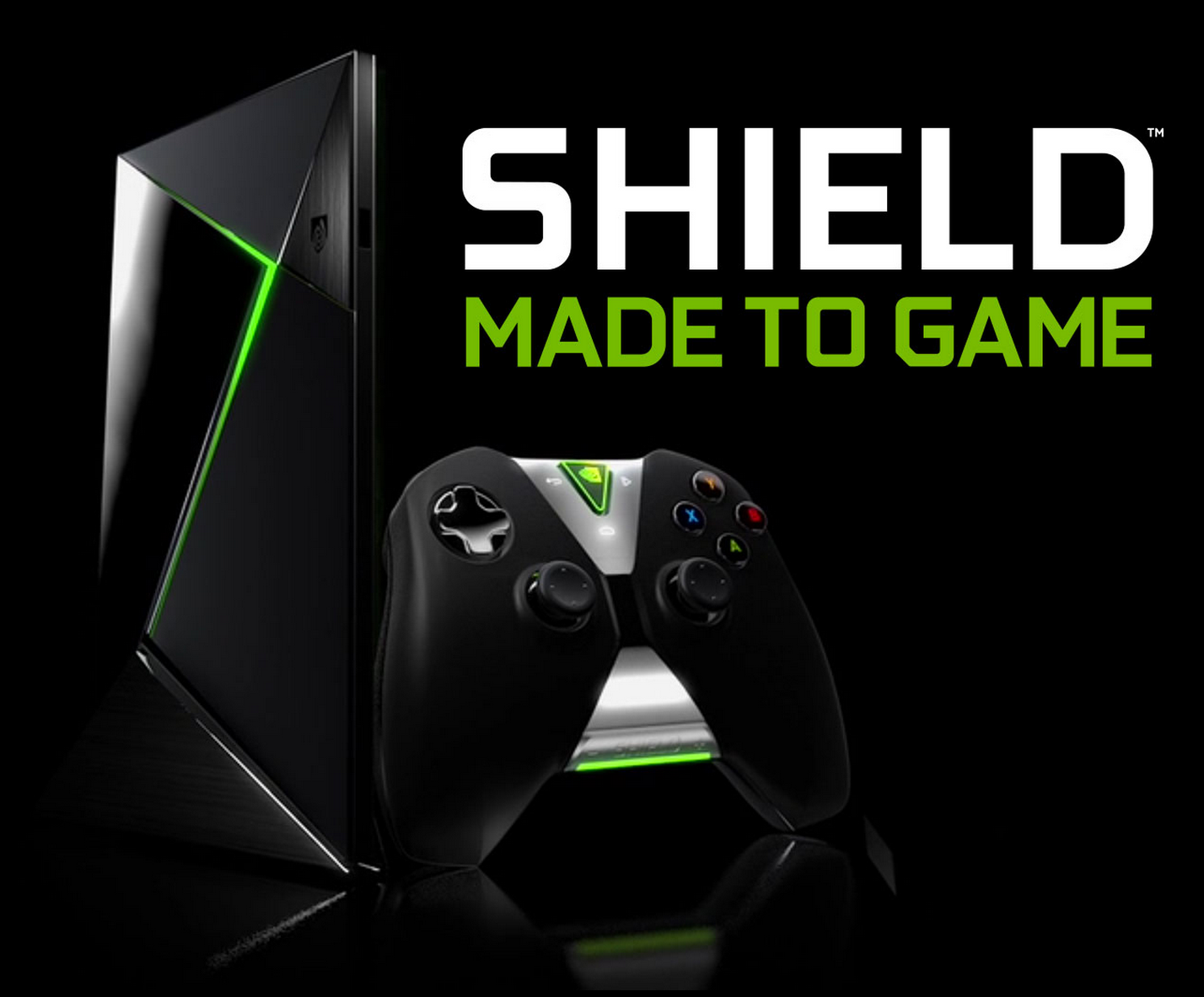
The NVIDIA Shield Android TV is getting a quick update today. It’s version 1.2, and brings a number of important enhancements and changes that you’ll want to have your hands on ASAP. The biggest is the ability to share photos in 4K resolution. That isn’t the most exciting bit of functionality in the world, but if you can’t stand to view your photos in anything other than 4K then there it is.


We’re also getting 4 new apps, including Fox Sports Go, EPIX, CBS News and CBS Sports, with NVIDIA detailing 12 more that will b on the way soon:


  • HBO Now

  • HBO Go

  • Fox News

  • Fox Now

  • FX Now

  • Qello

  • Twitch

  • UFC

  • USA Today

  • Vimeo

  • Vudu

  • WWE


And here’s everything else that you can expect to see differently after taking this update:


  • Delivering enhancements for SD card auto-move setting

  • Optimizations to streaming experience for Google Play Movies and Netflix

  • Shield Accessories Upgrade for Shield Remote for better response

  • Adds notifications for low battery on Shield Remote

  • Delivers enhancements for NVIDIA GameStream (requires update to GeForce Experience v2.25 beta or later)


It’s available right now so be sure to check the settings menu on your SHIELD to pull it down.


[via ShackNews]


Google Play Music update brings a much improved method for adding music to your Android Wear device


Google Play Music 6.0


In an update to Google Play Music that landed earlier today, the music streaming app added the ability for users to play ad-supported radio stations (a lot of ads) for free. While that was the main gist of the update, it wasn’t the whole story. As we so find inside updates, smaller changes like bug fixes and improved functions also managed to creep in unnoticed.


While we’re not sure how many of you were using the Google Play Music to listen to music on your Android Wear device (a feature that rolled out late last year), it’s now more functional than ever. Arriving in the 6.0 update, Google has finally made it possible to add music to your Android Wear smartwatch independent of a tethered smartphone or tablet. What we mean by that is previously, users had to download or pin the music to their Android device first then enable the “Download to Android Wear” setting to transfer to their pinned music to their smartwatch. With the latest update, you can now download/pin music on your directly onto the smartwatch — the way it should have been from the start.


You can either wait for the update to hit the Google Play Store, or download and install Google Play Music 6.0 from us right here.


[via Reddit]


HTC One M9 update brings improvements to camera, battery life and heat management


htc-one-m9-software-angle


HTC is pushing out a new upgrade for the HTC One M9. It’s not a big overhaul of features or a new version of Android (we’re still on 5.0.2 here), but it does bring a number of important enhancements for crucial device features.


For starters, that all-important camera will be getting tweaks to make for better images. The changes include a better auto-exposure balance to make for better exposed shots. We’re also getting reduced noise and blur for low light photos, as well as the reduction of yellow and green hue in photos to make them more color accurate.


In areas of battery life, HTC has improved their Facebook and YouTube integration to make sure they’re sipping less power. Finally the company has improved smart charging to make sure the device doesn’t get too hot while it’s juicing up.


The upgrade is headed out to European devices starting today, while those in North America will have to wait a while longer. You’re looking for version 1.40.401.5, so check for it (carrier variants might not receive it right away) and let us know how it’s treating you on the other side.


Dropbox for Android 3.0 brings a full Material Design makeover


dropbox 1


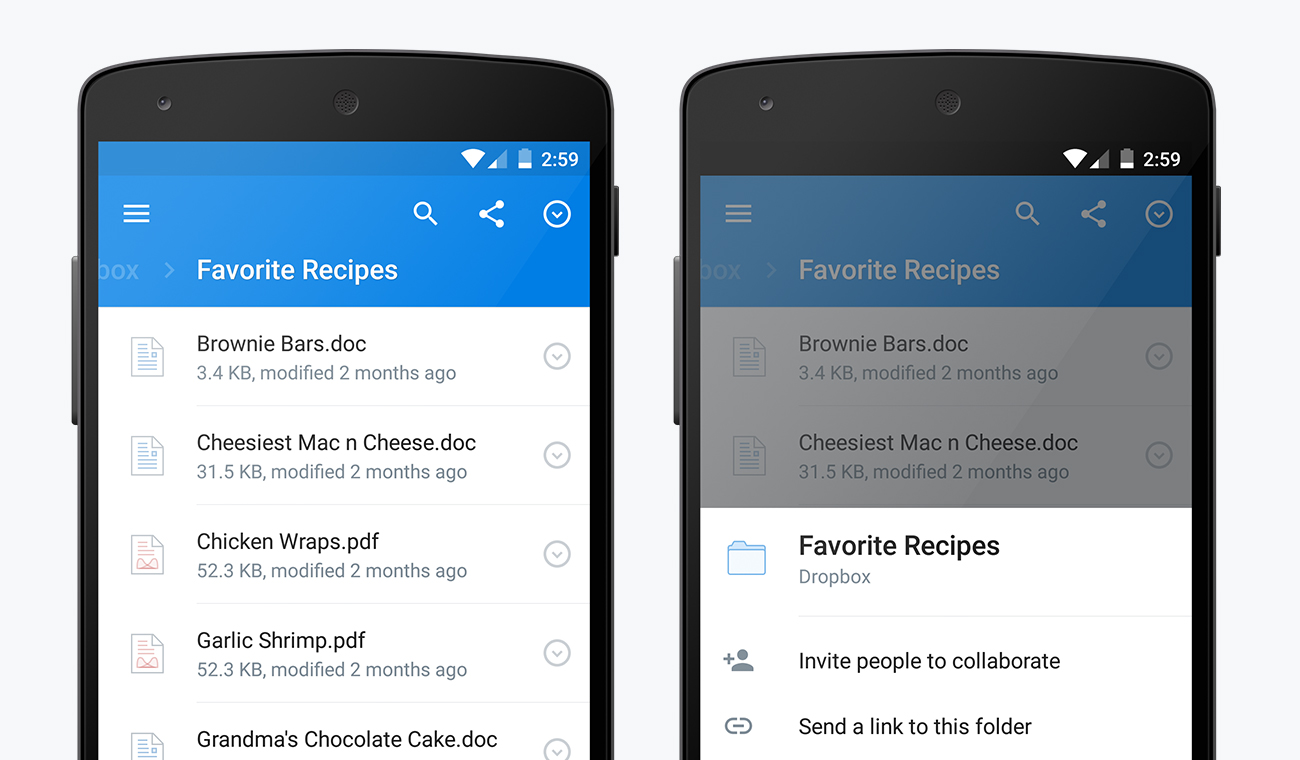
Dropbox has announced a nice new upgrade to their Android app. It’s Dropbox 3.0, and the main highlight is that the app is now doused in a full coat of Material Design. We’re finally getting an excellent use of white space, drop shadows, and — oh yes — that glorious floating action button (which will allow you to easily add files and photos to whichever folder you’re in while you press it).


dropbox 2


There weren’t many other functional changes made to the app, though you’ll notice a persistent search button throughout the app, as well as more consistent placement of sharing and file management controls throughout the app.


dropbox 3


The upgrade should be headed to your phones and tablets shortly, so be sure to keep an eye out on Google Play throughout the course of the day. Oh, and check out the cool new user animation video they’ll be using straight ahead.


[via Dropbox]