That didn’t take long, did it? If you were scarred by the one-week delay of the Nexus 6 on Verizon you’ll be happy to know that the phone received a full retail launch today (those who preordered online last week should already have it in their hands). You can order one online right now and have it shipped to your door as soon as tomorrow, or simply stop into a brick and mortar location to get one in person.
Verizon has one model available — Midnight Blue in 32GB — and it’ll run you 0 on a one-year contract, .08 per month on Verizon Edge, or 0 outright. If the lack of the 64GB or Cloud White options bothers you, you can always opt to buy one straight from Motorola or Google and get it activated in no time (though that obviously means you will have to pay full price).
And here’s the best part of this entire story: Verizon doesn’t install an obnoxious amount of bloatware during the setup process, and their logo is so easy to remove from the rear that it’ll probably fade off on its own at some point. Head here to buy if you’re interested.
It was only a few weeks ago that Google moved all their hardware off of the Play Store and into their all new Google Store (their merchandise store has since been relocated). While the Nexus 5 was officially EOL’d, during this transition, that doesn’t mean they’re giving up on expanding availability of the rest of their hardware around the world.
In fact, starting today you can now purchase the Nexus 6 in 6 all new countries around the world: Austria, Denmark, Finland, Ireland, Norway, and Portugal. This brings the running list up to 21 countries where the Nexus 6 can be purchased directly from Google, here’s the full list:
Nexus 6 country availability (green = new)
Australia, Austria, Belgium, Canada, Denmark, Finland, France, Germany, India, Ireland, Italy, Japan, Netherlands, New Zealand, Norway, Portugal, Spain, Sweden, Switzerland, United States, United Kingdom
Last Friday, OnePlus issued an open invitation for anyone who cared to be on the lookout for a big announcement today. OnePlus 2? Hopeful, but those hopes were dashed if the contents of this blog post is all we’re to expect today: the OnePlus One is now available for anyone to buy without an invite.
It’s been possible to buy the OnePlus One without an invite for quite a bit of time now, except you had to wait until Open Sale Tuesdays to partake. Even still, finding a OnePlus One invite has always been as easy as finding leaves on the ground in autumn.
Anyone who really wanted a OnePlus One by now likely already has one, and anyone who wants one in the future can be happy that they won’t have to play the waiting game or jump through hoops to get it. With that, the company also announced a decent sale that will take 75% off the cost of their Flip Covers and premium screen protectors. Bamboo SwapStyle covers are also now available without a purchase (but only until their current stock runs dry).
Folks in North America, the European Union, Hong Kong, and Taiwan will be able to get in on these deals, though everyone else is sadly left out.
The tiny set top box can now be picked up for a mere 80 quid, allowing you to infuse your television with Android TV smarts. If casual gaming is more your thing, you can also find the official gamepad — sold separately — for a £35.
If the Google Store isn’t your thing, you can also find the Nexus Player at Currys PC World, John Lewis, and, of course, Amazon. If you’re still on the fence, don’t forget to check out our full Nexus Player review right here.
Specs probably wont blow your socks off, but the Samsung Galaxy Tab A will be available in 2 different sizes — 8-inch and 9.7-inch models — both with a 1024×768 resolution display in a 4:3 aspect ratio. The 8-inch version will retail for 0, while the 9.7-inch (which comes with an S Pen digital stylus) will be available for 0.
The rest of the hardware specs include a 1.2GHz quad-core processor, 2GB RAM, 16GB internal storage, micro SD card slot (up to 128GB), 5MP rear/2MP front facing cameras, and a 4,200mAh battery — all running on Android 5.0 Lollipop. Also worth noting, the larger 9.7-inch Tab A features two speakers on the bottom, while the smaller version only has one.
You can pre-order the tablets right now in the US via the link below in either white, blue, or titanium color options, with the official launch kicking off May 1st from retailers like Amazon or Best Buy. Let’s not all rush out at once.
Google has finally broken their silence about the rollout of Android 5.1, finally making an official announcement. Things are starting to move quickly: the company has wasted no time in publishing the first set of Android 5.1 factory images to their repository for Nexus Devices:
Download the appropriate system image for your device below, then unzip it to a safe directory.
Connect your device to your computer over USB.
Start the device in fastboot mode with one of the following methods:
Using the adb tool: With the device powered on, execute:
adb reboot bootloader
Using a key combo: Turn the device off, then turn it on and immediately hold down the relevantkey combination for your device. For example, to put a Nexus 5 (“hammerhead”) into fastboot mode, press and hold Volume Up + Volume Down + Power as the device begins booting up.
If necessary, unlock the device’s bootloader by running:
fastboot oem unlock
The target device will show you a confirmation screen. (This erases all data on the target device.)
Open a terminal and navigate to the unzipped system image directory.
Execute the flash-all script. This script installs the necessary bootloader, baseband firmware(s), and operating system.
Once the script finishes, your device reboots. You should now lock the bootloader for security:
Start the device in fastboot mode again, as described above.
Execute:
fastboot oem lock
Locking bootloader will wipe the data on some devices. After locking the bootloader, if you want to flash the device again, you must run fastboot oem unlock again, which will wipe the data.
Flashing a factory image will erase EVERYTHING on your device and if you don’t follow the steps properly, you risk damaging your device permanently. We won’t take any responsibility so proceed at your own risk and if you need help… we highly recommend visiting the appropriate section on Android Forums.
Google will inevitably push updates for additional Nexus devices over the course of time so stay tuned to Phandroid for that breaking news.
Verizon yesterday officially announced that the Nexus 6 would be available for purchase online today. That’s true — you can head right here and order one for 0 on a two-year contract or .08 per month on Edge (9.99 outright if you have the dough to spend).
There’s just one problem, though — it won’t actually ship until March 18th, which is one-day shy of its in-store availability. We’re not sure why Verizon failed to mention this “gotcha” when they announced the device, but if you were hoping to throw your money at them today for the biggest Nexus phone in history and get it in time for the weekend then you’ll be quite disappointed.
Whether you should still pre-order the device is up to you. There’s a slight chance it could ship ahead of March 18th, but Verizon’s backorder dates typically don’t change. For what it’s worth the Nexus 6 is one of the few devices worth waiting for. We gave it a glowing review, and although there were some performance issues early on we’re expecting Android 5.1 (which it’s shipping with) to clear most of that up.
Don’t forget that Verizon’s Nexus 6 will also come with support for HD Voice / VoLTE / Advanced Calling 1.0 / whatever else you want to call it out of the box. If that’s important to you then there is almost no better phone to get right now (you can check the full lot of them out here). Let us know if you’ll still be looking to buy one or if Verizon’s being a bit too slow for your taste.
Just as we’d heard from trusty insiders at Big Red, the 2nd gen Moto E — you know, the one with LTE — is now available for purchase. You can only get it through Verizon pre-paid for now, though considering its outright price is we’re sure that isn’t a problem for budget-minded spenders.
The 2nd gen Moto E trumps the original in a few different ways. Most notable are the addition of a front-facing camera to go along with the 5-megapixel rear camera and a faster quad-core Qualcomm Snapdragon 410 chipset clocked at 1.2GHz. You’ll also get a bigger battery at 2,390mAh, 8GB of internal storage, 1GB of RAM and a 4.5 inch 960 x 540 display. It’ll ship with Android 5.0 Lollipop, to boot
Another minor firmware upgrade for those on Android 5.1 has been released by Google, and it’s headed to both the Nexus 5 and Nexus 6. It’s build LMY47I, and there doesn’t appear to be much new compared to the base release of Android 5.1. It’s our understanding that this release deals with a couple of bugs pertaining to dual-SIM support, but that’s about it.
If you’re in a rush to get it and don’t want to wait for the OTA you’ll be happy to know that the factory images for both are now available for download directly from Google.
As always, you’ll need fastboot (available in the SDK tools) to flash the system image to your Nexus device. Google has instructions laid out at the aforementioned link so be sure to reference it if your flashing skills are a bit rusty. Let us know how it’s treating your device once you’ve gotten it loaded up!
Google’s popular 7-inch tablet has been removed from the Google Store. The Nexus 7 was one of the first Android tablets to gain popularity. It was affordable, very capable, and ran stock Android. Instead of updating the Nexus 7 again, this year Google released the Nexus 9. Now Google is sticking with that device as their flagship tablet.
Google says there is still some inventory in stores and carriers, but they are really emphasizing the Nexus 9. If you want a Nexus 7 you should act fast. We’re sad to see the Nexus 7 being retired. The 7-inch size is still one of the best form factors for a tablet. It was easy to hold and it worked better with the many Android apps that don’t have tablet UIs.
Do you own a Nexus 7? Do you think Google should update the Nexus 7 again, or stick with the 9-inch tablet?
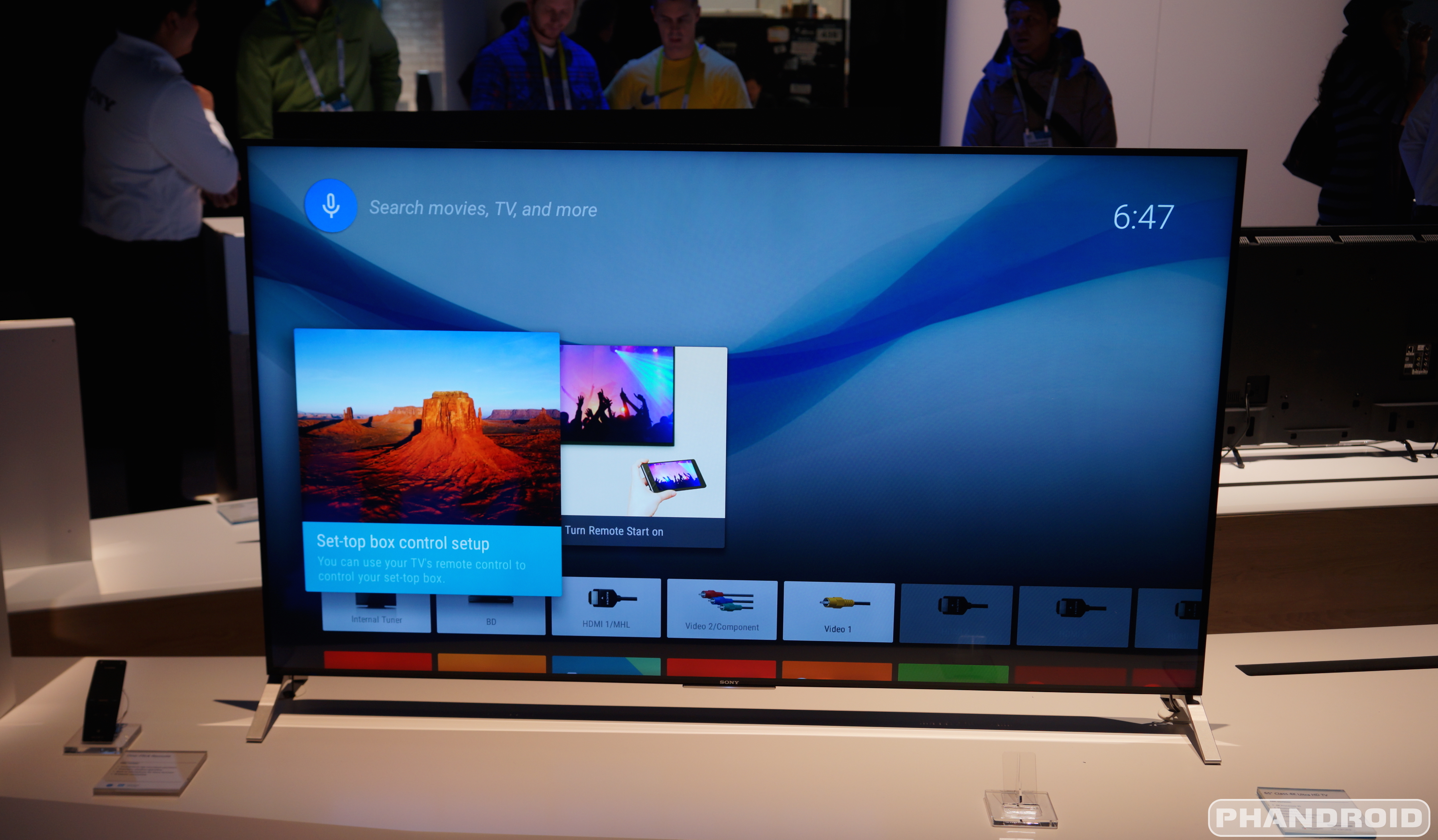
Sony is officially announcing pricing and availability of their upcoming 4K Ultra HD televisions powered by Android TV. We got a look at one of these models — the X900C — during CES 2015 a few months back with its ultra-thin profile. It was definitely slim up at the top, but not the bottom half where all the television’s components were. Still, we were mostly impressed by what we saw (even if Android TV didn’t take advantage of all those pixels).
All of the 2015 televisions come equipped with Sony’s new “4K Processor X1″ on the computing side of things and although they run Android TV, Sony has added some of their own software features on top. The TVs also include future compatibility with PlayStation Now for the streaming of select PlayStation 3 games using a DualShock 4 controller for input.
There are 6 total new 4K Ultra HDTV models, but only 4 of them going up for pre-order starting today. Here’s what we’re looking at:
Sony 4K Ultra HDTV
X830C (May)
43-inch: ,300
49-inch: ,600
X850C (May)
55-inch: ,200
65-inch: ,500
75-inch: ,000
X930C (May)
65-inch: ,500
X940 (May)
75-inch: ,000
X900C (this summer)
55-inch: TBA
65-inch: TBA
X910C (this summer)
75-inch: TBA
Once again, the Sony’s new 4K Android TV-powered televisions — along with their 2K TVs as well (R510C, W800C, W850C) — are up for pre-order starting today, with the exception of the X900C and X910C. Should you feel like waiting a bit, you’ll be able to purchase the televisions online in May at the Sony Store, Amazon, Best Buy or other authorized dealers across the country.
Keep in mind if you opt for one of Sony’s lower resolution 2K televisions, only the W850C and W800C series feature Android TV, the R510C does not. Check out our hands-on of the X900C down below.
And just like that, our old friend, the Nexus 5, is now no longer available for sale on the Google Play Store. Earlier today, Google launched their new online store front (the aptly named “Google Store”) where they’ll now be selling all of their hardware. That means that every piece of hardware previously listed on the Play Store (play.google.com/store/devices) now redirects to the new Google Store, even the Play Store’s old Devices page.
As one of our readers discovered, the Nexus 5 is now listed as no longer available for purchase on this all new Google Store. Whether this is simply temporary and has something to do with the transition is anyone’s guess. This wouldn’t be the first time we’ve seen the Nexus 5 disappear form the Play Store, only to return a few weeks later.
With so many new devices looming on this year’s horizon — HTC One M9, Samsung Galaxy S6 Edge, LG G4, Sony Xperia Z4 — we don’t imagine too many of you will be bummed out about this news. Of course, until we get official word from Google, this might not be good bye just yet for the Nexus 5.
LG’s latest smartphone is now available to those on the Now Network. You can grab the LG G Flex 2 from Sprint for $21.00 per month for 24 months through Sprint’s Easy Pay smartphone financing, or sign a contract to get it for 0 on a two-year commitment. Those not interested in that commitment can instead opt to pay 4 for the phone outright.
The LG G Flex 2 isn’t expected to be considered LG’s flagship for 2015, but it sure does read like one on paper. It’ll come with Android 5.0 out of the box and its gears tick by way of a Snapdragon 810 processor from Qualcomm.
You’re also getting a 5.5-inch 1080p display, 32GB of storage, 2GB of RAM, a 3,000mAh battery and a microSD card slot that can support up to 2TB. Rawr. Of course, LG’s most proud of the natural curve they were able to get, as well as the vastly-improved self-healing back that makes a return from the original. Get your order in right here if this sounds like something worthy of your dollars with even more competitive options looming.
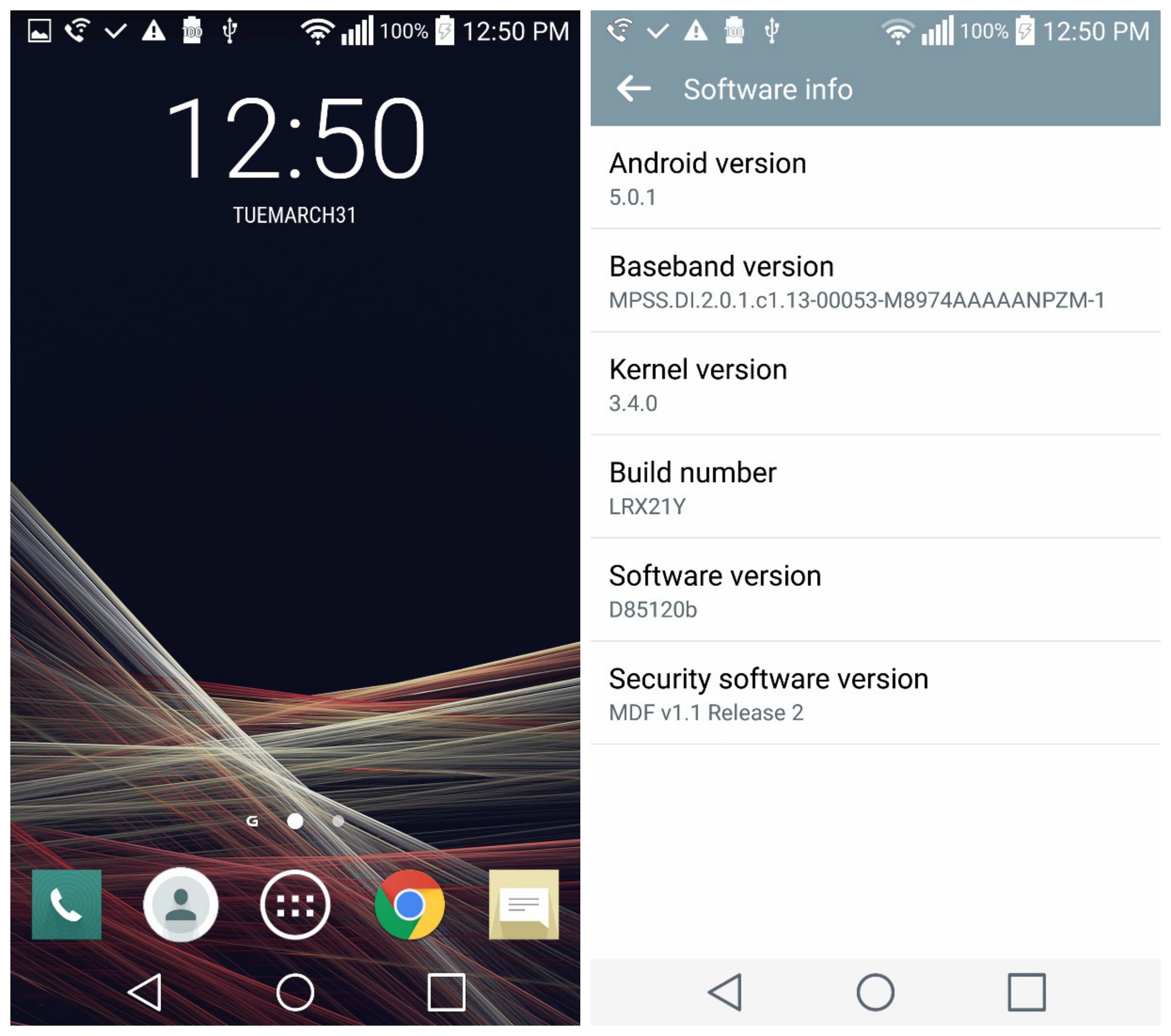
After the Lollipop update for the LG G3entered into T-Mobile’s “testing phase” early last week, we knew it was only a matter of time before it officially began hitting devices. Sure enough, Android 5.0.1 is now finally ready for the T-Mobile LG G3, but not in the way many of you are used to.
The update isn’t pushing out over-the-air, so you can’t update from just your phone alone. Instead, you’ll need to update the T-Mobile LG G3 via LG’s Mobile Support Tool (download it here). This means you’ll have to download LG’s updating software to your desktop computer and like an animal, connect your device via USB in order to apply the update.
We’re not sure how long the update will only be available in this way, but it’s kinda neat that a manufacturer is giving users the option to update early with this method rather than waiting around for a carrier to push out new software to their device. Again, it’s entirely possible the update — which at the time of writing, still hasn’t been green lit by T-Mobile — will be rolling out to G3s in the coming hours/days/weeks. So, if this process is too much for you, just sit tight. Lollipop will be here soon enough.
It’s been a little over a week since Mortal Kombat X was released for nex-gen consoles (and a few weeks since the iOS version became available). Today, the over-the-top gore fest finally lands on the Google Play Store for Android devices, courtesy of NetherRealm Studios and of course, is only suitable for ages 17 and up.
Gameplay is a bit different than that console versions, but anyone who’s played other “free-to-play” brawlers like Marvel Contest of Champions or previous Injustice will know what to expect. The actual fighting in the game involves mashing the screen to attack, with gestures cues and other quick time events popping up onscreen to execute some of the moves. It’s pretty basic and can get repetitive at times, but then again it’s the level grinding that really looks to suck players in.
The actual characters you use in battle are based on cards that can be leveled up the more you play, with successful matches netting you “Koins” (gold and silver) and “Souls.” Those are the currency in the game (freemium games tend to have at least 3 types of currency to keep things interesting) with the latter being the hardest to earn. Alliance points are earned with support cards, Koins are used to buy silver card packs for new characters or power up special moves, and Souls are the highest form of currency, used to gain access to gold characters.
All the violence you love from Mortal Kombat is here, with the series’ X-Rays and Fatalities making the successful transition to mobile. You can play online against other players in Faction Wars, or summon other players’ character cards for use in battle. Whatever your expectations of this game are, expect to spend plenty of time unlocking anything worthwhile.
If you look at reviews on the Google Play Store, you’ll find the game not running the best on older handsets. If your phone has 1GB of RAM or less, you’re probably going to want to stay away. The install takes up a whopping 1.5 GB of free space, so keep that in mind before downloading to your 8GB handset. The game is only available in select countries right now, but if you’d like to take a stab at it, Google Play link provided below.
There’s a new color option available for those who might still be in the market for a Motorola DROID Turbo. It’s the Sapphire Blue Ballistic Nylon model. A mouthful, yes, but if you like the color blue it actually looks pretty cool.
Of course, looks are the only thing separating this new release from the one we reviewed way back when. It still has ridiculously long battery life that charges ridiculously fast, it still has that great, clean Motorola software, and it’s still as powerful as anything else you could buy right now. You can buy one right here if it tickles your fancy.
While some still anxiously await Android 5.1 to hit their devices, Google is onto bigger and better things. Android 5.1.1 (officially 5.1.1_r1 build number LMY47V) has just been uploaded to AOSP and as the small .1 increase suggests, looks to bring smaller bug fixes. That’s not to downplay the software update which probablymaybehopefully patches up that nasty memory leak plaguing some devices.
While Nexus devices will have to wait a little longer before an official rollout begins, a factory image is currently available for the Nexus Player (Fugul) if you feel like getting a head start. If you’re looking for exact changes, a detailed developer changelog from Android 5.1.0_r5 to 5.1.1_r1 can be found right here.
We took a look at all of Motorola’s custom leather options for the Moto X (2nd Gen) when we got a tour of their headquarters last year. They had most of their bases covered: black, natural (light tan), cognac (darker brown), and navy blue. More recently they added football leather option, but it was (and still is) exclusive to the Verizon model.
Today, they’ve officially added a new red leather option for all Moto X models and as usual, it comes with the normal + premium. Motorola calls it a “rich red hue,” even if the option on Moto Maker shows something a lot more toned and darker than that. We’re guessing you’ll want to see some photos in real life before pulling the trigger, although our lead image above should give you a better indication of what you’ll be getting.
After launching their photo collage making app for iOS back in March, Instagram’s Layout is now finally available for Android. It’s a song we’ve heard before and something we’re, quite frankly, used to by now. In any case, the app basically introduces a feature Instagrammers have been clamoring for since the service first launched: the ability to create photo collages in an Instagram-friendly 1:1 aspect ratio.
Sure, this feature could have easily been built directly into Instagram itself, but for whatever reason Instagram felt the need to keep things separate. We have no problem with this as it keeps the app lighter than it otherwise would be with this functionality packed inside. As we talked about in our initial post, the app is painfully simple to use, something other collage apps could never seem to get right.
Simply choose photos from your gallery app — where they’re all conveniently organized in tabs — or snap photos on the fly using the photo booth feature. From there, you choose the layout of your new collage and can fine tune it by dragging and dropping photos around. Simple, quick, and more importantly super easy.
The best part is you don’t even need to use Instagram for sharing if you don’t have an account. Save the collage and share it Google+, Twitter, or whatever else you’re using these days. If you guys want to give Layout a spin, you can find the app for free right now on Google Play.
Earlier today, ASUS revealed availability of the ASUS ZenFone 2 for North America. The phone was set to launch tomorrow, May 19th but it seems Amazon has already jumped the gun with both 16GB of 64GB of the phone in all 3 colors now available with free Prime 2-day shipping.
Seems the NA version is GSM-only (no real surprise there), so if you’re on Sprint or Verizon you’re out of luck. We’ve already received an order confirmation, with one day shipping saying it’ll arrive tomorrow. Feel free to head on over and start purchasing to get a head start!