Affichage des articles dont le libellé est themes. Afficher tous les articles

lundi 6 juillet 2015

Create your own Sense 7 themes for the HTC One M9 using their handy web tool


HTC Themes landing


If you’ve got a little time to kill this weekend, why not create a theme for the now available HTC One M9? HTC recently launched a handy web tool which allows anyone — both novices and pros alike — to build their own Sense 7 theme. The site is pretty intuitive and easy to use, while at the same time providing enough customizable UI elements that you can take it as far as you’d like.


HTC Themes 2


You can pick different wallpapers (or your own) for placement on several HTC apps: home screen, lock screen, app drawer, Dot View app, or messaging apps — then tweak all the colors and icons to your liking. From there, you can even change up the sounds and font, then save everything to your account and post online for other Sense 7 users to download. Veteran themers can try out HTC Themes’ Maker Pro section to really get in depth.


According the landing page, HTC Themes will soon have its own app for theme creation on the go, although it’s currently linking to the BlinkFeed app on Google Play. In either case, HTC Themes is something to check out while you debate picking up an HTC One M9.


[HTC Themes]


HTC Sense Home brings themes, intelligent widget, and more to the One M8/M7


HTC Sense Home


It’s not Sense 7, but HTC is bringing HTC One M8 and M7 owners a taste of some of the new features touted in the HTC One M9. By updating their BlinkFeed app in the Google Play Store — now officially renamed “HTC Sense Home” — HTC is giving the One M8/M7 on Lollipop the ability to apply a handful of themes we took a look at on the One M9.


Not every theme is available, as some require Sense 7 to function, but there’s enough here that it should wet your appetite until a future software update arrives. But you can get started building your own themes on-the-go, even publishing your favorites for others to download, or following your favorite designers. We also recently told you about HTC’s online tool for building your own themes, so you can check that out as well right here.


Aside from themes, HTC’s Sense Home Widget has also been added. Sense Home Widget is a little folder that intelligently delivers commonly used applications based on your location. It even offers suggestions for apps you haven’t downloaded yet.


HTC BlinkFeed has also been updated (One M9/M8/M7), now pulling in Tumblr feeds if you’d like. Oh, and as Android Forums member SolApathy points out, if you don’t like using the stock HTC launcher (Sense Home) but enjoy BlinkFeed, you can create a custom shortcut to quickly access BlinkFeed in most 3rd party launchers. For more details, head to his post right here.


The lock screen has also received some small, Sense 7 like UI tweaks with a different font style and weather widget that mirrors the HTC One M9. All in all a pretty substantial update, one we didn’t see coming. This, foks, is why HTC threw their system apps on the Play Store: no need to wait around for full system updates to enjoy great new software features.


For the HTC One M9, HTC One M8, and HTC One (M7), you can update via the Google Play Store link down below.


Thanks for the M7 confirmation, Ben!


Here are the new themes making their way to the Samsung Galaxy S6 and S6 Edge [VIDEO]


Themes seem to be the new software feature smartphone makers are (finally) including in their custom Android UIs. We love themes. The ability to completely change up the look of your device on the fly is just one of things that make Android great (and sets it apart from iOS).


Samsung Galaxy S6 new themes


When the Samsung Galaxy S6 initially became available to reviewers, it featured a modest amount of themes for the user to apply to their device, about 12 total. But Samsung promised more would be on the way and as it turns out, the boys at SamMobile have stumbled upon a few new ones already making their way to the Galaxy S6 and Galaxy S6 Edge. The themes, which will be available in time for the devices’ official April 10th launch, showcase a variety of styles and color palettes.


samsung-galaxy-s6-themes-9
samsung-galaxy-s6-themes-8
samsung-galaxy-s6-themes-4
samsung-galaxy-s6-themes-1

While most fall a little more on the girly side (there’s literally a section for girl tailored themes), our favorite would have to be the blacked out them with wire frame icons. Aside from looking slick, the dark colored background and see through icons will further help minimize battery drain caused from brighter themes. We could definitely see ourselves switching to this theme before heading out for a night on the town.


Samsung is preparing to publish an SDK later this month that should get designers up and running with themes on the Galaxy S6. At that point, expect to find a smorgasbord of free and paid themes — hopefully more that are a bit more masculine/unisex.


How to create custom themes on the HTC One M9 [VIDEO]


In our hands-on with the HTC One M9 we talked about the new software features in Sense 7. They added a new widget that identifies where you are and shows the apps you will need, smart folders, and a cool new way to create custom themes. HTC has used themes in the past, but in Sense 7 they’re making it really easy for everyone to create super personalized themes.


The HTC One M9 comes with a bunch of pre-installed themes out of the box, but if you’re not a fan of those you can create your own. In fact, Sense 7 can create a personalized theme for you. All you have to do is take a photo. Sense will then identify colors from that photo and change accent colors, icons, and even system sounds. Here you can see a theme Chris made from a photo of flowers.


HTC-One-M9-Custom-Theme-Final


As we mentioned above, there are a number of pre-installed themes to choose from. You can see all of them right here. We love the level of customization HTC has added to Sense. Android is great for customizing, and this makes it really easy. Check out the video above to see how to create a custom theme from a photo. Would you use this feature?


Here are all the HTC One M9 Themes in one place


HTC One M9 Themes app


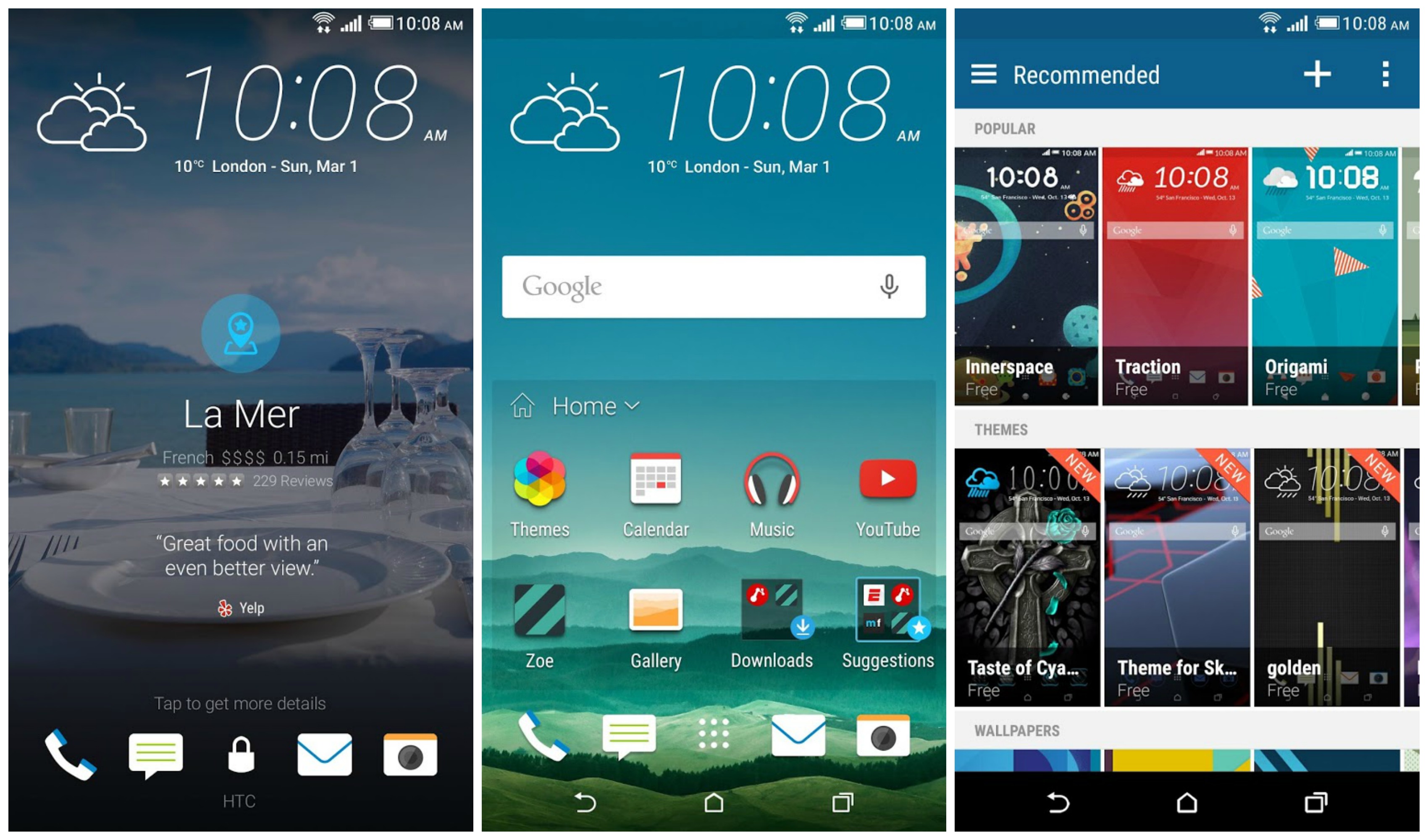
One of the coolest new features of the HTC One M9 is the all-new theming capability. With a couple taps, you can completely overhaul and customize the entire look and feel of your device. We’ve gathered every single theme currently found on the HTC One M9 for this gallery from Mobile World Congress.


We hope and expect there will be many more in the future… and when that time comes, you’ll know exactly where to hear about them. For now, enjoy these 9 beautiful HTC One M9 Themes.


HTC One M9 Stock Theme


HTC-One-M9-Stock-Theme


This is theme that comes preloaded on the M9. The bright and beige sand with water majestically pouring onto it is accompanies by simple blue app trays and icons.


Cascadia Theme


HTC-One-M9-Cascadia-Theme


HTC-One-M9-Cascadia-Theme-Keyboard


This angular, cartoony night scene reminds me a bit of a Tim Burton movie.


Numero Theme


HTC-One-M9-Numero-Theme


HTC-One-M9-Numero-Theme-Keyboard


This is easily one of my favorites… simple geometric shapes, light colors, and a simple numbered clock. Lots to love here.


Innerspace Theme


HTC-One-M9-Innerspace-Theme


HTC-One-M9-Innerspace-Theme-Keyboard


This isn’t the only place the M9 and Galaxies collide… but the outcome here is much more fun and peaceful. Abstract planets in an overall cool theme.


Nimbus Theme


HTC-One-M9-Nimbus-Theme


Apparently I don’t know what “Nimbus” means. Neither does Merriam-Webster. Maybe the guy who took this photo was named Nimbus.


Origami Theme


HTC-One-M9-Origami-Theme


HTC-One-M9-Origami-Theme-Keyboard


Take a close look at the design of the icons and the numbers in the clock and you’ll see they look like they’re folded out of origami paper. Clever and cool. I’m a fan.


Pastorale Theme


HTC-One-M9-Pastorale-Theme


HTC-One-M9-Pastorale-Theme-Keyboard


This rural landscape with flat colors and lots of yellows and greens is perfect for country lovers. Or really anyone fond of simple art and simple living.


Tilt Theme


HTC-One-M9-Tilt-Theme


HTC-One-M9-Tilt-Theme-Keyboard


A very simple, dark theme with all icons and shades at a very distinct angle.


Traction Theme


HTC-One-M9-Traction-Theme


HTC-One-M9-Traction-Theme-Keyboard


This bright red theme is the most bold of the bunch and I hope HTC includes more like it. The keyboard really ties the room together. I mean theme together.


Bonus Theme – Build Your Own!


Perhaps the coolest feature of the One M9 is the ability to automatically build your own theme based on a photo in your library. In the example below, we took an image of pretty pink flowers found in the stock gallery:


HTC-One-M9-Custom-Theme


After some brief customizations (you can get pretty advanced if you really want), out pops a theme inspired by the pinks and reds and blues and purples from the picture. And of course, our cropped image is used as the wallpaper.


HTC-One-M9-Custom-Theme-Final


So there you have it… all 9 themes for the HTC One M9 that currently exist. What do you think?



Stock Android themes are coming to the Galaxy S6 very soon


material design s6 theme


One of our favorite trends in smartphones right now is themes. Users can easily change the look of their entire phone without complicated rooting or ROMs. The Samsung Galaxy S6 and Samsung Galaxy S6 Edge both support themes. Before the phones launched there were rumors about a “Stock Android” theme that would make TouchWiz look more like Google Lollipop. No such theme was available at launch, but soon that will change.


A user over at XDA has submitted two Material Design themes to Samsung, and both have been approved to show up in the Themes Store. There is a dark and light theme, and both will skin the notification bar, settings, wallpaper, icons, keyboard, and some stock apps. The themes should show up in the next couple of weeks. If you want stock Lollipop on your Galaxy S6 with minimal effort these themes will be your best option.


material design s6 theme 2


Will you be downloading one of these Material Design themes? Dark or Light? Are you currently using a theme on your Galaxy S6?


[via iTechTriad]


Android M introduces black status icons for light colored themes


windowlightstatusbar


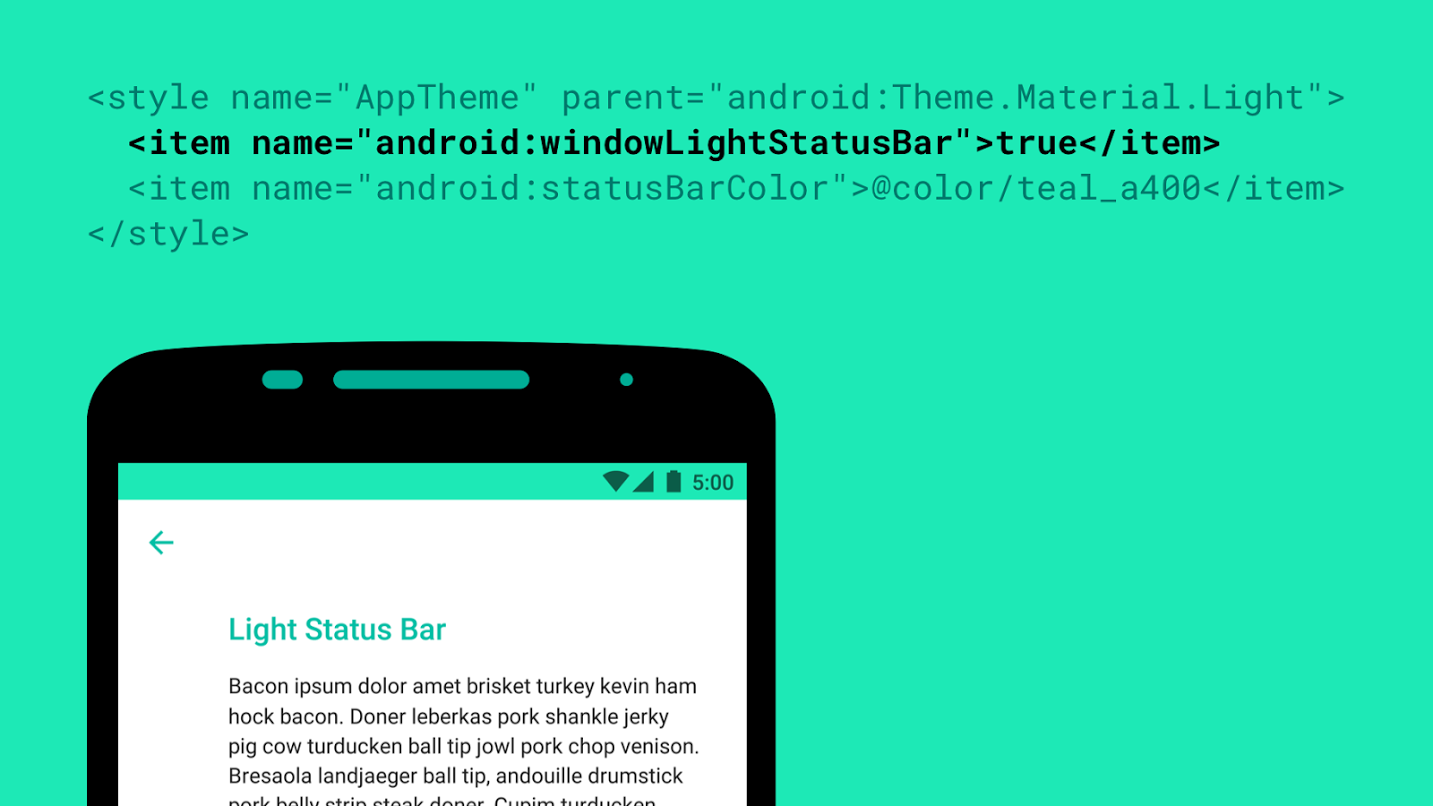
Android M will have a lot of cool new features, but one of the smaller ones Google didn’t mention was for app developers. Roman Nurik has revealed a new windowLightStatusBar flag that will tell the system to make icons and text in the status bar a translucent black color instead of the usual white.


This flag will be useful for apps which use light-colored tint for their status bar where white icons might be hard to read. It’s small, but developers who remain mindful of these small details tend to earn loyal userbases, so be sure to use it if your app needs it!


[via Google+]