The tech world has been dominated by Apple Watch news this week, but we here in Android Land have been using smartwatches for a while. Long before Apple was selling overpriced watches we’ve been using some beautiful devices of our own. The Moto 360 was the first smartwatch that could pass as a fashionable “real” watch, and now it’s on sale for a great price.
Atlanta is the latest city to get Amazon Prime Now goodness. It’s Amazon’s one-hour delivery service for Prime subscribers, and it costs .99 if you want it within the hour, or free if you can do 2 hours.
Simply download Amazon’s app and buy any of the items eligible for one-hour delivery, input your zip code and if your area is supported (they’ll cover the major population areas of the city at first, but will add more surrounding areas in time) you’ll have your goods in no time.
Let’s hope other cities are added to the list as fast as Dallas, Miami, Baltimore, New York and now Atlanta were. Let us know if you’ll be giving it a try!
Android TV devices have left a lot to be desired so far. Back at CES Razer showed off a device that should finally do justice to Android TV. The Razer Forge TV is a beast of a set-top box, and you can pre-order it right now from Amazon. Razer is typically known for their gaming products, which is precisely what makes this device so great.
Razer calls the Forge TV a “micro-console. It glows with an intriguing green light as it sits below your TV. What sets this device apart from other Android TV devices are the specs. It’s packing a Qualcomm Snapdragon 805 processor and 2GB of RAM. Those beefy specs translate to a very smooth user interface experience, as well as ample power to run apps and intensive Android games. Other specs include WiFi, Bluetooth 4.1, an ethernet port, 16GB of internal storage, HDMI port on the back supports up to 1080p sets, and a USB port.
The gamepad, called Serval, isn’t the most revolutionary thing we’ve ever seen, but you’ll be able to play games in a natural, comfortable way. The ability to attach up to 4 controllers at a time will make it quite the nice inexpensive gaming console for a family that doesn’t want to spend money on an Xbox One or PS4. Head on over to Amazon to pre-order the box and controller combo for 9.
If you’re a fan of the Amazon Appstore you’re well aware of the free apps Amazon gives away every day. Anyone can take advantage of the deals, but you have to use Amazon’s own Android Appstore. An internal presentation obtained by TechCrunch suggests that Amazon will be taking free apps to the next level with a new program.
The program is called “Unlocked,” and it sounds a lot like Amazon Prime. The Unlocked program would offer paid apps for free, and even unlock all in-app purchases for “free-to-play” games. It’s unclear how the program will work, where the free apps will be located, and how much it will cost. Amazon already offers many perks for Prime subscribers, such as free shipping, movies, TV shows, and music. It would make perfect sense to roll this into the current Prime benefits.
Would you use the Amazon Appstore for the Unlocked program? Would you consider signing up for Amazon Prime if it meant free Android apps? Would you sign up for a standalone program to get free apps?
Many of you should have received a nice upgrade to Fire OS 1.5 for Amazon Fire TV and Fire TV Stick by now, but we’re curious — have you upgraded yet? If not, you might want to.
It comes with a ton of cool new features that you shouldn’t miss out on, especially the ability to expand storage using USB on the Fire TV, as well as Amazon X-Ray — the company’s second screen experience that gives you more information about the characters, stories and settings in the show — directly on the TV interface. Here’s the full list of everything that’s changed:
Expandable USB storage—Use a connected USB flash drive to expand your Amazon Fire TV storage for downloaded apps and games—this enables you to have more games downloaded for easy access. See compatible USB storage devices
Connect to your hotel or dorm room Wi-Fi with captive portal support—Take your favorite movies, TV shows, games, and more with you when you’re away from home. Amazon Fire TV enables you to connect to Wi-Fi that requires web authentication—this includes Wi-Fi at most major hotels, as well as some universities.
New X-Ray on Amazon Fire TV—You can now use X-Ray on Amazon Fire TV to explore your favorite movies and TV shows on Amazon Instant Video directly on your TV screen. Powered by IMDb, identify actors and songs in the current scene, explore actor bios, and more by simply clicking the “Up” button on your Amazon Fire TV remote.
Private listening on Amazon Fire TV—Support for wireless Bluetooth headphones lets you listen to your favorite movie, TV show, or music without bothering others in your household.
Browse and search Prime Playlists—Prime members can now take advantage of Prime Music playlists directly from Amazon Fire TV—there are hundreds of expertly curated Prime Playlists to choose from based on your mood, activity, artist, or decade of choice. Browse Prime Music Playlists
Hidden PIN entry—With the new PIN entry screen that hides the numbers selected, you can now make sure your kids can’t see your device PIN as you enter it on-screen to confirm a purchase.
New shortcuts—Quickly put your Amazon Fire TV to sleep or enable display mirroring by pressing and holding the Home button on your remote.
That’s down from its usual price of 9, and it’ll get you a 7-inch 1280 x 800 tablet with a 1.5GHz quad-core processor, 8GB of internal storage, front and rear cameras with 1080p video recording, and quick and easy access to Amazon’s ecosystem of movies, books, music, apps, games and more.
It won’t run circles around many tablets, but for it should prove capable enough for whatever you need it to do. Go ahead and order one from Amazon right here if you’re interested.
Huawei is looking to challenge the Moto Es and Moto Gs of the world with a new affordable smartphone set to launch in a couple of days. The device is modeled Huawei G620-A2, and while its listing on Amazon has its shelf name as the Expo, Huawei is planning to sell it as the Huawei SnapTo (as evidenced by a banner on the very same page).
We’re not sure why they decided to throw it onto the online retailer in such quiet fashion, but they’ve done so with 0 price tag and a spec sheet that’s not all that bad for that amount of coin. Here’s what we’re expecting:
The device also isn’t designed bad, to boot. It features a faux-leather textured backing for a premium look and feel despite its non-premium price tag.
It might not be the most powerful, best looking or even the most affordable smartphone on the market right now, but the Huawei SnapTo sounds like a device anyone wouldn’t mind owning for the small price you’re paying. You can pre-order the device right now and Amazon will have it shipped to you as soon as April 9th hits.
Amazon has announced that their same-day delivery service — Amazon Prime Now — is now available for folks in Dallas, Texas. Orders to be delivered within 2 hours are free, while those who want it within 1 hour can pay just .99.
You’ll need an Amazon Prime membership (it comes with amazing benefits as is) if you want to be in on the fun, though, so make sure yours is active before giving it a go.
A select number of Dallas zip codes are in from the start, though more will be added as time goes on. To check to see if yours is on the list simply download the Prime Now app here and put your location in. If not, you can sign up to be notified of its arrival.
In Amazon’s quest to provide more homegrown games for their growing platform of Android phones, tablets and television products, the company has partnered with an experienced development house to bring an awesome new game. It’s called Lost Within, a horror game that places you into the shoes of a patient stuck at a haunted, hollowed mental ward.
Everything seems ordinary at first — your typical eery building that used to be filled with some of the world’s most deranged, crazy, delusional and, well, weird people — until you realize there’s a good reason the building was completely abandoned. Something inside it is out to kill anything and everything that steps foot inside, including you.
This isn’t a simple hide-and-seek jump scare fest like most horror games tend to be these days. The player will have access to the various tools scattered throughout the asylum to create makeshift weapons and defend themselves. That’s not to say you won’t need to hide at all, though — you won’t always have a weapon available. You’ll also find scarcity in the amount of supportive items such as medkits, so you’ll need to be as frugal as you’ve ever been.
The adventure will wind to a close whenever you uncover the asylum’s darkest secrets and understand why it is now inhabited by such an evil being.
If that description doesn’t have your curiosity piqued, perhaps this will: the same development studio that headed up Prey is making Lost Within. Prey never reached the heights of some of its contemporary counterparts in the mid-2000s, but it was a very good experience that had a lot of new ideas that other games had yet to explore.
Something else that might delight you to know is that they are sticklers for quality: they cancelled Prey 2 because they felt like it wasn’t up to their standards. We’re sure that studio’s lingering desire to keep trying new things and get it perfect will spill into Lost Within’s development and make a positive impact, and we can’t wait to see it for ourselves.
The game is scheduled for launch later this year on the Amazon Kindle Fire family of tablets, the Amazon Fire Phone, the Amazon Fire TV and TV Stick, as well as iPhone and iPad. Is this interesting enough to get you to buy one of Amazon’s products to play it? Let us know what you think below!
Lexar is the latest dealer of storage cards to be featured on Amazon’s Gold Box deal of the day. A good number of their products are going for steep discounts today. For starters, 32GB, 64GB and 128GB microSD cards are going for .99, .95 and .99, respectively.
These are all Class 10 UHS-1 / U3 cards that can transfer at up to 95 megabytes per second, and they all come with a USB 3.0 memory card reader for use with a computer if you need.
They also have a number of USB 3.0 jump drives on sale, ranging from 32GB to 128GB. You can get those for .99, .99 or .99, respectively. Be sure to check out the full list of goods at Amazon’s site right here if you’re looking to add to your memory pool.
Amazon’s announced a great new update for their TV products, which include the Amazon Fire TV and Amazon Fire TV Stick. The two biggest features users will care about is support for expandable storage via the device’s USB port, as well as the ability to listen to your content using Bluetooth wireless headphones.
There’s also a neat feature that’ll easily allow you to bypass web authentication processes when you connect the Fire TV and TV Stick to certain public WiFi hotspots (such as those found in hotels, universities and coffee shops). Here’s the full list of what’s coming:
Expandable USB storage on Amazon Fire TV—You can now use a connected USB mass storage device to expand your Fire TV storage for downloaded apps and games—this enables you to have more games downloaded for easy access.
Connect to your hotel or dorm room Wi-Fi with captive portal support out of the box—Take your favorite movies, TV shows, games, and more with you away from home—Amazon Fire TV and Fire TV Stick are the first streaming media devices to enable you to connect to Wi-Fi that requires web authentication—this includes Wi-Fi at most major hotels, as well as some universities.
Private listening on Fire TV—Enjoy favorite movies and TV showsafter the kids go to sleep, without worrying about waking them up. Support for wireless Bluetooth headphones to Fire TV lets you listen to your movie, TV show, or music without bothering others in your household.
Browse and search Prime Playlists—Prime members can now take advantage of hand-crafted Prime Music playlists directly from Fire TV and Fire TV Stick—there are hundreds of expertly curated Prime Playlists to choose from based on your mood, activity or even artist or decade of choice.
Hidden PIN entry—With the new PIN entry screen that hides the numbers selected, you can now make sure your kids (or freeloading friends) can’t see your device PIN as you enter it on-screen to confirm a purchase on Fire TV or Fire TV Stick.
New shortcuts—Quickly put your Fire TV or Fire TV Stick to sleep or enable display mirroring by pressing and holding the Home button on your remote.
There’s no exact date for the update’s release just yet, though Amazon promises it’ll be along within the coming weeks. Oh, and folks in the UK and Germany who prefer the stick-shaped variant will be happy to know that you can now order one, but it won’t be shipping until April 15th.
Amazon Echo, the weird cylindrical speaker/home assistant, has received an update to add a few highly requested features. The update gives Alexa, the digital assistant lady, the ability to play your Pandora radio stations and give you scores from MLB and MLS games.
To use these new commands simply say “Alexa, play a classic rock station,” or “Alexa, what’s the score of the Detroit Tigers game?” Alexa works a lot like Google Now, but with a little more personality. We compared Alexa to Google Now in our full review of the Amazon Echo. Google can answer more questions, but Alexa is more quirky. Check out the video below to see how they compare.
Amazon is celebrating the 4th birthday of their Appstore by giving away a bundle of apps and games for free. There are 34 titles to be had, and the value of it all when normally priced comes out to be about 5.
You might not need to download all 34 depending on your tastes, but there are some pretty good gems here worth checking out. Five Nights at Freddy’s a pretty nice horror game, World of Goo is one of the best and most fun puzzle games out there, and Cut the Rope is always good for quick fun.
It’s no secret that we, as a society, want to live in a world where we seamlessly talk to computers à la Star Trek. Nearly every futuristic Sci-Fi movie has been portraying computers with voice interactions for ages. Thanks to a few tech giants, we’re slowly on our way to making this a reality.
Now, talking to your Android phone is nothing new. In fact, you’ve been able to use voice commands with Android since Voice Actions were first introduced way back in 2010 with Voice Search for Android. This new capability allowed us to send messages, get directions, make phone calls, take notes, and listen to music just by speaking to your smartphone. If we fast forward about two years later, we’ll see the launch of Google Now and a drastically updated Google Search application that you’re all familiar with today. The new Google app brought on countless voice search capabilities that continues to grow and mature with Google’s ever expanding Knowledge Graph.
Today, I can talk to a variety of Android powered devices and even the Chrome web browser or Chromebook, and receive a plethora of information back in the form of voice responses and informative cards. Having the power of Google in your pocket or on your desk is a truly powerful experience.
When it comes to voice assistants, Google has their cleverly named Google App, often referred to as Google Now, Apple has Siri, and Microsoft now has Cortana. Amazon has been ramping up their content ecosystem for a few years now and has a handful hardware products with their Fire line of devices, yet the company was missing the coveted voice assistant, until now. The Amazon Echo is their answer.
Amazon Echo Hardware
Amazon Echo is a WiFi and Bluetooth connected cylinder speaker, coming in at about 9 inches high and 3 inches in diameter. On the bottom you’ll find a speaker grill, on top you’ll find a multi-colored LED ring, two hardware buttons, and there’s even a small remote. Inside the Echo you’ll find a 2 inch tweeter and a 2.5 inch subwoofer. Simply put, the Amazon Echo is a smart speaker, but it’s the brains that matter most here.
The LED ring is a nice feature too. During setup, the ring is orange, it’s blue while Alexa is actively working, and white when you’re changing the volume, expanding or shrinking around the top of the Echo. You can also manually adjust the volume of the Echo by turning the top ring, though it’s much easier to just ask Alexa to turn it up or down and watch her do her magic.
The two hardware buttons on the Echo are used for disabling the seven built-in always listening microphones and an action button that is used during the setup process as well as a manual prompt, telling the Echo to begin listening for a command. And speaking of microphones, the built-in microphones are the number one feature of the Echo, in my opinion. They hear you from across the room, with a normal speaking voice. It’s quite pleasing.
Amazon also includes a small remote, that resembles a Fire TV remote or a Nexus Player remote, which can be used in instances where Alexa might not be able to hear you. Outside of testing purposes, I haven’t used the remote control yet. For me the need hasn’t arisen.
Getting started with Amazon Echo
Amazon has nailed the setup process with their Echo, making it very easy and straightforward. After you plug in the power cord to your Echo, you’ll head over to Amazon or the Google Play Store to download the Echo companion app for Android. After you launch and sign into the app, your Android phone or tablet will then disconnect from your WiFi network and connect directly to the Echo. After you enter your WiFi credentials into the app, your Echo will connect to your WiFi network and you’ll have the option to pair your Echo remote, which is takes just a few seconds after pressing the forward button on the remote. And, that’s it. You’re done.
While your Echo is ready to go at this point, you’ll want to take a few seconds and set up additional services to use with your Echo for a better experience. For example, Amazon’s Prime Music is quite limited, so you’ll want to add iHeartRadio and TuneIn to you Echo. You’ll also want to go into the Echo app to configure your news sources (flash briefing), enable voice purchasing (kinda scary), and add information about your daily commute.
Now you’re ready to start working with Alexa.
Comparing Amazon Echo to the Google App
When it comes to comparing Alexa with the something everyone’s familiar with, such as the Google App, Google’s Knowledge Graph comes out on top, and that’s no surprise. Google can answer more questions, has conversational search, and integrates with more applications. That doesn’t mean that Alexa isn’t useful though. For the time, weather, sports scores, news, general inquires, and playing music, Alexa is great. Alexa works quite well actually, in most scenarios. Even though Alexa’s brains aren’t as well developed as Google’s, Alexa’s voice sure does sound a bit more human, less robotic, and is noticeably faster – that’s a huge plus in my book.
Interacting with Alexa reminds me of Apple’s Siri and not the Google App. She’s a bit quirky and funny, if you want to go down that route. You can tell her you love her, hate her, or even mute her by telling her to be quiet or shut up. She’ll tell you jokes, play rock, paper, scissors, and Simon says. Compared to Google’s offering, she’s got a lot more personality. Check out the video below and visit the our official Amazon Echo Forums for more Amazon Echo Easter Eggs.
Living with Amazon Echo: Pros and Cons
Amazon Echo’s secret weapon is by far the seven built-in microphones that are always listening, awaiting your command. Sure, an always listening microphone isn’t anything new, as the original Moto X from 2013 launched with this capability, the Amazon Echo however can hear and understand you from across the room, while speaking in a normal voice. This makes using and interacting with Alexa a much more pleasurable experience than the Google App, because she can hear you from across the room and even while music is playing.
Have you ever said ‘ok google’ to your phone, tablet, or computer and waited for the audible prompt to let you know that Google is awaiting your voice command to only have your device not respond, because it didn’t hear you? I’m sure you have. Then, you’ve most likely would have taken a few steps closer to your device and tried again. If that didn’t work, you may have even then raised your voice so that the device can hear you, which can lead to voice recognition failures, because you’re yelling, having it fail yet again. I’m sure this scenario isn’t out of the norm for a lot of people.
We’ve all been there and that’s okay. Today’s phones and tablets weren’t meant to be listening for your voice commands from across the room. They’re meant to hear you from a few feet away. In that regard, the Google App, accompanied by an always listening microphone, works great and is extremely useful. When it comes to distance though, the Amazon Echo wins more often than not in tests with my Nexus 6. If there’s any background noise, the Nexus 6 can have trouble at about 10 feet or less, while Alexa normally pushes through with no issues. If there’s music playing, voice commands on the Nexus 6 are pretty much worthless, but Alexa performs just as she always would.
We know the microphones on the Amazon Echo are great, now how about the speaker? I’m not an audiophile by any means, but I can definitely recognize quality when I hear it. For 0, the Amazon Echo is a whole lot of speaker, able to fill the room with plenty of highs and lows. It’s definitely loud enough for my family and I and plenty loud enough for when the family is away and this guy needs a private jam session. Things do get a bit distorted at the max setting of 10 though.
Another weapon in Alexa’s arsenal is voice controls for music. You can tell Alexa to skip the song, play it again, play the next song, pause, resume, and even control the volume level, all with your voice. As someone who listens to countless hours of music on Google Play Music, this is a feature that I’ve wanted for years. Applications such as Tasker and Commander for Google Now can be configured to provide a similar, yet sub-par experience, though I wouldn’t recommend it. Even though Amazon Music is an inferior product, the voice capabilities alone keep drawing me back to the Echo for my music fix.
There is a supported workaround though. As I mentioned above, the Amazon Echo does have Bluetooth capabilities, so you can easily pair your Echo with your phone by saying “Alexa pair with my phone” to being the pairing process. Then, you can say “ok Google listen to [insert your favorite artist or genre of music here] and music will play from your phone, to the Echo. The best part, you can now control the music being played from Google Play Music, with your Echo. Just say “Alexa next song” and Play Music will skip ahead, etc. This does work great, though it’s kind of silly to use two device to accomplish with what would be preferably done on just one.
The Amazon Echo and Alexa have a lot going for them, however a few downsides do exist. Stating the obvious, the Google App is portable and continues to work anywhere with an Internet connection, such as every room in your home, outside your home, in the car, you get the picture. The Echo is a stationary device and can’t compete in that regard.
The largest downside to the Amazon Echo is certainly the ecosystem, as with all Amazon products. If you’re not fully embedded into Amazon’s playground, some features you’d might expect, just aren’t there or don’t work as you’d hoped. You can’t add items to your calendar or receive calendar notifications. You can create notes and reminders, but they’re limited to the Amazon Echo companion app, sadly not working with third party apps such as Google Keep, Evernote, or Trello. Even if you’re okay with using Amazon’s offering, the extremely basic functionality included in the companion app for notes and reminder are pretty horrible. For music, you’re limited to Amazon Music, iHeartRadio, and TuneIn, unless you pair your Echo with another device, of course.
Conclusion
I’ve been living with Amazon Echo and “Alexa” for quite a while now and I have to say that I’m truly impressed with Amazon’s offering. I held off on my review for a while because I wanted to be sure that I wasn’t just experiencing the honeymoon phase of a new tech gadget. I wanted to put Alexa through the paces as an everyday addition to my house and my life. My Amazon Echo has lived in a variety of places throughout my house, finally settling in a central location near my kitchen, breakfast nook, and family room.
It’s safe to say the Ross household has been assimilated by Alexa, being used by not only myself, but my wife and small children throughout the day. My five year old son often asks Alexa about the weather or has her play various Daft Punk songs or even Dubstep playlists (he gets his music tastes from me). I told my wife I’d be moving Alexa to the basement now that recent renovations for my office are complete, however she angrily told me that I was not removing her from the Kitchen and I’d have to order another one if I wanted her with me in the basement. She’s obviously a fan.
I’m a fan of the Amazon Echo too. However, being perfectly honest, if this connected speaker responded to “ok Google” and not “Alexa”, I’d be in connected device heaven. I already use the Google App non-stop and I’m heavily embedded in Google’s ecosystem for everything imaginable. I personally don’t like spreading myself across various ecosystems, but I’m making an exception for the Echo, because the Echo has a lot going for it and it’s going to improve with time. However, if Google or one of Android’s OEMs came out with a similar product, there’d be no need for the Echo and Alexa.
At this exact moment, is the Amazon Echo worth 0? Possibly. Is it worth 0? Most definitely. If you’re an Amazon Prime subscriber, for 0, you get a great sounding WiFi and Bluetooth speaker that can be controlled with voice commands. What’s more, answering normal questions such as the weather, listening to the news, getting sports scores, setting timers, settings alarms, and getting answers to countless fun and interesting facts is a great experience for the price. This makes the Amazon Echo a great household companion.
I don’t play in Amazon’s ecosystem at all, but I still use the Echo daily for music, weather, quick searches, and every once in a while, a little bit of personality. Alexa’s capabilities are always expanding, just like the Google App, and she’ll continue to get better over time. If you want to purchase one for yourself, Prime Members can request an invitation to purchase one for 0, while non-Prime members will have to fork over 0.
If you don’t mind getting your apps from Amazon’s Appstore (or if you don’t have a say in the matter) you’ll want to tune into this opportunity to get some free apps.
There are 26 downloads waiting for you at the cost of each, all of which add up to be worth about 5 were you to pay normal pricing. There are some real great gems here, such as Plants vs Zombies and Wolfram|Alpha. Here’s the full list of apps and games you can get your hands on:
Plants vs Zombies
Wolfram|Alpha
Adventure Time Game Wizard
Table Top Racing
Runtastic Pro
F18 Carrier Landing Pro
Songsterr Guitar Tabs
Flightradar24 Pro
MeteoEarth
Virtua Tennis Challenge
Amazing Alex Premium
Unmechanical
Pudding Monsters HD
Prince of Persia Classic
Osmos HD
CityMaps2Go Pro
LectureNotes
A Better Camera Unlocked
Oxford Spanish Dictionary
RDP Pro Client
TouchDraw
Mobile Doc Scanner
Fun English Course Language Learning
Splashtop Whiteboard
Chess and Mate Premium
You can download them all by heading right here. Remember that you’ll need the Amazon Appstore on your Android phone or tablet to download them, but that’s no tough task (especially considering you’re getting over 0 in free apps for your time and effort).
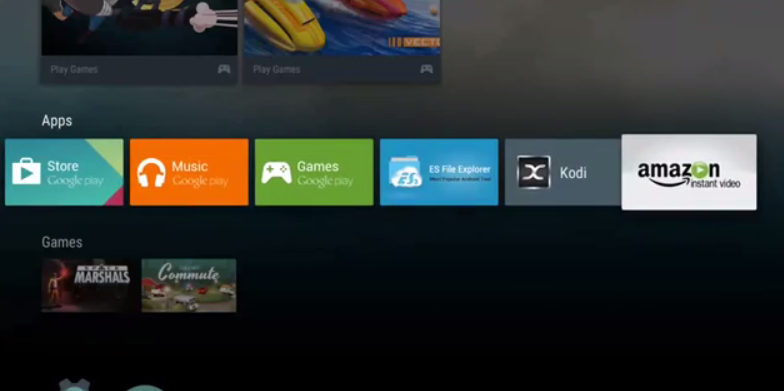
Sony was crafty enough to secure themselves an exclusive to Amazon’s Instant Video app for their Android TV products, but why should Bravia owners have all the fun? If you have yourself a Nexus Player or the original Android TV device — ADT-1 — you’ll be happy to know that it’s now possible to download and install the APK on your device.
The app was extracted from Sony’s firmware just as it exists. You sideload it onto your Android TV device if possible (how to sideload APKs on the Nexus Player) and you’ll be able to run it just like you would any other app. It’s possible the app works with other Android TV products, though only the Nexus Player and ADT-1 are reported to have been tested.
Once you’ve gotten it loaded up simply login with your Amazon credentials and before you know it you’ll be off to watching all the movies and TV shows you’ve bought through Amazon Instant Video, or the content you’re entitled to as part of your Amazon Prime subscription. XDA has the download you’re looking for right here so be sure to check it out if you’ve been looking for a way to grab this app for your non-Sony device.
Earlier today, ASUS revealed availability of the ASUS ZenFone 2 for North America. The phone was set to launch tomorrow, May 19th but it seems Amazon has already jumped the gun with both 16GB of 64GB of the phone in all 3 colors now available with free Prime 2-day shipping.
Seems the NA version is GSM-only (no real surprise there), so if you’re on Sprint or Verizon you’re out of luck. We’ve already received an order confirmation, with one day shipping saying it’ll arrive tomorrow. Feel free to head on over and start purchasing to get a head start!
Amazon is putting up another bundle of paid apps and games for free. This sale brings 0 worth of the digital content for absolutely no cost to you, save for the time to download them.
Highlights of this particular sale include the first episode of Game of Thrones, Five Nights at Freddy’s 3, Angry Birds Seasons HD and Fleksy keyboard. Here’s the entire list for you to consider:
Angry Bird Seasons (ad-free)
Daily Expense Manager Pro
Peppy Pals Beach
Photo Studio Pro
Deep Sleep with Andrew Johnson
Fleksy Keyboard
Language Coach
G-Stomper VA-Beast Synthesizer
Mini Golf Mundo
Mirroring360 – AirPlay Receiver
My Weekly Budget
Toca Kitchen
Xtralogic Remote Desktop Client
Perfectly Clear
Alarm Clock Xtreme + Timer
Grudgeball: Enter the Chaosphere
ShutterFolio
Super Why ABC Adventures: Alphabet
Genius Scan+
AVG Antivirus Pro Android Security
Empress of the Deep: The Darkest Secret
Sago Mini Space Explorer
PicShop Photo Editor
Smart Office 2
Cooking Dash Deluxe
True Booster Speed Cleaner
Sorcery! 3
Royal Envoy
Star Traders 4X Empires Elite
Time Mysteries 2: The Ancient Spectres
Bloons TD 5
Angry Birds Seasons HD
Five Nights at Freddy’s 3
Rebuild
Highrise Word Heroes+
Star Command
Bike Race Pro
Game of Thrones
You can find all the downloads over at Amazon right here so be sure and take advantage if any of these appeal to you (and if you don’t mind getting your apps from anywhere other than Google Play).
Amazon has already brought their Prime Now one-hour delivery service to the lucky residents of Manhattan, but now it’s about to get even better. The company has announced that they will start taking orders for products from local stores to be delivered to you within one or two hours.
You’ll be able to purchase groceries, prepared meals and baked goods from D’Agostino, Gourmet Garage and Billy’s Bakery through the Prime Now app. This is in addition to the items Amazon warehouses which you can order through their website.
The service has come to 7 different cities since its launch, and Amazon anticipates adding a lot more before year’s end. Here’s the list of places where you’ll be able to get items delivered:
Atlanta
Austin
Baltimore
Brooklyn
Dallas
Manhattan
Miami
The best part is that two-hour delivery is free for Prime members, while 1-hour delivery is available for just .99. Not a bad way to get some goods if you’re in a pinch, need them in a hurry and can’t run to the store yourself. Be sure to give it a try by downloading the Amazon Prime Now app from Google Play.
We reviewed this bad boy back when it was still the new kid on the block and found that it was an excellent top-line smartphone for its time despite not having the gaudy Snapdragon 600 and a 1080p display. Don’t take too long reading our review, though, because the current price could evaporate before you even realize it.
PS: Note that this smartphone is only intended for use on Verizon Wireless. Don’t purchase it if you don’t plan to use it with Verizon service.