Affichage des articles dont le libellé est Launcher. Afficher tous les articles

lundi 6 juillet 2015

Nova Launcher gets some Material Design love in latest beta


nova


One of the most popular 3rd-party launchers is getting some Material Design love today. Alpha testers have been using the Material Design version of Nova Launcher for a little while now, and it’s ready to graduate to public beta. There are plenty of new Material goodies for Nova fans to enjoy.


First and foremost is the brand new look and feel of Material Design. You might not notice it immediately on your home screen (depending on your set up), but diving into the menus and settings will show a brand new look. A long-press on empty home screen space will bring up a more modern dialog instead of the old 2.x style pop-up. You’ll also notice a new red and white theme in the settings with smooth Material animations.


nova search


A new feature that I really like can be found in the app drawer. When the app drawer is opened you can swipe down from the top to bring up a search bar and list of recently installed or updated apps. This is super handy for trying to find apps quickly. Another new feature is the awesome app icon layout editor (seen above). You can also now adjust icon size and font size independently for desktop, drawer, dock, and folders.


All of these new #materinova features will eventually come to the stable version of Nova Launcher. If you don’t want to wait for that you can opt-in for Nova Launcher Betas from Google Play by following these steps. Check out the full changelog for below.


  1. Join the Nova Launcher Beta G+ Community (This is not optional)

  2. After joining, Opt-in for Nova Launcher

  3. When a new beta update is available you will get it through the Play Store


Nova Launcher beta
Nova Launcher beta
Nova Launcher beta
Nova Launcher beta
Nova Launcher beta
Nova Launcher beta
Nova Launcher beta
Nova Launcher beta

#materinova.14 public beta 1


  • Full Material Design

  • Google Search from the search bar shows as an overlay

  • Edit Shortcut dialog, and quick menu, tinted based on colors of the icon

  • New icon

  • New Nova Action icons

  • Rebased on top of Launcher3

  • Individual icon layout settings (size, font, etc) in Desktop, Drawer, Dock, Folder

  • Max icon size boosted to 150%

  • Widget Search

  • Pull to search (pull down in the drawer to open app or widget search)

  • Widgets given their own drawer, removed from App Drawer

  • Ability to change Page Indicator color

  • Drawer Tab Bar completely optional

  • Support for Android for Work managed profiles (Lollipop)

  • Workaround Expand Notifications Nova Action not working on Samsung Lollipop

  • Requires Android 4.1 or higher (Dropped support for Android 4.0 ICS)

  • Unlimited desktop pages (previously limited to 9)

  • Add/remove of desktop pages by dropping icons on the blank page, or removing all icons from a page

  • Add blank desktop pages (for gestures or live wallpapers) from overview

  • Improved bulk edit of folders (Folder > Menu > Select Apps)

  • Added shadows to unread badges

  • Unread Badge size scales with icon size

  • Allow reordering drawer folders by drag/drop within window

  • Added Roboto-Medium font option

  • Improve handling of apps installed to sdcard


Nova Launcher 4.0 brings grouped widgets, full Material Design, circular app animations and 25+ other changes


adbtmp.mKmR


Nova’s Material Design update has been a long time coming for those who aren’t particularly crazy about beta testing, but the wait for it to hit the stable channel is finally over. Nova Launcher 4.0 is out on Google Play, and it stands to be one of the biggest updates yet for the premier home screen replacement.


The biggest changes will be a more refined Material Design user interface, including new animations, updated fonts, new material-themed wallpapers and other aesthetic-focused things. The full list is rather large, and rightfully so: this has been in the works for a few months now, with the last version — 3.3 — having been released as far back as December 2014.


adbtmp.2KOw
adbtmp.mKAq
adbtmp.dF1c
adbtmp.7vGx

Here’s a full list of changes you can expect if you haven’t been using the beta:


  • Full Material Design

  • Google Search from the search bar shows as an overlay

  • Edit Shortcut dialog, and quick menu, tinted based on colors of the icon

  • New icon

  • New Nova Action icons

  • Rebased on top of Launcher3

  • Individual icon layout settings (size, font, etc) in Desktop, Drawer, Dock, Folder

  • Max icon size boosted to 150%

  • Widget Search

  • Circular App animations (Settings > Look and Feel > App Animation > Circle)

  • Pull to search (pull down in the drawer to open app or widget search)

  • Widgets given their own drawer, removed from App Drawer

  • Ability to change Page Indicator color

  • Drawer Tab Bar completely optional

  • Support for Android for Work managed profiles (Lollipop)

  • Workaround Expand Notifications Nova Action not working on Samsung Lollipop

  • Requires Android 4.1 or higher (Dropped support for Android 4.0 ICS)

  • Unlimited desktop pages (previously limited to 9)

  • Add/remove of desktop pages by dropping icons on the blank page, or removing all icons from a page

  • Add blank desktop pages (for gestures or live wallpapers) from overview

  • Improved bulk edit of folders (Folder > Menu > Select Apps)

  • Added shadows to unread badges

  • Unread Badge size scales with icon size

  • Allow reordering drawer folders by drag/drop within window

  • Added Roboto-Medium font option

  • Improve handling of apps installed to sdcard


The download is sitting over at Google Play right here so be sure to grab it as soon as possible.


Android M’s new launcher has an app drawer you’re probably going to hate [VIDEO]


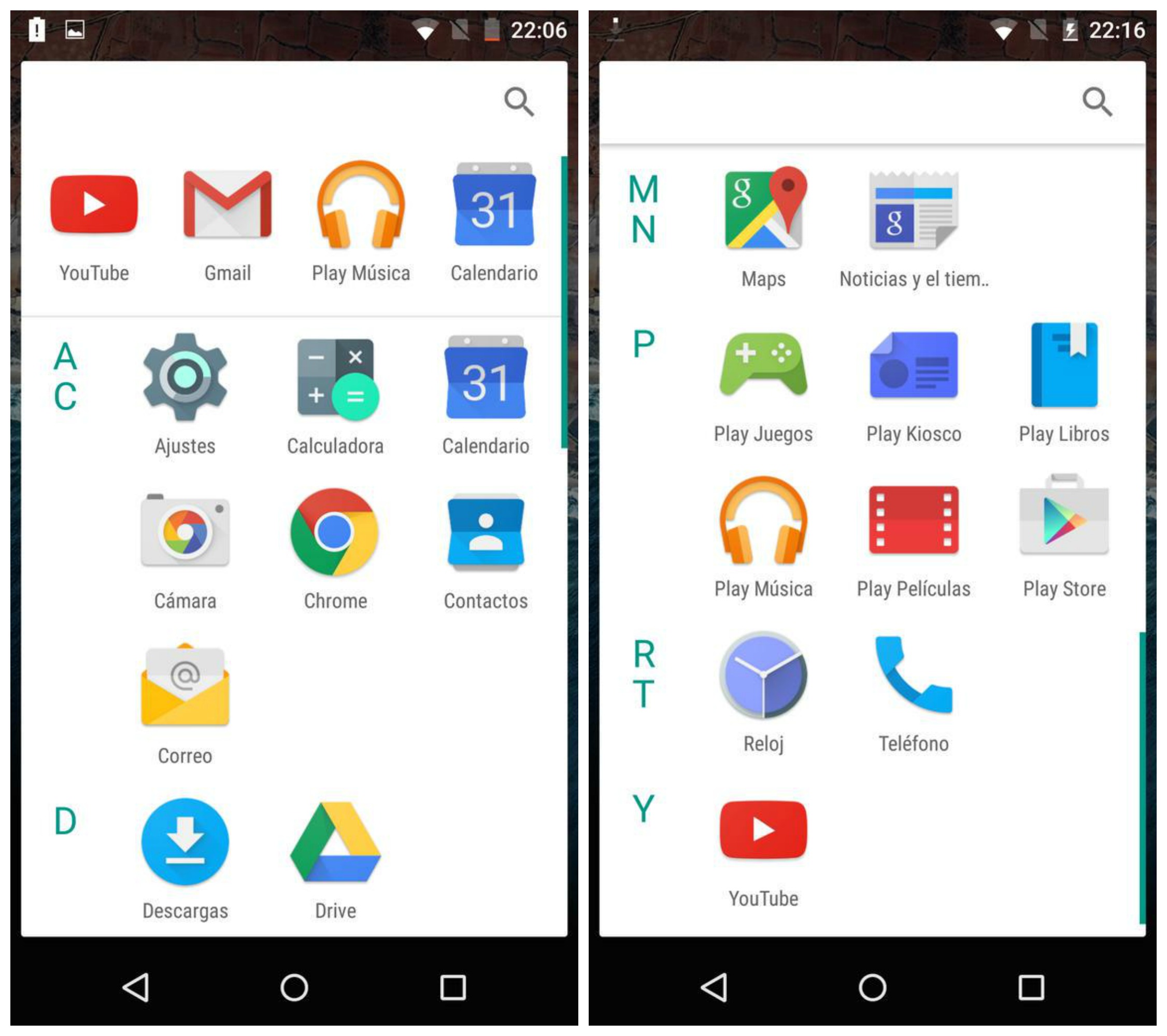
Android M app drawer


With the exception of HTC’s Sense UI, it’s been awhile since we last saw a vertical scrolling app drawer on Android. Ever since Ice Cream Sandwich ditched Gingerbread’s vertical scrolling app drawer for a nice horizontally scrolling one, it just felt… well, right. While Froyo’s cubed shaped app drawer will always hold a special place in our hearts, we’ve loved the way vertical scrolling felt.


Last year’s Lollipop update added a little spin on the classic home screen with an all new Google Now launcher featuring easier access to Google Now and white cards in the app drawer. It’s crazy to think that Google is already changing things up again this year and it’s pretty drastic.


The Android M Developer Preview features a new throw-back launcher with an app drawer that scrolls vertically, something we haven’t seen since Android’s early days. Upon opening, a row of recently used apps can be found along the top (something we’ve recently seen in 3rd party launchers) along with apps that are now sectioned off by the alphabet.


You’ll also notice a new app opening animation that kind of zooms out from the app icon itself (although backing out of an app still uses the old Lollipop animation). Oh, and if uninstalling apps from the app drawer wasn’t easy enough, you can now do this by dragging icons straight from the launcher itself. You can see what we’re talking about in the video below.


We have to say, it’s a strange move but of course this is a developer preview and anything can change in time for M’s official release later this year. In either case the vertically scrolling app drawer wont mean much to many of you already invested in one of Android’s many 3rd party launchers.


Thanks, Hernan!


Nokia’s Z Launcher adds Android widget support in latest update


Z Launcher Widget update


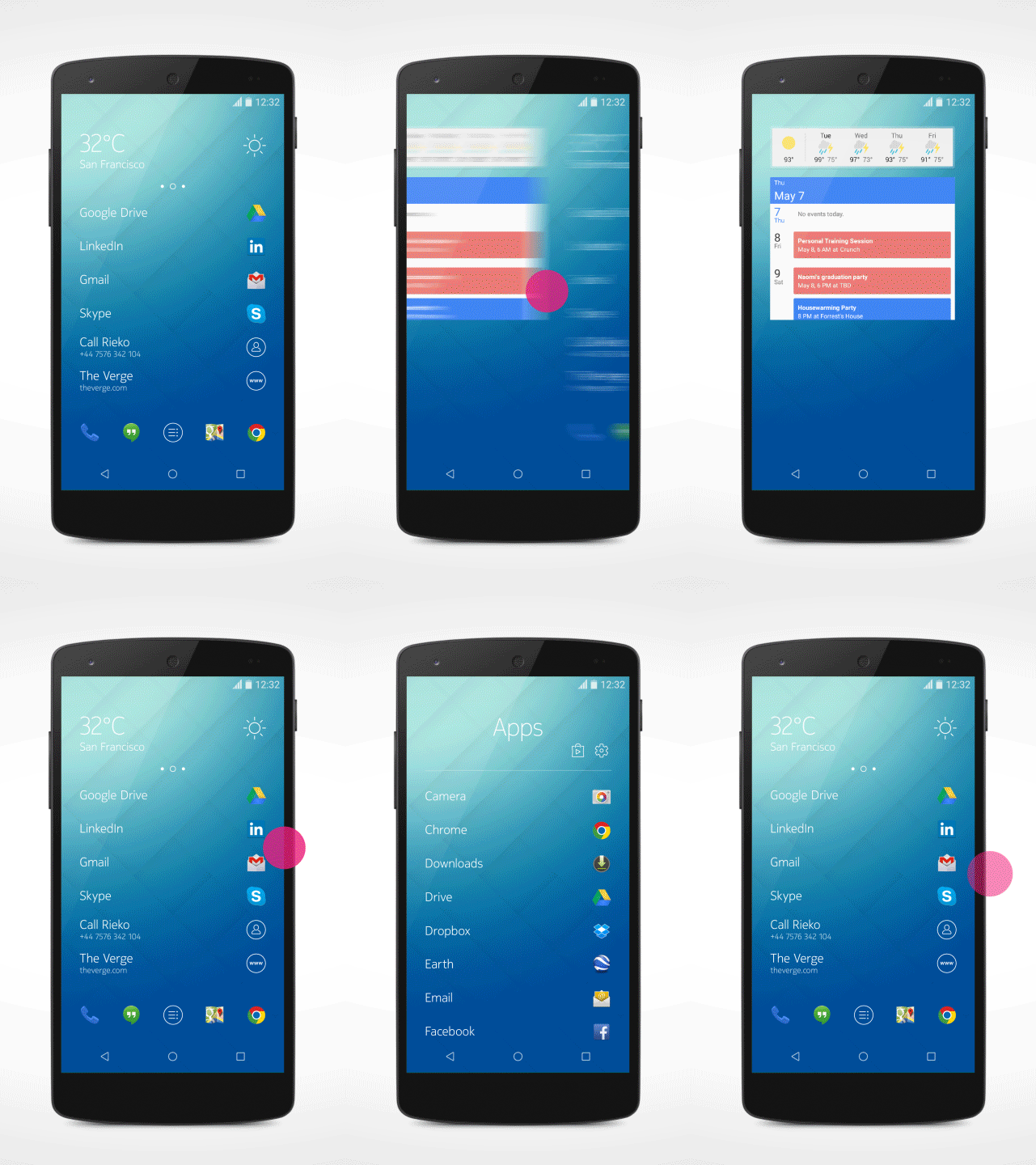
The folks at Z Launcher have announced an update for their home screen replacement app that brings support for one of their most requested features: Android widgets. We know, it’s almost crazy to think that any Android launcher could launch without support for widgets, they are an Android staple after all.


But remember, Z Launcher is still in beta and continually evolving based on user feedback. As it stands, Z Launcher has a pretty big following, with users raving about its unique adaptive and gesture-based app launching that learns your usage habits. Basically, Z Launcher learns what apps you use the most and brings them front and center for easy access. Still can’t find what you’re looking for? Simply draw out the first letter of the app on anywhere on the screen and you’ll see it magically appear. Doesn’t get much more easy than that.


Z Launcher widget animation


Widgets can now be found on their own separate page by swiping left from the edge of the display. From there you can long press to add widgets, reposition, and resize them like you would with any other launcher. The only difference is this screen is delegated to widgets-only — no app icons allowed, not even in the dock.


Z Launcher says they’ve also hammered out some big fixes and have added a few performance improvements, which is to be expected. If you’d like to give your input or request a specific feature, you can make your voice heard by jumping on over to Z Launcher’s feedback forum at zlauncher.com where you an submit your own idea, or vote on others. If you’d like to give Z Launcher a shot, it can be found free on the Google Play Store via the link below.