Affichage des articles dont le libellé est Much. Afficher tous les articles

lundi 6 juillet 2015

The HTC One M9 and M8 look so much alike, not even HTC can tell them apart


Check out everything you need to know about the HTC One M9


HTC One M9 Facebook post


After numerous leaks — including an exclusive of our very own — suggested HTC would be more-or-less revising the design of the HTC One M8 for the all new HTC One M9 instead of drastically changing it, many were taken aback to find out the leaks were true. Especially considering @evleaks came out of nowhere with some beautiful renders of the device next to its bigger brother, the HTC One M9+.


In the end, the cold reality was a 2015 flagship that looked nearly identical to its predecessor, save for the back which features a new square camera and other very subtle tweaks. No matter how much HTC says to the contrary, the phone looks so close to last year’s HTC One M8 that even HTC is having trouble telling them apart.


We stumbled across a sponsored post from HTC’s Facebook page which was supposed to show off the BoomSound speakers on the One M9, but actually pictured last year’s One M8 instead. Ouch. Of course, we wanted to give HTC the benefit of the doubt. Maybe this was just an ad touting their One line’s BoomSound speakers only? Unfortunately, the text accompanying the photo clearly makes mention of the HTC One M9 in hashtag form. And if HTC can’t tell the 2 apart, how do they expect anyone else to?


Now, we understand comparisons made with auto makers who build upon the design of a flagship car line. A Corvette will always look like a Corvette and a Porsche, a Porsche. But in the case of the HTC One M9 and M8, maybe they were too close for their own good. Especially considering the great lengths their biggest competitor (Samsung) went through to revise their flagship Galaxy line.


[Facebook]


Sharp reveals a ridiculous 5.5-inch 4K display, but will smartphones ever need that much?


sharp office


The display arms race has been underway since companies decided Quad HD was the new high-end standard last year, but Sharp says that isn’t enough — displays need to be even more rich and dense than they currently are. The company today announced the development of a 5.5-inch display at a whopping 4K resolution. That’s 3,860 x 2,160 pixels if you aren’t aware, and stuffing all of that into a 5.5-inch form factor stands to bring you a pixel density of 806ppi.


That’s far higher than what the human eye is said to be able to notice, and it should make for a display quality that’s absolutely out of this world. Sharp touted the use of “IGZO” technology that is able to produce a richer picture while using significantly less power, something we imagine was important considering the batteries for the types of devices that these displays will be used for aren’t quite fit to handle such a thing.


A 4K display at this size is seen to be quite useless, though there are many benefits to be had for technologies such as virtual reality where a rich pixel density helps immerse you into whichever virtual world you’re whisked to. We imagine VR will be the initial and primary market for this sort of display, though we wouldn’t be surprised to see smartphone manufacturers wanting to use it just for the sake of saying no other smartphone’s resolution can beat theirs.


We’ll have to wait for its arrival in an actual device to see if there are any significant drawbacks to using the display (such as being more taxing on a mobile processor or sucking a battery dry before the sun sets), but it’ll have to wait as Sharp doesn’t expect to ship these displays until sometime next year.


[via Techblog.gr]


Samsung is much bigger than you thought [VIDEO]


It’s no secret that Samsung is a large company. Just take a look around your house and you’ll probably find at least one Samsung product. It could be your phone, TV, Blu-ray player, headphones, computer, dishwasher, dryer, refrigerator, vacuum, or light bulbs. Even if you don’t see the Samsung logo on something you still might have a product with some Samsung internals.


Samsung is everywhere.


It’s easy to think we can understand just how large a company like Samsung is, but in reality we have no idea. Did you know Samsung built the tallest building in the world? Did you know Samsung has more employees than Apple, Google, and Microsoft combined? Did you know they have their own military department? That’s just the tip of the iceberg.


The video below goes in-depth at how massive Samsung has become. The company that first started out making noodles is now in nearly every household. If you’ve got 11 minutes to spare it’s well worth a watch. You’ll never look at the Samsung Galaxy S6 in your pocket the same way.


Lollipop’s sound profiles were confusing, Android M’s are much clearer


Android M sound controls


Android VP of Engineering Dave Burke addressed criticisms surrounding the Lollipop’s awful sound profiles head-on while on stage at Google I/O. Along with “thousands” of bug fixes making their way to Android M, arguably one of the bigger bugs was Lollipop’s convoluted sound profiles which made sense to just about no one and didn’t really behave the way they had in previous versions of Android.


Android M sound profiles 1


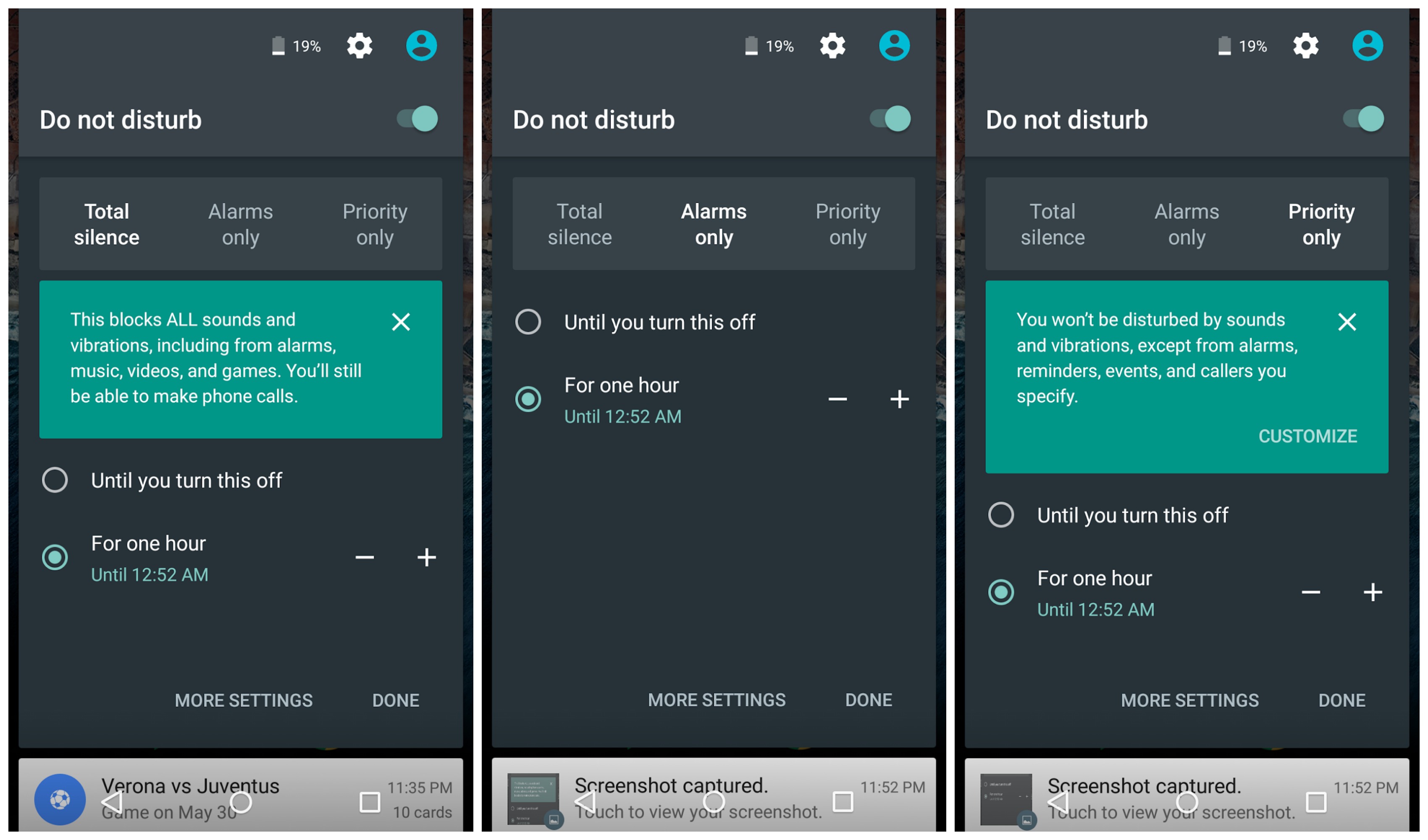
For Android M, Google’s making things a little bit simpler with new and improved controls. Currently, changing the volume in Lollipop brings up the volume slider along with the options to choose between no sounds at all (even alarms), priority notifications, or all notifications.


Android M has a similar UI, only now it spells things out more clearly with a first-time popup message explaining each option in plain language. There’s also a handy drop down when adjusting the volume to control audio output for notifications and alarms individually. Again, it’s not too drastically different from what we had in Lollipop, but it’s better and better is good.


Thanks, Hernan!


If you hate passwords as much as we do, you’ll love Google ATAP’s latest projects


project-abacus-you-are-your-password-phandroid


It’s another wonderful day of Google I/O and the developer conference is proving that there’s still more interesting developments outside of Android M. During a Google ATAP session, Regina Duggan took the stage to talk about what the special projects unit as been working on.


Project Abacus


One of the more interesting projects is something called Project Abacus. They’ve actually been conducting user trials and gathering data since last year. Everyone knows passwords suck (Duggan actually said this on stage) and Project Abacus looks to eliminate the hassle of typing out or remembering long passwords because simply put: humans aren’t good at this.


Because your smartphone knows more about you than you think, Project Abacus combines a variety of sensor data — how you walk, location patterns, how you talk, how you type — to verify that you are you. In other words, your device is the key to your authentication and it doesn’t even need fingerprint scanning hardware to pull it off.


project-abacus-password-types-phandroid


Project Abacus works passively in the background to continually authenticate you before a website or app or anything else asks you for your password. Based on a trust score, it can verify your identity and you’ll be logged in without having to type a single thing. Higher trust scores could be required from something like a banking app, while low ones for something like logging into a game. Should your device fall into the wrong hands, the trust score will drop and the user will be asked to input a password like the olden days.


Of course, the question on everyone’s mind is how secure Abacus is when compared to other methods of authentication. ATAP says that by combining all this sensor data, Abacus is more than 10 times more secure than traditional methods. We’ve seen enough movies to know that anyone can pop out your eyeball or cut off your fingers — wouldn’t it be great if you phone knew you were you?


Project Vault


project-vault-announcement-phandroid


Another interesting project to come out of Google ATAP’s session is something they’re calling Project Vault. ATAP says Vault is tiny, security dedicated computer squeezed into a micro SD card. It uses a suite of encryption primitives to act as a digital mobile safe for your most sensitive data, anything from chat conversations to files and everything in between.


Using a driver-free interface, Project Vault partitions a portion of an SD card to store data and works out of the box on a variety of platforms outside of Android (like full fledged Windows PCs). ATAP says that Vault more or less aimed at the enterprise market for now and like most things to come out of Google I/O, still in its early stages but will soon have an open source SDK for developers.


Google Play Music update brings a much improved method for adding music to your Android Wear device


Google Play Music 6.0


In an update to Google Play Music that landed earlier today, the music streaming app added the ability for users to play ad-supported radio stations (a lot of ads) for free. While that was the main gist of the update, it wasn’t the whole story. As we so find inside updates, smaller changes like bug fixes and improved functions also managed to creep in unnoticed.


While we’re not sure how many of you were using the Google Play Music to listen to music on your Android Wear device (a feature that rolled out late last year), it’s now more functional than ever. Arriving in the 6.0 update, Google has finally made it possible to add music to your Android Wear smartwatch independent of a tethered smartphone or tablet. What we mean by that is previously, users had to download or pin the music to their Android device first then enable the “Download to Android Wear” setting to transfer to their pinned music to their smartwatch. With the latest update, you can now download/pin music on your directly onto the smartwatch — the way it should have been from the start.


You can either wait for the update to hit the Google Play Store, or download and install Google Play Music 6.0 from us right here.


[via Reddit]


Galaxy S5 Lollipop Update G900FXXU1BNL9, Much Stable Android 5.0


Firmware build G900FXXU1BNL9 Android 5.0 Lollipop update on Samsung Galaxy S5 SM-G900F. The G900FXXU1BNL9 is the 3rd firmware build for Europe countries.  Unlikely before the previous released such as the  U1BNL2 and the U1BNL7 which are available in Poland only.  The G900FXXU1BNL9 update was also seen and had been rolled out in Spain.  This is a good indication that the rest of world might also see an update very soon.


Perhaps, many of us has been expecting the Android 5.0 update on our Galaxy S5 last year. Unfortunately, it wasn’t made it through as a worldwide release. There are still some issues reportedly found out that causes some adverse effect on some 3rd party apps, like FC’s and lag-issues.


In addition, it seems like Samsung developers still on ironed out some bugs, so let’s hope that they can give us a much stable Android 5.0 Lollipop update this year. So everyone with Samsung Galaxy S5 at hand might as well keep an eye of it,  if and when available in your areas soon.


So here goes the details of the Android 5.0 Lollipop G900FXXU1BNL9 update on Samsung Galaxy S5 SM-G900F;


Details of G900FXXU1BNL9 Android 5.0 Firmware:


G900FXXU1BNL9 Galaxy S5 G900F Android 5.0 kitkat
Device: Samsung Galaxy S5 G900F
Android version 5.0 (Lollipop OS)
Baseband version G900FXXU1BNL9
Kernel version 3.4.0-3624618
dpi@SWDD5623 #1
Thu Dec 18 17:35:48 KST 2014
Build number LRX21T.G900FXXU1BNL9
SE for Android status Enforcing
SEF_SM-G900F_5.0_0002
AP: G900FXXU1BNL9
CSC: G900FXEO1BNL1
CP: G900FXXU1BNL9


For those who may wants know of which Samsung Galaxy S5 variants all over the world already receive the Android 5.0 Lollipop as of this time being. Here goes the rundown list of Samsung Galaxy S5 got the Android 5.0 update as of January 05, 2015:


SM-G900F Samsung Galaxy S5 (Snapdragon)


  • G900FXXU1BNL9

  • G900FXXU1BNL7

  • G900FDXU1BNL3

  • G900FXXU1BNL2


SM-G900K & SM-G900S (South Korea)


  • G900KKTU1BNL5

  • G900KKTU1BNL2

  • G900LKLU1BNL5

  • G900LKLU1BNL2


SM-G900FD Samsung Galaxy S5 Duos LTE


  • G900FDXXU1BNL9 (available in Russia)


No official Android 5.0 Lollipop update yet, but there is a leaked Android 5.0 last year on other carrier.


United States and Canada Galaxy S5 variants


  • SM-G900A – AT&T

  • SM-G900R4 – US Cellular

  • SM-G900P – Sprint

  • SM-G900T & SM-G900T1 – T-Mobile

  • SM-G900V – Verizon

  • SM-G900W8 – Bell, Rogers, Telus, Wind etc.


And the rest of  the globe.


  • SM-G900H Galaxy S5  international (Exynos chip).

  • SM-G900I Australia, New Zealand, Taiwan, India

  • SM-G900FQ – Turkey

  • SM-G900M & SM-G900MD – Latin America

  • SM-G901F Galaxy S5 Plus

  • SM-G906S,SM-G906K and SM-G906L Samsung Galaxy S5 LTE-A


To those lucky countries already had an official Android 5.0 being held available you can manually update either via OTA or using Kies.


How to Update the Samsung Galaxy S5 SM-G900F to Official Android 5.0 Lollipop build G900FXXU1BNL9


Samsung always urge us to prepare the following important notes to consider before performing the software update.  I have also added some useful insights why you should follow this procedures to keep your  phone in safe.


Recharge the phone’s battery – You should make sure your device is fully recharged before performing the software update. Do not also remove the battery during the software update is in progress. A power failures may cause damaged to your device that might results as we so-called “soft-bricks”. If this happens your device may just stuck on Samsung logo or welcome screen and can’t reboot normally.


Backup important data – You should back-up your important files, including contacts, emails, messages, photos, videos, apps and other stuff. Like I said while during software update process is interrupted there is a possibility that your data stored from your device internal SD card may lose or deleted when a sudden unexpected failure happened and it forces you to perform a factory data reset which basically wipes your phone’s memory.


Galaxy S5 should no root – Your device should not be modified or rooted, there is a certain circumstances that a modified and rooted Galaxy S5 SM-G900F may not accept any official software update anymore or it can accept an update but it might harm your device once the update has made. Learn about the new Samsung KNOX security suite. Most known error that says ‘firmware upgrade encountered an issue, please select recovery mode in Kies and try again‘ or “Your device has been modified Software update are not available” you should try to avoid that from happening.


How to Update Galaxy S5 G900F to  Android 5.0 G900FXXU1BNL9 via Over-The-Air (OTA)


Samsung Galaxy S5 OTA Update This is usually how the carrier branded or locked Samsung Galaxy S5, performs a software update.  This method is Firmware Update through over the air or called as OTA update, which most often  a notification message will directly sent to you from your network provider or Samsung and notifies you that there is a new update available for download.  If you did not receive any notification messages you can manually check for the update instead.  Doing this you may only tap on your Galaxy S5 SM-G900F Settings>>About Device, tap Software Update.


  • Find “Software update”

  • Slide your finger down the display starting from the top edge of your mobile phone.

  • Tap the settings icon.

  • Tap About device.

  • Tap Software update.


It will automatically tells you that a new update is available or your software is up to date when there is none yet. You can simply tap install now when you want to perform an update or install later. The G900FXXU1BNL9 5.0 update is about 371.33 MB in file size, updating via OTA.


How to Update the Galaxy S5 G900F to Android 5.0  Lollipop G900FXXU1ABNL9 Thru Kies


Samsung Galaxy S5 Kies Software update download


The second method is a firmware update through Samsung Kies. You may head-over to your  local Samsung support page from where you can download Samsung Kies from there, and install it in your Windows or Mac computer. Choose the new Kies 3 which supports the Galaxy S5 SM-G900F and other Samsung devices running with Android 4.4.2 and up OS .  Once you installed Kies 3, all you need is connect your Samsung Galaxy S5 SM-G900F to the computer using the USB cable, then simply run and follow Kies on-screen software update instructions.


Do your Samsung Galaxy S5 SM-G900F has been updated to Android 5.0 lollipop software update G900FXXU1BNL9?  Might as well do shed us how’s your first impression on how it performs on your Samsung Galaxy S5 SM-G900F.  Let everyone know if you have found some interesting features, and even some bugs you might have had encountered.


The post Galaxy S5 Lollipop Update G900FXXU1BNL9, Much Stable Android 5.0 appeared first on GalaxyS5Update.