Wondering why everyone goes so crazy over CyanogenMod / Cyanogen OS but not willing to flash it for yourself? Perhaps the company’s latest video series is what you need. They’re calling it Cyanogen Bites, a series of short video highlights showing you the best features of the custom Android-based OS.
The first one is all about the app themer which lets you customize how individual app looks instead of having to use the same theme for the entire OS. Cool stuff, that, and you can really only get it if you use CyanogenMod. We’ll be on the lookout for more of these as time rolls on, for sure.
The Samsung Galaxy S6 Edge is one of the coolest looking Android devices in recent years. The curved edges make it look like a phone you might see in a sci-fi movie. However, the curved display is for more than just looks. Samsung has made use of the “Edge Screen” with some nifty features. Let’s taker a closer look at what you can do with the Edge Screen.
People Edge & Notifications
Since the Galaxy S6 Edge has curved displays you can actually see part of the display even when the phone is lying on its face. Samsung uses this area as a notification indicator. When certain notifications come in, such as a phone call, the Edge Screen lights up. If you’re getting a call and your phone is lying on its face you can even use the heart-rate sensor on the back to reject the call.
(click to enlarge)
When the phone is not lying on its face you can use a feature called “People Edge.” By swiping from the side of the Edge Screen you can bring up a list of five favorite contacts. You can use these as shortcuts to make calls and send SMS messages. If one of the five contacts has sent you some type of notification it will show a colored line that you can drag over to view.
Information Streams
Another thing you can do with the extra screen real estate on the edges is display information. Samsung calls this feature “Information streams,” and it allows you to display information from several different sources only on the edge. When the display is off you can slide your finger along the edge of the screen to bring up the stream, and then you can swipe through the sources.
(click to enlarge)
Some of the Information streams include Twitter, Facebook, and a few from Yahoo including news, sports, and finance. It’s a handy little feature for quickly getting some information without having to unlock the phone and dive into apps.
Night Clock
The Galaxy S6 Edge also has a Night Clock built in. When this feature is enabled it will show the current time and date only on the curved edge of the display. Since the clock is only on the edge display you can easily see it from your bed. The AMOLED display means the Night Clock doesn’t emit much light, and it can stay on all night with minimal battery drain.
What do you think about the Edge Screen features on the Galaxy S6 Edge? Are they useful or just gimmicky? Would you buy the Edge for these features, or do you just think it looks cool?
We know, you’ve no doubt heard the claims that the iPhone 6 is the “best smartphone” in the market. At least, according to some. Now that the Samsung Galaxy S6 has finally launched, you’ve probably been curious to see how the 2 heavy weights match up. Wonder no more, friends. This is our Galaxy S6 vs iPhone 6 face-off.
Design/Build quality (Winner: Galaxy S6 Edge)
Beauty is always in the eye of the beholder, but there’s no denying Samsung did a bang up job updating the Samsung Galaxy S6 for 2015. We’ll admit, the Samsung obviously took some design cues from the iPhone 6. The familiar billet drilled speaker holes, headphone jack placement. Sure, the rest of the phone is all Galaxy, but the bottom of the S6 looks nearly identical to the iPhone’s.
And where someone might make the argument the rest of the phone is similar too, the Galaxy S6 Edge smashes previous conventions with an all new double-sided curved display. It’s not really functional so much as it is just damn cool to look at.
We still love the 2.5D glass on the iPhone 6, but it’s clear the Galaxy S6 Edge is a double threat — rock solid build quality, coupled with futuristic design. The Edge most certainly has the edge in this category.
Display (Winner: Galaxy S6)
The iPhone 6 was released nearly a year ago, a time where every Android flagship was boasting a 1080p display. While there is no excuse for Apple to release yet another iteration of the iPhone with a 1334×750 display, the iPhone 6 made up for it with Apple’s new multiple-domain LCD panel or “dual-domain pixels” that allowed for exceptional viewing angles. Color reproduction is top notch as well, even if things can occasionally look a tad washed out.
Samsung on the other hand has built a thriving business around their display panels, with Super AMOLED being their crown jewel. AMOLED offers the deepest blacks, the most saturated colors, and fantastic refresh rates. Arguments of over saturation are quickly laid to rest thanks to Samsung’s TouchWiz software which allows you to tone it down to your liking. And while 2K display sounds a bit like overkill, it’s hard to go back to anything else after your eyes have been spoiled by it for a few weeks.
The Galaxy S6 Edge also uses a flexible version of Samsung’s AMOLED panels, one that is curved around both sides of the device. It sounds great in theory, but when viewing the device head-on, images become warped and colors can look off at an angle. The Edge panel might win in sex appeal, but it’s clearly the loser here.
Hardware (Winner: Galaxy S6)
There’s no denying the iPhone 6 is built well enough, but mobile technology has been advancing at a lightning quick pace. Quicker than even Apple can keep up. The iPhone 6 added NFC capabilities, but they’re tied down to Apple’s payment method and not open to anything else.
Meanwhile, the Samsung Galaxy S6 features technology that supports both wireless charging standards, has adaptive fast charging that brings the battery to 50% in only 30 minutes, heart rate monitor for health nuts, a much louder speaker, and a fingerprint scanner that performs as flawlessly as the iPhone’s. Users can also use NFC right now to transfer data, sync with Bluetooth devices, or yes, make mobile payments using Google Wallet. Once Samsung Pay is officially ready, you’ll be able to use the phone as payment anywhere regular credit cards are swiped via Magnetic Secure Transmission.
With a doubt, the Samsung Galaxy S6 takes the hardware win on this one, leaving the iPhone 6 back in 2012 where it belongs.
Camera (Winner: Galaxy S6)
You know the story. The iPhone has long been the standard of mobile photography. Mixing a stupid simple interface with consistently great output, there hasn’t been an Android device that could really compete with the iPhone — until now.
For the Galaxy S6, Samsung has added a 16MP sensor that produces crystal clear visuals. This is thanks in part to a new f/1.9 aperture lens that allows more light to hit the sensor, and Optical Image Stabilization to compensate for shaky hands. The result are photos that look great no matter the lighting conditions. Oh, and there’s also a high resolution 5MP front facing shooter for selfie addicts.
The iPhone 6 on the other hand is using an 8MP camera with f/2.2 lens, along with a 1.2MP from facing camera. We’re not going to sit here and tell you photos taken with the iPhone 6 look bad by any means. It’s just the iPhone has finally been trumped by the Samsung Galaxy S6 which offers sharper images, more shooting modes, superior imaging hardware, and better control of the camera with a new Pro mode.
Battery life (Winner: iPhone 6)
Battery life is always one of the hardest specs to talk about in mobile devices, mainly because it’s never the same between 2 people. Having spent months with the iPhone 6 and a few weeks with the Galaxy 6, I think I have a good idea of how far the battery will take me on each. For the most part, they’re evenly matched despite their huge battery size differences: the iPhone 6 is equipped with a meager 1,810mAh, while the Galaxy S6 packs a much larger 2,550mAh battery.
I found that both will take my about 15 or so hours depending on use. Battery life on both seems to deplete evenly the more you use them. But it’s only on the iPhone 6 that when left alone, the battery barely drops at all when in standby. Keep in mind, that’s with all the same social apps, and constant notifications coming through the entire day waking up the display.
The battery on Galaxy S6 on the other hand seemed to drop no matter what I did. We have seen reports of battery life issues across various carrier versions of the device, so that’s definitely something to consider (although my devices didn’t show any of the symptoms). A buddy of mine sends me screenshots on the daily of his great battery life, meanwhile both my regular S6 and S6 Edge are barely pushing 12 hours if I’m lucky. Not sure what gives, but until Samsung can get their house in order, the iPhone 6 takes the win on this one.
Software (Winner: Galaxy S6)
We’ll admit, Apple’s been doing some great things with iOS as of late. Notification widgets are interesting and background app refresh are all nice additions Android users have been enjoying for years. Oh, and who can forget those cute new emoji.
But when you leave software features to the big boys, Samsung always comes out ahead. We mentioned this in our review, but despite Samsung removing much of their bloat from TouchWiz, the OS itself is still chock full of features. There’s too much to list here, but our favorites are Multi-view window for displaying 2 apps at the same time, quick gestures, and emergency features. The best part is these software features no longer bog down the OS. TouchWiz is finally as fast as stock Android, making it a joy to use.
If you’re an iOS user, don’t worry. We’re sure you’ll see a few of these features in a few more years. Maybe with iOS 10.
Price (Winner: Tie)
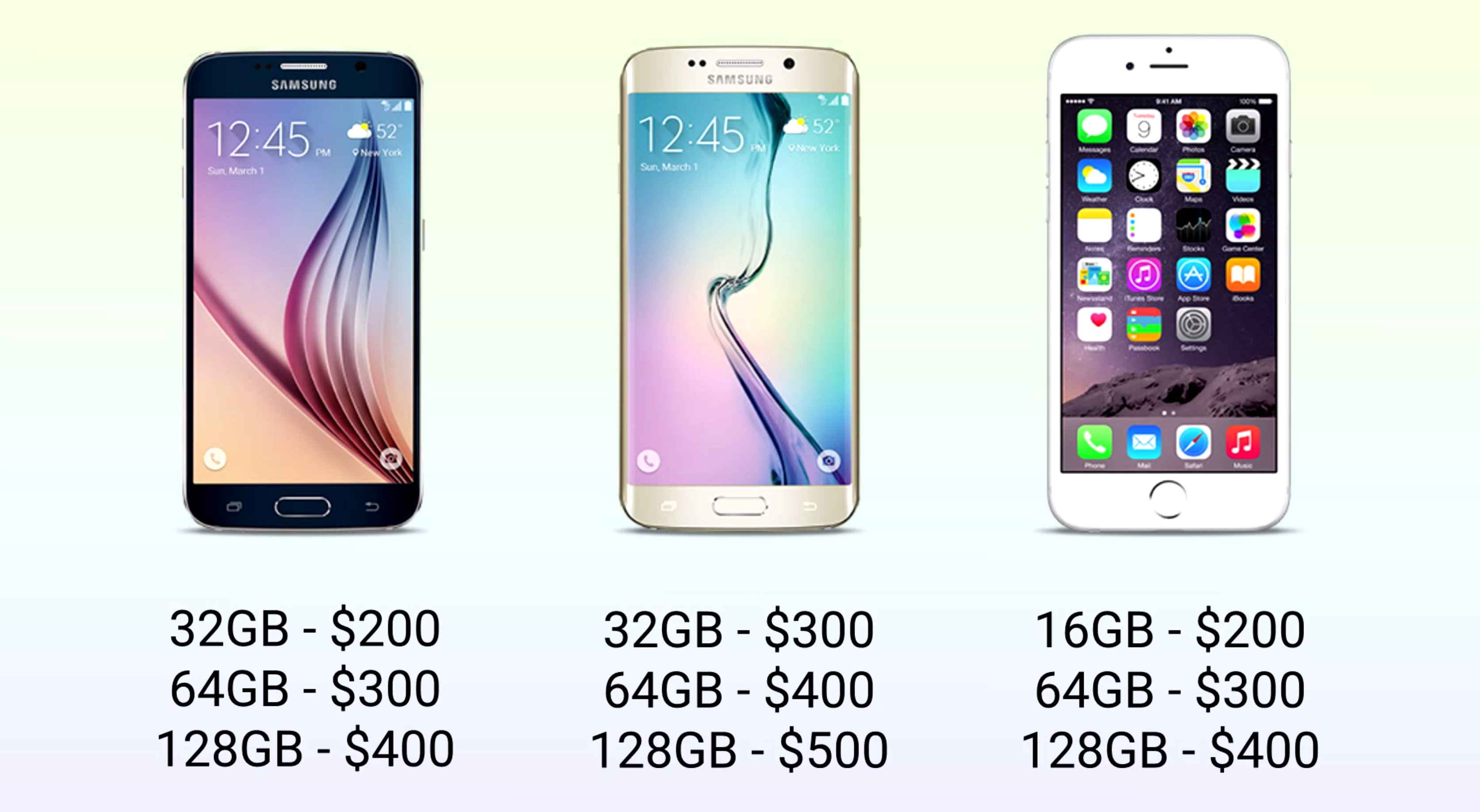
The base model Samsung Galaxy S6 starts at 0 on contract for 32GB model, or 0 full price (there’s also the 0 unlocked international model). From there it jumps 0 for every storage increase — 32GB, 64GB, or 128GB. The Galaxy S6 Edge also sees another 0 bump simply for its gorgeous curved AMOLED display.
The iPhone 6 on the other hand, starts at 200 for the 16GB model (0 unlocked), then jumps an extra 0 to the 64GB version, and another for hundred bucks for the 128GB option. For whatever reason, there is no 32GB model, a clever move by Apple to nudge consumers into grabbing the 64GB iPhone 6.
While pricing is for the most part the same across the board, the regular Galaxy S6 offers more internal storage at the base configuration. It’s the next 2 tiers — 64GB and 128GB — that things even out, with the S6 Edge being the most expensive out of the bunch.
Verdict
If you’ve made it this far, we think it’s pretty obvious the Samsung Galaxy S6 is the clear winner in this race. The phone offers more hardware for your money, a superior camera, and all around better software experience. From here, the real question is whether you’ll be opting for the S6 Edge, and in what color.
The Galaxy S6 scores almost a clean sweep in our comparison, tidily defeating the iPhone 6 in just about each of the categories we examined. For those keeping score at home, here is the final tally:
It’s pretty obvious which phone we would want to have in our pocket, though the decision might not be so close for others. There is no denying the iPhone 6’s place among the smartphone elite, but does Samsung win this round? Let us know which phone you are going with in the below poll.
The Samsung Galaxy S6 features improved finger scanning hardware that gives us something functionally identical to Apple’s highly-touted Touch ID, but its software-side enhancements build a case for the S6 as the benchmark for fingerprint authentication. Take for example the newly added ability to login to your favorite websites with just the touch of your finger.
While not a full-fledged password manager, Samsung’s finger scanner now sports the ability to securely store login credentials for use in the phone’s web browser. Find the site you want to login to, scan your finger, and the phone’s software will autofill the form. No more typing in usernames or fumbling over your super secure passwords (they are super secure, right?).
The first time you log into a site, the Galaxy S6 will ask you if you want to store the credentials and use the finger scanner to authenticate website sign ins in the future (provided you have already set up the fingerprint reader). You’ll have to do this individually at first for each login, so you can choose which sites require authentication.
While Apple has done a lot to improve the Touch ID experience and open it up to third-party developers, it has been slow to roll out core functionality in the same way that Samsung has with their Galaxy line. Before, we could say Samsung’s hardware lagged behind, but now it seems Apple may be the one with some catching up to do.
Sense ID utilizes ultrasonic waves to map fingerprints in 3D. The benefits of this might not be immediately obvious, but let me explain. Much like a dolphin or whale uses echolocation to “see” the underwater world around them, Qualcomm’s new tech uses ultrasonic waves to generate a highly detailed rendering of your fingerprint. These waves are able to look past dirt and grime to provide an accurate reading in any condition. In fact, because water is a great medium for carrying sound waves, it actually works better with sweaty fingers.
This isn’t the case with the current generation of conductive fingerprint sensors found in devices like the iPhone and Samsung Galaxy S6. Those systems rely on a capacitive technology much like the one used to give smartphone touchscreens their magic. The result is not only a sensor that provides a less detailed fingerprint map, but also one that has a tendency to not work when confronted with dirty, sweaty fingers.
As you can see from our time with Qualcomm’s Sense ID, their new tech is lightning fast while producing a high resolution scan. Because sound waves carry, another benefit becomes apparent: the fingerprint sensor can be embedded behind glass, plastic, of even aluminum and still achieve its function. Even behind 4mm of glass, Sense ID still kicked out a perfectly suitable (albeit slightly lower quality) scan. Imagine the possibilities this opens up for manufacturers looking to incorporate fingerprint sensors in novel, design-friendly ways.
Sense ID won’t be available to manufacturers until later this year, but some current-gen Qualcomm chips, including the Snapdragon 810 and Snapdragon 425, already support the functionality. It will be an even bigger point of focus in Qualcomm’s next generation of mobile processors. The best part, though, is because this system has been developed by Qualcomm, a company that already provides silicon for a large portion of Android devices out there, there is a very good chance we will see Sense ID make its way to a wide variety of handsets and tablets.
It wasn’t that long ago that Mobile World Congress was flooded with Android tablets. Everyone from Alcatel to ZTE had to get in on the post-iPad tablet boom. Nowadays tablet releases are few and far between. We haven’t seen many new tablets at MWC this year, but one from an unlikely source really grabbed our attention.
Back in November you may remember hearing about the Nokia N1. It came out of nowhere, but looked really nice. Nokia is showing off the N1 at Mobile World Congress, and we couldn’t pass up the chance to check it out. The first thing you’ll notice about the N1 is the design that mimics the iPad more than a Lumia device. Nokia says the design is made to fade away and not distract from the contents of the display.
iPad-esque or not, the Nokia N1 is a very attractive device, and that’s not the only thing to love about it. The N1 runs stock Android Lollipop out of the box. Nokia only pre-loads one app, which happens to be the app you use the most. Z-Launcher is Nokia’s own home launcher replacement that uses contextual information to show apps you might need at the moment. It also has a handy handwriting search for apps, contacts, and bookmarks. The good news is you can simply use a different launcher if you don’t like it.
The display is 7.9-inches at 2048×1536 resolution. It’s powered by an 2.3GHz Intel 64-bit processor, 2GB of RAM, 32GB of storage, and a 5300mAh battery. On the back is a 8MP camera, with a 5MP camera on the front. One really cool spec is the USB Type-C reversible charging cable. This is the newest standard that allows the USB cable to be plugged in at any orientation.
The Nokia N1 has one big flaw: availability. If you live in China you can buy one for the equivalent of 0, but here in North America it’s nearly impossible to get. That’s a real shame because we like the N1 a lot. It has a great design, excellent build quality, top-notch specs, and stock Lollipop. If it ever does come to the U.S. for 0 it should be an easy sell.
One of the first surprising stories to come out of Mobile World Congress this year was a beautiful smartwatch made by an unlikely source. The Huawei Watch was officially announced on Sunday, and we’ve been dying to get a closer look at it. We were finally able to check out this device in the flesh, and now we’re even more excited about it.
The Huawei Watch is a round Android Wear device, but with one big difference. Current round smartwatches have some sort of trade-off for the display. The Moto 360 has the infamous “flat tire,” and LG’s watches have completely round displays, but a lot of bezel around them. Huawei has managed to make a completely round display with not a lot of bezel. It looks like a legit watch.
The display is 1.4-inch AMOLED with 286ppi. It’s powered by a 1.2GHz Qualcomm processor, and has 4GB of storage, 512MB of RAM, 300mAh battery, and a 6-axis sensor for fitness tracking. The Huawei Watch will be sold in 20 countries (including North America), but we don’t know when it will go on sale or how much it will cost. When it does go on sale it will be available in black, silver, and gold. This might be the best looking Android Wear device to date.
Over the years Samsung has put a lot of work into the camera app found on their Android phones. Maybe a little too much work, considering how overwhelming the various features and filters and photo modes started to get with the Samsung Galaxy S5 and Note 4. With the Samsung Galaxy S6, the Korean phone manufacturer felt a different approach was in order: a more simple, streamlined camera experience.
But simple and streamlined do not mean lacking in capability, and here Samsung has done us the favor of including a Pro mode for those that wish to have more manual control over shooting parameters. Tapping “Mode” within the camera and switching from Auto to Pro enables users to adjust things like white balance, ISO, metering, and even focus.
Long-pressing an area of the screen will focus on that point, just like in Auto mode, but in Pro mode you can alternatively choose to focus on one area of the photo while base the exposure off a separate area. This is a feature we have seen in several third-party camera apps, and one we are glad to have in the Galaxy S6’s default camera.
If you checked out our comparison shots between the Galaxy S6 and iPhone 6, you probably noticed the drastic difference in white balance between the two. In Auto mode the GS6 had the tendency to lend a yellow hue to the scene. Manual white balance adjustment means we can dial that yellow out of the photo, and in hindsight would probably have us thinking differently about the results of our comparison.
Of course, the Galaxy S6’s new camera retains most of the features we have come to expect. Real-time filters, slow motion video, panorama, and more are all there at your disposal. The camera is also super fast to load and features killer optical image stabilization. Pro mode is just one more addition to your virtual photographer’s bag that could mean the difference between a typical smartphone photo and a true work of art.