Affichage des articles dont le libellé est Home. Afficher tous les articles

lundi 6 juillet 2015

Qualcomm’s 3D fingerprint scanner could finally allow Samsung to ditch physical home buttons [VIDEO]


qualcomm-snapdragon


Alongside an announcement that they’ve teamed up with CyanogenMod, Qualcomm had some other interesting news to share this morning. The first bit of news pertains to the next generation of Snapdragon.


The details are scarce at the moment, but we’re told to expect Snapdragon “820” to be built with a FinFET 14nm or 16nm process, which would make for a physically smaller die that uses less power. Qualcomm will also be taking this opportunity to introduce their own mobile 64-bit CPU architecture named “Kryo,” which is a custom ARM v8-A chip. Sampling will begin later this year, which should mean first devices will start to use the new chipset as soon as this time next year.


But that’s not even the most exciting news out of Qualcomm today. The company announced a new fingerprint scanning technology that utilizes 3D imaging through supersonic waves to capture a user’s fingerprint instead of 2D-based sensors currently used by the likes of Samsung and Apple.


Dubbed “Sense ID,” the fingerprint scanner’s ability to capture a print using supersonic waves enables the scanner to be used even if the scanner’s surface is covered by plastic, glass and metal. Imagine a device that doesn’t require a physical home button or any other visible, tangible part that the user has to interface with in order to enable fingerprint scanning — !%&* just got real.


Samsung currently uses Synaptics’ surface area fingerprint scanner for the Samsung Galaxy S6. As you’ll see in our quick video showing the feature it doesn’t require you to swipe anymore, but it does still require a physical surface (and we suspect that’s the main reason Samsung still uses physical home buttons aside from visual differentiation). Apple would wet itself if Samsung could finally meet everyone’s wishes to ditch that button and place a scanner beneath a small bezel area unseen by the user.


More than just practicality and design, the ultrasonic 3D imaging also makes Qualcomm’s implementation more secure. The sensor’s ability to map the surface area — including the depth of the ridges and all the other unique imperfections in your fingers — makes it harder for no-gooders to spoof a 2D pattern based on your fingerprint.


Qualcomm says some of their current chips (namely the Snapdragon 810 and the Snapdragon 425) already support Sense ID, so device manufacturers planning to use their latest silicon will have the option to put these scanners inside forthcoming phones without much issue. Qualcomm is also working on a standalone solution for even more flexibility.


As good as the fingerprint scanning technology on the iPhone 6 and Samsung Galaxy S6 is right now, Qualcomm’s innovative take on it has us looking forward. We can’t wait to see who’ll be the first to take advantage.




Samsung’s Dropcam competitor is called Perch, helps you monitor your home from an Android phone


samsung cameraSamsung SmartCam HD (not the Perch)


One of the biggest trends in technology right now is home automation. Before smartphones it was nearly impossible to know what was going on at your home while you were away. New products, like the Google-owned Dropcam, have made it possible for ordinary people to easily monitor their home from afar at a reasonable price.


Samsung is the another company looking to break into home automation. Last year they acquired SmartThings, a company who has created a popular open platform for connected devices. A new patent from Samsung suggests they are ready to create their own hardware or software for the platform, and it could be a direct competitor to Dropcam.


The patent filed on April 1st, 2015 is for something called “Perch.” Here’s what the description says:


“computer application software for mobile devices for remotely controlling and monitoring video cameras and video feeds; computer vision system for home automation comprised of methods for image and signal processing, object detection and recognition, and motion analysis”


It’s not far of a stretch to see how this is a competitor to Dropcam, a device that you can perch on a shelf to watch your home. The patent is for a mobile application, but we would be surprised if Samsung didn’t have hardware to go with it. They’ve already created home WiFi surveillance cameras in the past. The interesting thing is that Dropcam already works with the SmartThings system, but a device from Samsung could offer more tightly integrated features and software.


This would be a huge move for Samsung. With Samsung’s ability to pump out hardware, and the excellent SmartThings platform, there is massive potential here. Many companies are dabbling in home automation, but there are no clear front-runners yet. Samsung could be the one to step into that position. Have you bought any home automation devices? Would you buy a Dropcam competitor from Samsung?


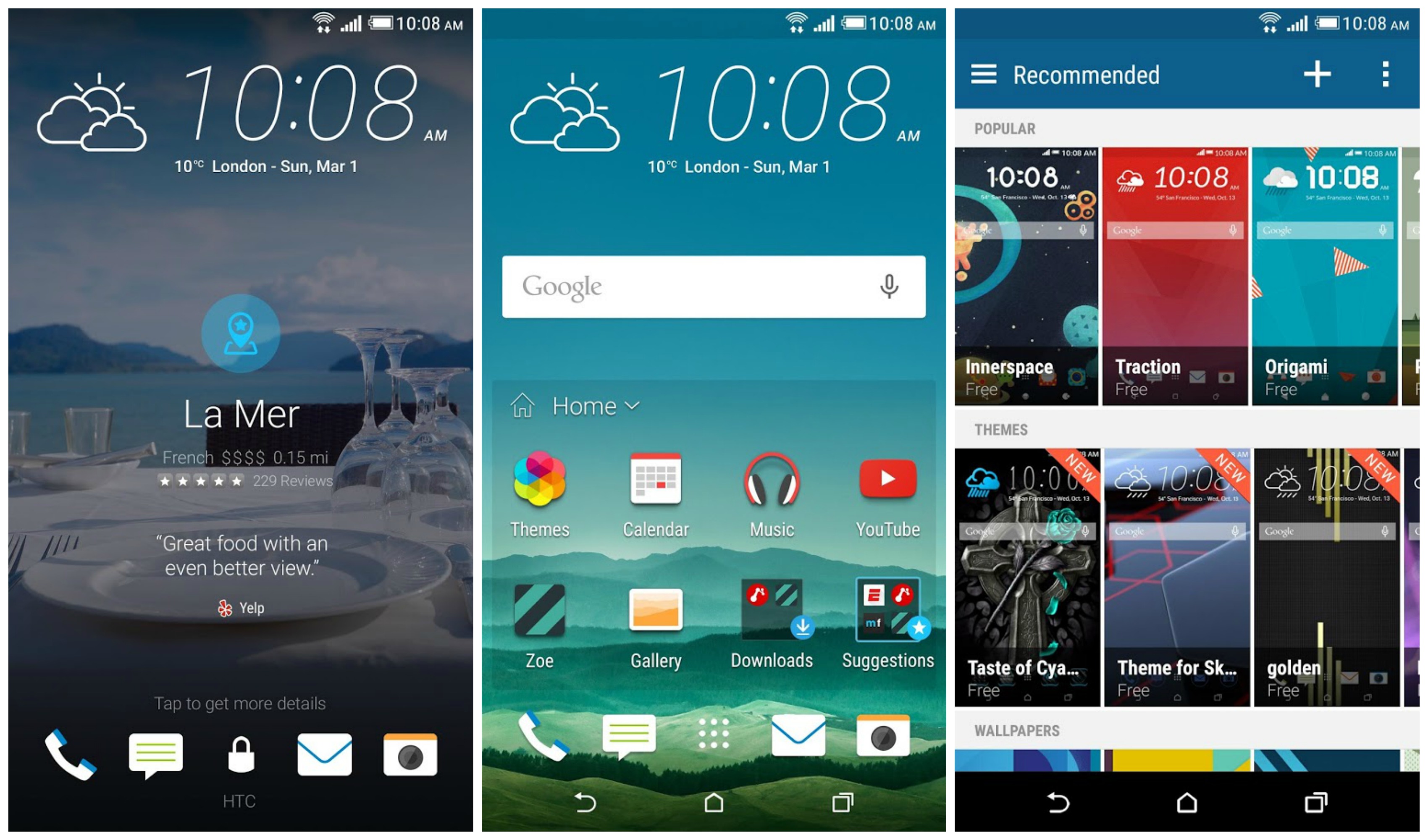
HTC Sense Home brings themes, intelligent widget, and more to the One M8/M7


HTC Sense Home


It’s not Sense 7, but HTC is bringing HTC One M8 and M7 owners a taste of some of the new features touted in the HTC One M9. By updating their BlinkFeed app in the Google Play Store — now officially renamed “HTC Sense Home” — HTC is giving the One M8/M7 on Lollipop the ability to apply a handful of themes we took a look at on the One M9.


Not every theme is available, as some require Sense 7 to function, but there’s enough here that it should wet your appetite until a future software update arrives. But you can get started building your own themes on-the-go, even publishing your favorites for others to download, or following your favorite designers. We also recently told you about HTC’s online tool for building your own themes, so you can check that out as well right here.


Aside from themes, HTC’s Sense Home Widget has also been added. Sense Home Widget is a little folder that intelligently delivers commonly used applications based on your location. It even offers suggestions for apps you haven’t downloaded yet.


HTC BlinkFeed has also been updated (One M9/M8/M7), now pulling in Tumblr feeds if you’d like. Oh, and as Android Forums member SolApathy points out, if you don’t like using the stock HTC launcher (Sense Home) but enjoy BlinkFeed, you can create a custom shortcut to quickly access BlinkFeed in most 3rd party launchers. For more details, head to his post right here.


The lock screen has also received some small, Sense 7 like UI tweaks with a different font style and weather widget that mirrors the HTC One M9. All in all a pretty substantial update, one we didn’t see coming. This, foks, is why HTC threw their system apps on the Play Store: no need to wait around for full system updates to enjoy great new software features.


For the HTC One M9, HTC One M8, and HTC One (M7), you can update via the Google Play Store link down below.


Thanks for the M7 confirmation, Ben!


Amazon’s Dash Button lets you refill home goods at the simple press of a button [VIDEO]


amazon dash tide


Our immediate reaction to Amazon’s latest announcement was that it has to be an April Fools joke, but perhaps that’s a testament to just how cool and future-thinking this product actually is. This is the Amazon Dash Button, a tiny little button that you can press to instantly order replenishment for any perishable product you need from Amazon.


amazon dash button maxwell


Whether that product is a huge case of diapers, enough gatorade to supply a full basketball team or some macaroni and cheese, you only need to press the button once and Amazon will automatically place an order for shipment to your doorstep. You’ll get a notification on your phone to confirm the details of your order, and Amazon’s app will make it easy enough to make changes to your button’s behavior whenever you need, such as setting up different quantities or flavors.


The buttons can be ordered from Amazon, and the best part is it’s free for any Prime user. You might also find some products that come with Amazon Dash Buttons pre-installed, such as a washing machine with a Tide button or a water cooler that’ll get you jugs of nature’s primary element whenever you need it.


amazon dash button phone appIn fact, there’s already one such product that exists. It’s Poppy’s smart coffee machine that’ll make you coffee whenever you need it, whether you set an automatic timer to have it make a batch in the morning, or you tell it to make a cup via the smartphone app for when you get home. Poppy’s machine integrates Amazon’s dash replenishment service to automatically detect when you’re running low on coffee and place an order for more to ensure you get a shipment before you run out.


You’ll see the same sort of functionality in Brita’s smart filters and Brother’s printers. Sounds like cool stuff. Unfortunately we’re not yet sure of some of the details of Dash Button, such as whether you’ll be able to order a generic one to program for getting items such as those that can be bought through Amazon Subscribe & Save.


Amazon users who are interested can actually sign up to be let in on the early round of testing set to go down within the next few weeks. In the meantime be sure to check out the early crop of products you’ll be able to order Dash buttons for right here once Amazon’s fully launched this thing, and keep your fingers crossed that this isn’t the most elaborate April Fools day joke in existence!


Google reportedly re-introducing Android-based home platform codenamed Brillo at I/O 2015


Android At Home banner


You can walk into any hardware store and find smartphone-controlled light bulbs, but yet we haven’t seen much from Google’s home automation project — Android@Home — since it first debuted at Google I/O 2012. It’s been a good couple of years since then and we’ve seen Google take a few strides in that direction with their recent acquisitions of Nest and Dropcam.


Soon, just about every electronic device will find itself connected to the internet, something Silicon Valley is calling the Internet of Things. Because Android (at least in its current state), isn’t really optimized for low-power gadgets and doodads, Google is doing something about that with a new software codenamed “Brillo.”


Although we’re not entirely sure if it will be Android-based, it’s being worked on by Google’s Android unit so it only makes sense. The difference is that Brillo will reportedly have no problem running on as little as 64MB or 32MB of RAM, much way less than the 512MB minimum Android can run on right now. The aim is to make every electronic device in the entire home “smart” — microwaves, refrigerators, washer/dryers/ — and the best way to do that is by connecting them to the web.


While smart slow cookers and other appliances haven’t really taken off in recent years, home automation is becoming cheaper and more practical than ever. Hopefully we’ll learn more at Google I/O in a few short weeks.


[The Information]


Watch Android M turn home buttons into magic with Google Now on Tap [VIDEO]


Google’s knowledge graph, combined with Google Now, is changing the way we think about search. Instead of reacting to direct questions we ask our devices through search engines, Google Now predicts what we want to know and when, delivering it right to our fingertips.


Google Now is already an amazing feature for Android users, but the newly announced Google Now on Tap integration may completely change the way you use your phone.


It’s that simple:


  • You’re in an Android app

  • You want to know something relevant to the current screen

  • You launch Google Now on Tap by holding the home button


You’ve just started the magic trick better known as Google Now on Tap and it takes only a split second for it to pull the proverbial rabbit out of the hat. Now on Tap collects and interprets the data on your current screen, predicts what it is  you’ll want to know based on the context of that information, and present you with – hopefully – exactly what you’d want. Without even having to ask. It already knows.


Here are 3 examples of Google Now on Tap in action.


(1) Discussing what movie to watch, when, and where


google-now-on-tap-screens


(2) Texting about dinner plans


google-now-on-tap-restaurants


(3) Current curiousity (in this case, your music)


google-now-on-tap-music


As Google’s Knowledge Graph expands and more developers integrate with the new APIs, Now on Tap has the potential to become an outrageously powerful tool.


Think about it: how often are you inside a particular app, going about your merry mobile way, and something triggers a question or task for which you need to exit the app, conduct a search, or perform some other task to finish your thought? All. the. time.


Now (no pun intended) what if you just held the Home button down and Google automatically launched the answer for the question you were already intending to ask? Call me the king of laziness, but I’m pretty sure I’d smile with satisfaction every time my buddy Googs served up this mind-reading goodness on a silver platter.


google-now-on-tap-2


Initially the use cases of Google Now on Tap may be limited, but over time will grow. The concept is so simple, yet so brilliant, that a year from now we may be wondering how we lived without it (or why someone else didn’t think of it first).


New Lollipop Update on Bell’s Galaxy S5 to version 5.0 G900W8VLU1BOC1, Fixes Home button issue


We have posted about the Android 5.0 Lollipop update dubbed with build version G900W8VLU1BOB3 on all Canadian carriers Samsung Galaxy S5, including Bell, Rogers, Telus,  Videotron, Koodo and WIND Mobile.  Bell on the other hand had officially announced the update on their twitter page. Some users got the update but while some users did not seen it.  According  to Bell’s support, it turned out that Samsung has recently halted and pulled the update after noticing an issue with the home button.


Bell Galaxy s5 Lollipop update home button issues


However, yet today there is another Lollipop update we recently spotted in Kies firmware server. It’s dubbed with released build version  number G900W8VLU1BOC1. The latter corresponds to Bell, Telus  and Kodoo’s Galaxy S5, and there is nothing yet on Rogers and other Canadian carriers.  The update is going to replace the previously pulled out G900W8VLU1BOB3  and then might also resolves the issue found in the home button.


  • Device: Samsung Galaxy S5

  • Model number: SM-G900W8

  • Android version: 5.0 (Lollipop OS)

  • Baseband version G900W8VLU1BOC1

  • Kernel version: 3.4.0-4100894

  • Build number: LRX21T.G900W8VLU1BOC1

  • SE for Android status Enforcing

  • AP: G900W8VLU1BOC1

  • CSC: G900W8OYA1BOC1

  • CP: G900W8VLUIBOC1


To manually check  its availability right now just simply tap your phone’s Settings>>About Device>>Check for Software Updates.


Just ensure that your Galaxy S5 G900W8 is still runs in official firmware build such as the recent 5.0 Lollipop update G900W8VLU1BOB3 or the Android 4.4.2 G900W8VLU1ANF3 and has not been rooted or modified so you’ll get the official Android 5.0 G900W8VLU1BOC1 without any hiccups.


G900W8VLU1BOB3
Below are the step by step procedures on how you can update your Samsung Galaxy S5 SM-G900W8 to the official Android 5.0 Lollipop released build G900W8VLU1BOC1.


How to Update Galaxy S5 G900W8 to 5.0 Lollipop via Over-The-Air (OTA)


This is usually how the carrier branded or locked Samsung Galaxy S5, performs a software update.  This method is Firmware Update through over the air or called as OTA update, which most often  a notification message will directly sent to you from your network provider and notifies you that there is a new update available for download.  If you did not receive any notification messages you can manually check for the update instead.  Doing so you may only navigate on your Galaxy S5 SM-G900W8Settings>>About Device, then tap Software Update.


  • Find “Software update”

  • Slide your finger down the display starting from the top edge of your mobile phone.

  • Tap the settings icon.

  • Tap About device.

  • Tap Software update.


It will automatically tells you that a new update is available or your software is up to date when there is none yet. You can simply tap install now when you want to perform an update or install later. The G900W8VLU1BOC1  Android 5.0 update is around 900+ MB in file size while updating via Over-The-Air (OTA) update.


How to Get the Lollipop Update using Kies


Samsung Galaxy S5 Kies Software update download


The second method is a firmware update through Samsung Kies. You may head-over to your  local Samsung support page from where you can download Samsung Kies from there, and install it in your Windows or Mac computer. Choose the new Kies 3 which supports the Galaxy S5 SM-G900W8 and other Samsung devices running from Android KitKat, and up to Lollipop OS .  Once you installed Kies 3, all you need is connect your Samsung Galaxy S5 SM-G900F to the computer using the USB cable, then simply run and follow Kies on-screen software update instructions.


source: Bell 


The post New Lollipop Update on Bell’s Galaxy S5 to version 5.0 G900W8VLU1BOC1, Fixes Home button issue appeared first on GalaxyS5Update.