Affichage des articles dont le libellé est version. Afficher tous les articles

lundi 6 juillet 2015

Google Glass partner Luxottica says version 2 coming soon, version 3 already in planning stages


Google Glass moody DSC06183


It was barely over a year ago Google announced a partnership with Italian eyewear maker Luxottica –the folks behind brands as Oakley, Ray-Ban, Arnette, Oliver-Peoples, and more — to build Glass compatible eyewear for the masses.


More recently, we watched as the Google Glass Explorer Edition finally came to an end (after a bumpy, and very controversial first run). But Google made it a point to stress that Glass was, in fact, not dead, and merely graduating from the Google X Labs into its own project under watchful eye of Nest CEO Tony Fadell. What we don’t know is what form Glass will take, or when we can expect to see a sequel.


Apparently that could be sooner than later according to Luxottica CEO Massimo Vian. He mentioned during a shareholders meeting that the next version of Glass was coming soon and what’s more, they’re already planning out a third followup. You heard right, Google Glass v3.


“In Google, there are some second thoughts on how to interpret [Google Glass] version three. What you saw was version one. We’re now working on version two, which is in preparation.”


Of course no specific dates were given, so for now we’re left wondering if that coming soon is later this year (Google I/O?), or sometime next year. We think Glass was a product well ahead of its time and there’s no harm in letting bake in the oven a little longer.


[WSJ]


Have you updated your Amazon Fire TV to version 1.5?


amazon fire tv and remote


Many of you should have received a nice upgrade to Fire OS 1.5 for Amazon Fire TV and Fire TV Stick by now, but we’re curious — have you upgraded yet? If not, you might want to.


It comes with a ton of cool new features that you shouldn’t miss out on, especially the ability to expand storage using USB on the Fire TV, as well as Amazon X-Ray —  the company’s second screen experience that gives you more information about the characters, stories and settings in the show — directly on the TV interface. Here’s the full list of everything that’s changed:


  • Expandable USB storage—Use a connected USB flash drive to expand your Amazon Fire TV storage for downloaded apps and games—this enables you to have more games downloaded for easy access.
    See compatible USB storage devices

  • Connect to your hotel or dorm room Wi-Fi with captive portal support—Take your favorite movies, TV shows, games, and more with you when you’re away from home. Amazon Fire TV enables you to connect to Wi-Fi that requires web authentication—this includes Wi-Fi at most major hotels, as well as some universities.

  • New X-Ray on Amazon Fire TV—You can now use X-Ray on Amazon Fire TV to explore your favorite movies and TV shows on Amazon Instant Video directly on your TV screen. Powered by IMDb, identify actors and songs in the current scene, explore actor bios, and more by simply clicking the “Up” button on your Amazon Fire TV remote.

  • Private listening on Amazon Fire TV—Support for wireless Bluetooth headphones lets you listen to your favorite movie, TV show, or music without bothering others in your household.

  • Browse and search Prime Playlists—Prime members can now take advantage of Prime Music playlists directly from Amazon Fire TV—there are hundreds of expertly curated Prime Playlists to choose from based on your mood, activity, artist, or decade of choice.
    Browse Prime Music Playlists

  • Hidden PIN entry—With the new PIN entry screen that hides the numbers selected, you can now make sure your kids can’t see your device PIN as you enter it on-screen to confirm a purchase.

  • New shortcuts—Quickly put your Amazon Fire TV to sleep or enable display mirroring by pressing and holding the Home button on your remote.


So, have you received it yet? Be sure to let us know down below, or over at AndroidForums.com to discuss the latest upgrade in more detail (or get some help with it if it’s not treating you well).


Is this Motorola’s next version of the Moto 360?


moto 360 2


It was only a matter of time before the next Moto 360 rumors and leaks started. The Moto 360 was (and still may be) the most popular Android Wear device to date, which makes the next model highly anticipated. An executive from Lenovo (who acquired Motorola last year) may have spilled the beans on their follow-up.


A Chinese Facebook community posted the photo you see above last night. They claim the photo was taken by Lenovo CEO Yang Yuanqing. We can see a padded case filled with different bands and what appears to be a bunch of old Moto 360 parts. Take a closer look and you’ll notice a few key differences.


The side button is now position slightly closer to the band instead of centered on the side. The bigger difference is the new lugs that connect the watch band to the body. The original Moto 360 didn’t have exposed lugs like most watches. The bands sort of disappeared underneath for a very clean look. The new Moto 360 with the lugs takes on a more traditional design, which frankly I don’t like as much.


It’s not an article about the Moto 360 if we don’t talk about the “flat tire.” Yes, it does appear to still be there. However, there is a good chance they are still using the old displays in these new designs. Motorola would be very foolish to ignore all the complaints about the “flat tire” and not get rid of it. We’ll wait before we rage.


Thanks Mike!


[via MyDrivers]


Here’s the full version of the Android “Wear what you want” ad by Google [VIDEO]


android wear what you want


Google attempted to steal some thunder away from Apple when the Cupertino company unveiled new details about their first ever smart watch. They did so by posting a quick video urging folks to “wear what you want,” and showed a wealth of energetic beings rocking the many different Android Wear watches out there.


The full video has now been posted online in case you were wondering how the whole thing plays out. Here’s a quick summary: a lot of cool people do a lot of cool things with a lot of arms and fingers. Be sure to take a gander below if you can afford to take a quick one minute break.


Samsung introduces new version of the Gear VR fit for Samsung Galaxy S6 + Edge


samsung gear vr for s6 s6 edge


Samsung Galaxy Note 4 owners won’t be the only ones who can get in on the virtual reality fun. Samsung announced a new edition of the Samsung Gear VR made especially for the newly-announced Samsung Galaxy S6 and Samsung Galaxy S6 Edge.


It’s the same headset, essentially — you put it on your face, drop your phone in and take in a horde of content in virtual reality — but this one will hold the company’s latest flagships instead of yesteryear’s phablet. Pricing is expected to be similar so try to set aside 0 if you’re interested. If that’s too rich for you, well, it should still work perfectly fine inside of something like Google Cardboard.


Google holds off on device encryption requirements for a later version of Android, but why?


Android 5.0 Lollipop DSC07205


In Google’s efforts to make Android a more secure platform, the company once required that all devices with Android 5.0 Lollipop or higher would have key partitions of the system disk permanently encrypted upon first boot. The Nexus 6 and Nexus 9 — the first publicly available devices with Lollipop — sure enough followed suit.


But several other devices to launch with Lollipop since then seem to come without encryption enabled. Many of the newest handsets introduced at Mobile World Congress are also found to have no encryption. So what, exactly, is going on?


Google quietly changed their Android Compatibility Definition policy to say that OEMs are no longer required to enable encryption on their phones out of the box. They still have to support encryption, but there’s nothing that says they have to enable it out of the box.


9.9 Full-Disk Encryption


If the device implementation has a lock screen, the device MUST support full-disk encryption of the application private data (/data patition) as well as the SD card partition if it is a permanent, non-removable part of the device. For devices supporting full-disk encryption, the full-disk encryption SHOULD be enabled all the time after the user has completed the out-of-box experience. While this requirement is stated as SHOULD for this version of the Android platform, it is very strongly RECOMMENDED as we expect this to change to MUST in the future versions of Android.


Does that mean Google’s vision for an encrypted Android is dead? Not at all. In fact, the company notes that they will be reintroducing the requirement for a later version of Android, and it’s that very reason they urge manufacturers to make a habit of enabling device encryption by default.


So that answers the question of why new devices aren’t coming encrypted out of the box. Now the question changes: why has Google decided to hold off?


Google_Lollipop


The likely answer is that device encryption either isn’t as ready as they thought it was, or that it’s too messy for an OEM to implement if they haven’t designed their phones with the encryption requirement in mind. Device encryption was blamed for the problematic performance issues of the latest Nexus devices (we even showed you how to disable it on the Nexus 6 to boost performance), though Google has yet to confirm whether it’s that feature which causes the issues.


For what it’s worth we’re hearing that many of the issues will be cleared up with the big Android 5.1 Lollipop bug fixer that’s due later this month so perhaps that’s the future version of Android Google is referring to. The delay might also give OEMs more time to adjust their firmware and hardware to handle device encryption more efficiently. Adjustments might include the use of a faster file system and faster flash storage.


Of course, only Google and their OEM partners know the true answer so we’ll have to wait for more details to leak before knowing why, exactly, they’ve decided to shelve the requirements.


[via Ars Technica]


Google code commit hints to multi-window app support arriving in future Android version


Galaxy S5 Multi-window


Google I/O is just around the corner and we have a good feeling Google will talk about/detail new changes headed to their mobile OS. Changes much bigger than what 5.1 — rolling out now to Nexus devices — introduced.


With that release now in the books (which mostly dealt with big fixes, dual SIM and HD Voice support) you may be wondering to yourself what could be ahead for future versions of Android. Well, a gem discovered in an AOSP framework code commit is shedding some light on a big new feature coming soon to Android: multi-window apps.


commit ed7698c8ed66b959d723caa7bfe01530d306fb8d
Author: Craig Mautner cmautner@google.com
Date: Tue Jan 27 11:44:59 2015 -0800


Defer tap outside stack until multiwindows


Taps outside of the stack boundary were causing the current app to
lose focus. This led to timeouts waiting for the app to respond.


Disabling the tap recognition keeps the focus from changing. It will
be reenabled for multiwindows.


As you can see above, there aren’t very many details, just a quick reference. While having multiple apps displayed onscreen at once isn’t a feature that everyone will use, it could be great for Android power users who need more multitasking than what stock Android provides. Really, the idea isn’t anything new. Samsung’s custom TouchWiz UI has allowed for multi-window apps for a while now, but exactly how Google plans on implementing this feature remains to be seen.


What say ye? Would you use multi-window apps if baked into Android in the near future?


[AOSP]


Fleksy keyboard giving away free unlock to full version, but only for a limited time


Fleksy tablet


We know, it’s going to be tough for anyone already invested in their favorite keyboard app to try something new, but we implore you to give Fleksy a shot. After recently adding a handful of amazing new features, it’s been fighting for the top spot in our favorite keyboard apps ever. Yeah, it’s that good.


Right now, Fleksy is allowing anyone with the free (trial) version of their app to unlock the full version for free. All you have to do is download the free version of the app (uninstall and re-download if you already have it installed) and when you sign into their cloud service, you’ll unlock the full version for free.


Fleksy free unlock app


Normally the paid version runs about , which isn’t much, but this will encourage new users to give them a shot. Especially if all you’ve used is the official Google Keyboard or SwiftKey. Fleksy really does offer something different with aggressive auto-correct that allows you to sloppily type whatever you like and the ability to use a combination of gestures to undo corrections, delete words, or add words to the dictionary. Once you get in the swing of things it quickly becomes 2nd nature, so try sticking with it for a few days.


You can find the free version of Fleksy down below.


Is a deluxe version of LG Watch Urbane on the way?


LG-Urbane-Watch3


The LG Watch Urbane is already one of the nicest looking Android Wear smartwatches on the market. It has a round display without the infamous “flat tire,” premium leather bands, and a beautiful metal finish. Everything about it screams “elegant,” but LG isn’t stopping there. A recent trademark suggests that the Watch Urbane is about to get the deluxe treatment.


LG Watch Urbane Luxe


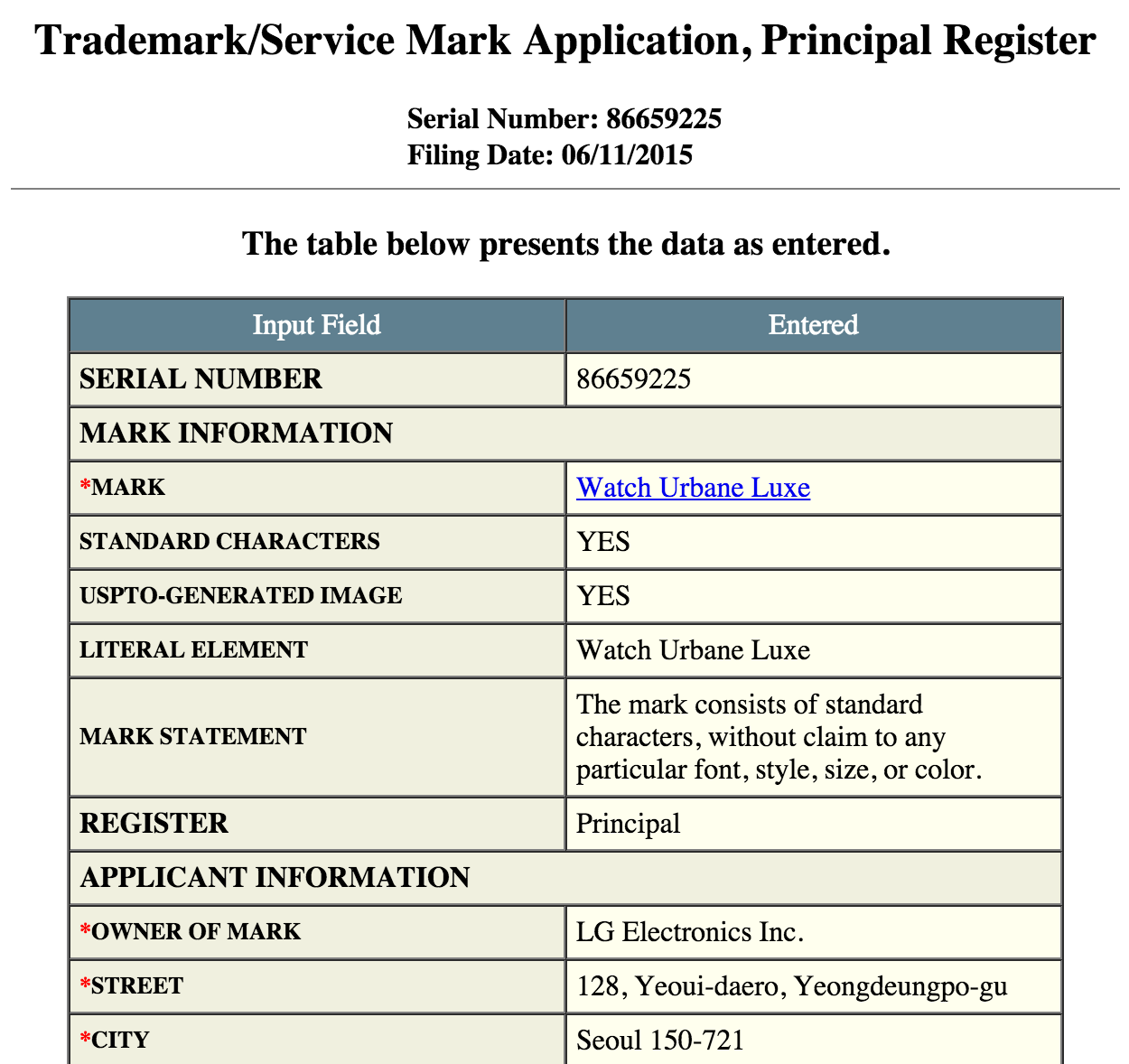
LG Electronics Inc filed a trademark for the name “Watch Urbane Luxe” on June 11th. We don’t have to take much of a leap to figure out that this is a new smartwatch. All we have to go on is a name, but this name gives a lot away. We know it will be in the Urbane family, which means it will most likely be round. The “Luxe” moniker is often used to describe something luxurious or deluxe. Putting all the clues together we can reasonably guess that this will be an even more premium version of the Watch Urbane.


Would you be interested in a more refined version of the Watch Urbane?


Slack for Android gets Material Design makeover in version 2.0


slack material design


Slack, a rich team communication platform, has updated their Android app in a big way. This is version 2.0, and it’s a complete rewrite from the ground up. The company felt the app needed to be done from scratch so that they were better-equipped to support Android’s unique features down the line.


The first thing you’ll notice when entering the new app is a complete Material Design overhaul. Dropshadows, white space and FABs, oh my! It’s certainly a lot better than the archaic mess that spawned in the Ice Cream Sandwich days.


There’s a long list of new additions and changes that should make the lot of you Slack users happy:


  • Slick new ways of navigating around the app

  • Simple tabbed navigation

  • ‘jump to’ option for channels, DMs and private groups

  • Team switcher dropdown menu

  • Refined notifications

  • Support for Message formatting

  • Support for Android emoji

  • An enhanced search function

  • Local message storage


The upgrade is headed out through Google Play over the next couple of days so keep on the lookout for it. Haven’t tried Slack yet? You can give it a free download right here to find out if it’s right for your business, student group or whatever it is you may need it for.


[via Slack]


OnePlus 2 confirmed to use a version of Qualcomm’s Snapdragon 810 that doesn’t overheat


oneplus 2 cpu


OnePlus has confirmed that the OnePlus 2 will be using Qualcomm’s Snapdragon 810 chipset for computing power. The company revealed as much in the latest post on their forums.


Curiously enough, OnePlus is pegging the version they’re using as “v2.1″, a moniker that seems to indicate they’ll be stuffing a refined unit inside the phone. They say they’ve worked closely with Qualcomm to reduce the heat output of the Snapdragon 810, and so there should be no worries for anyone who might have seen those early stories about companies having overheating issues.


OnePlus went into a bit of detail about the thermal gel used to make sure things never get out of hand:


Inside the 2, the 810 consists of several CPU processors. Layered on top of these processors is both thermal gel and graphite placed across different areas of the phone. This graphite ensures that heat generated from the processors will dissipate evenly, as opposed to being concentrated and leading to performance issues. After rigorous testing, the 2 meets the industry standard for phone temperature, even with hours of use.


They also baked in some software-based optimization to ensure the CPU is never being overworked. Sounds all fine and dandy to us. Heat issues aside, the Snapdragon 810 deserves attention as a top performing chipset for 2015 and we’re glad the two sides came together to make the improvements to make sure no one has any issues using it.


New Lollipop Update on Bell’s Galaxy S5 to version 5.0 G900W8VLU1BOC1, Fixes Home button issue


We have posted about the Android 5.0 Lollipop update dubbed with build version G900W8VLU1BOB3 on all Canadian carriers Samsung Galaxy S5, including Bell, Rogers, Telus,  Videotron, Koodo and WIND Mobile.  Bell on the other hand had officially announced the update on their twitter page. Some users got the update but while some users did not seen it.  According  to Bell’s support, it turned out that Samsung has recently halted and pulled the update after noticing an issue with the home button.


Bell Galaxy s5 Lollipop update home button issues


However, yet today there is another Lollipop update we recently spotted in Kies firmware server. It’s dubbed with released build version  number G900W8VLU1BOC1. The latter corresponds to Bell, Telus  and Kodoo’s Galaxy S5, and there is nothing yet on Rogers and other Canadian carriers.  The update is going to replace the previously pulled out G900W8VLU1BOB3  and then might also resolves the issue found in the home button.


  • Device: Samsung Galaxy S5

  • Model number: SM-G900W8

  • Android version: 5.0 (Lollipop OS)

  • Baseband version G900W8VLU1BOC1

  • Kernel version: 3.4.0-4100894

  • Build number: LRX21T.G900W8VLU1BOC1

  • SE for Android status Enforcing

  • AP: G900W8VLU1BOC1

  • CSC: G900W8OYA1BOC1

  • CP: G900W8VLUIBOC1


To manually check  its availability right now just simply tap your phone’s Settings>>About Device>>Check for Software Updates.


Just ensure that your Galaxy S5 G900W8 is still runs in official firmware build such as the recent 5.0 Lollipop update G900W8VLU1BOB3 or the Android 4.4.2 G900W8VLU1ANF3 and has not been rooted or modified so you’ll get the official Android 5.0 G900W8VLU1BOC1 without any hiccups.


G900W8VLU1BOB3
Below are the step by step procedures on how you can update your Samsung Galaxy S5 SM-G900W8 to the official Android 5.0 Lollipop released build G900W8VLU1BOC1.


How to Update Galaxy S5 G900W8 to 5.0 Lollipop via Over-The-Air (OTA)


This is usually how the carrier branded or locked Samsung Galaxy S5, performs a software update.  This method is Firmware Update through over the air or called as OTA update, which most often  a notification message will directly sent to you from your network provider and notifies you that there is a new update available for download.  If you did not receive any notification messages you can manually check for the update instead.  Doing so you may only navigate on your Galaxy S5 SM-G900W8Settings>>About Device, then tap Software Update.


  • Find “Software update”

  • Slide your finger down the display starting from the top edge of your mobile phone.

  • Tap the settings icon.

  • Tap About device.

  • Tap Software update.


It will automatically tells you that a new update is available or your software is up to date when there is none yet. You can simply tap install now when you want to perform an update or install later. The G900W8VLU1BOC1  Android 5.0 update is around 900+ MB in file size while updating via Over-The-Air (OTA) update.


How to Get the Lollipop Update using Kies


Samsung Galaxy S5 Kies Software update download


The second method is a firmware update through Samsung Kies. You may head-over to your  local Samsung support page from where you can download Samsung Kies from there, and install it in your Windows or Mac computer. Choose the new Kies 3 which supports the Galaxy S5 SM-G900W8 and other Samsung devices running from Android KitKat, and up to Lollipop OS .  Once you installed Kies 3, all you need is connect your Samsung Galaxy S5 SM-G900F to the computer using the USB cable, then simply run and follow Kies on-screen software update instructions.


source: Bell 


The post New Lollipop Update on Bell’s Galaxy S5 to version 5.0 G900W8VLU1BOC1, Fixes Home button issue appeared first on GalaxyS5Update.


Galaxy S5 gets Lollipop update version G900FXXU1BOD3 in England


There is another Lollipop update on Samsung Galaxy S5 SM-G900F  with build version G900FXXU1BOD3 that have seen in England alone. The latter might bring some minor system enhancements  and further improvements since this is the fourth Android 5.0 Lollipop update we have seen in the region. Noting that are still some glitches have been reported in previous Lollipop updates.  Some had claimed about the battery draining problem and has been experiencing heating  issue, while others has no any other issues whatsoever and were satisfied on the Lollipop update.


Here are the technical details about the G900FXXU1BOD3 Lollipop update which can be viewed in Settings>>About device:


Model number: SM-G900F
Android version: 5.0
Baseband version: G900FXXU1BOD3
Kernel version:  3.4.0-4664691
Build number:  LRX21T.G900FXXU1BOD3
Build date: April 09, 2015
Release date: April 18, 2015
G900FXXU1BOD3


Here is a recap of what are the key-features on Lollipop update:
The Lollipop features a new User Interface look and feel, more fluid motions. Smart Lock to secure phone or tablet by pairing it with a trusted device like a wearable or car.  Songs, photos, apps, and even recent searches from one Android device can be immediately enjoyed across all of your Android devices. Battery saving features and remaining time left to charge or deplete indicators. Priority mode to only allow certain notifications to get through.


The G900FXXU1BOD3 is an update to the previous released version G900FXXU1BOC7 which still continuously rolling out in Europe.  There are no any new features to expect on this update but of-course you might notice the some differences when it comes to speed and performance. So one have to make sure to get the update and then just observe whether it could bring some significant changes to the device.


The update is only available for the unlocked Samsung Galaxy S5 SM-G900F users in United Kingdom at this time being but might as well available in some countries soon.
Those who have not received the update yet, you folks might better manually check it via Over-the-air (OTA) update or using Kies. Below are the guides that shows the basic  method on how to perform a software update on Samsung Galaxy S5.


How to Update the Samsung Galaxy S5 SM-G900F to Official Android 5.0 Lollipop


Samsung always urge us to prepare the following important notes to consider before performing the software update.  I have also added some useful insights why you should follow this procedures to keep your  phone in safe.


Recharge the phone’s battery – You should make sure your device is fully recharged before performing the software update. Do not also remove the battery during the software update is in progress. A power failures may cause damaged to your device that might results as we so-called “soft-bricks”. If this happens your device may just stuck on Samsung logo or welcome screen and can’t reboot normally.


Backup important data – You should back-up your important files, including contacts, emails, messages, photos, videos, apps and other stuff. Like I said while during software update process is interrupted there is a possibility that your data stored from your device internal SD card may lose or deleted when a sudden unexpected failure happened and it forces you to perform a factory data reset which basically wipes your phone’s memory.


Ensure that your Galaxy S5 should still runs on the official Lollipop released build version and hasn’t been rooted – Your device should not be modified or rooted, there is a certain circumstances that a modified and rooted Galaxy S5 SM-G900F may not accept any official software update anymore or it can accept an update but it might harm your device once the update has made. Learn about the new Samsung KNOX security suite. Most known error that says ‘firmware upgrade encountered an issue, please select recovery mode in Kies and try again‘ or “Your device has been modified Software update are not available” you should try to avoid that from happening.


Update via Over-The-Air (OTA)


This is usually how the carrier branded or locked Samsung Galaxy S5, performs a software update.  This method is Firmware Update through over the air or called as OTA update, which most often  a notification message will directly sent to you from your network provider or Samsung and notifies you that there is a new update available for download.  If you did not receive any notification messages you can manually check for the update instead.  Doing this you may only tap on your Galaxy S5 SM-G900F Settings>>About Device, tap Software Update.


  • Find “Software update”

  • Slide your finger down the display starting from the top edge of your mobile phone.

  • Tap the settings icon.

  • Tap About device.

  • Tap Software update.


It will automatically tells you that a new update is available or your software is up to date when there is none yet. You can simply tap install now when you want to perform an update or install later. The G900FXXU1BOD3 Android 5.0 update is around 300+ MB in file size while updating via OTA.


Update Thru Kies


Samsung Galaxy S5 Kies Software update download


The second method is a firmware update through Samsung Kies. You may head-over to your  local Samsung support page from where you can download Samsung Kies from there, and install it in your Windows or Mac computer. Choose the new Kies 3 which supports the Galaxy S5 SM-G900F and other Samsung devices running with Android 5.0 Lollipop OS .  Once you installed Kies 3, all you need is connect your Samsung Galaxy S5 SM-G900F to the computer using the USB cable, then simply run and follow Kies on-screen software update instructions.


The post Galaxy S5 gets Lollipop update version G900FXXU1BOD3 in England appeared first on GalaxyS5Update.