Affichage des articles dont le libellé est multiwindow. Afficher tous les articles

lundi 6 juillet 2015

Google code commit hints to multi-window app support arriving in future Android version


Galaxy S5 Multi-window


Google I/O is just around the corner and we have a good feeling Google will talk about/detail new changes headed to their mobile OS. Changes much bigger than what 5.1 — rolling out now to Nexus devices — introduced.


With that release now in the books (which mostly dealt with big fixes, dual SIM and HD Voice support) you may be wondering to yourself what could be ahead for future versions of Android. Well, a gem discovered in an AOSP framework code commit is shedding some light on a big new feature coming soon to Android: multi-window apps.


commit ed7698c8ed66b959d723caa7bfe01530d306fb8d
Author: Craig Mautner cmautner@google.com
Date: Tue Jan 27 11:44:59 2015 -0800


Defer tap outside stack until multiwindows


Taps outside of the stack boundary were causing the current app to
lose focus. This led to timeouts waiting for the app to respond.


Disabling the tap recognition keeps the focus from changing. It will
be reenabled for multiwindows.


As you can see above, there aren’t very many details, just a quick reference. While having multiple apps displayed onscreen at once isn’t a feature that everyone will use, it could be great for Android power users who need more multitasking than what stock Android provides. Really, the idea isn’t anything new. Samsung’s custom TouchWiz UI has allowed for multi-window apps for a while now, but exactly how Google plans on implementing this feature remains to be seen.


What say ye? Would you use multi-window apps if baked into Android in the near future?


[AOSP]


Split keyboard and multi-window are just a few tricks Android M has in store for tablet owners [VIDEO]


Android M tablet multi-window mode


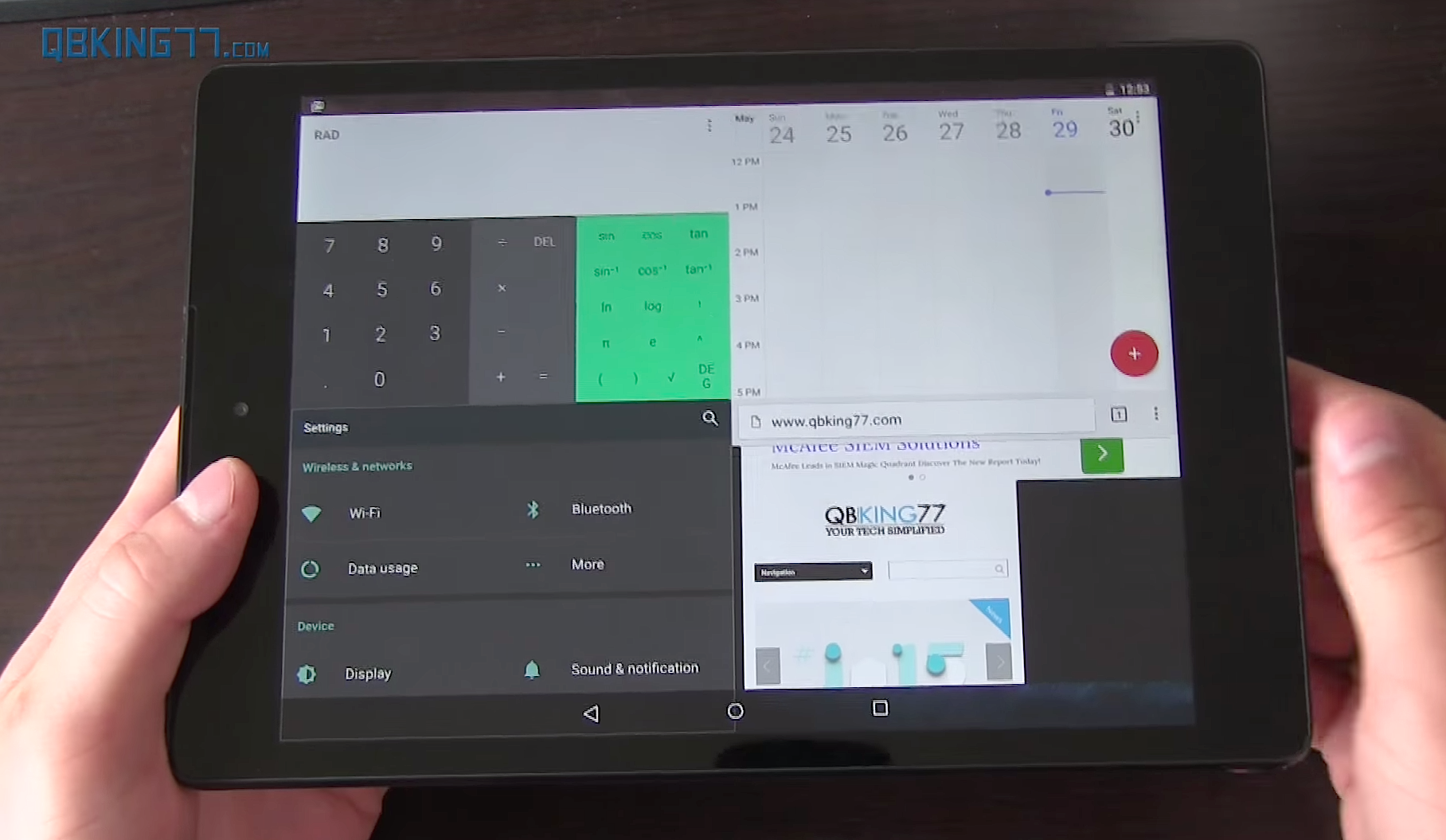
Android M’s hidden multi-window mode


To say we’re over Lollipop and its shenanigans would be an understatement. Right now, we got our eyes locked on Android M and all the improvements and polish the future Android update looks to bring to the platform. There’s a lot of stuff being uncovered almost everyday — and we’ve shown you much of that already. — but if you’re wondering what Android M has in store for tablet user, it seems Google’s got your back.


Android M tablet split keyboard


Our friend Tim Schofield, better known around Android circles as Qbking77, uploaded a video showing off some much needed features heading to the Android M release. He discovered that the default Google keyboard actually features a split typing mode for use on tablets where your thumbs have trouble reaching all the keys. It doesn’t appear to be available for smartphones, even ones as big as the Nexus 6 but that could change in the future.


There was also an all new multi-window mode that actually isn’t available in any of the settings by default, but can be added only after tinkering around with the build.prop. Once the necessary changes have been made, the new setting can be toggled in the Developer options. It works pretty well even in this early state, with a button that appears in an app’s title bar whenever opening Android’s recents menu.


Android M multi-window layout select


When pressed, a menu pops up asking you to specify the layout. It’s a little “hack-ie,” but we’re sure it’ll be polished up in time for M’s release later this year. We were actually surprised at how well everything worked. Even with 4 apps open at the same time, scrolling was smooth and everything loaded up quick.


Android M tablet notification shade


Other small improvements like the notification shade the moves around the top depending on where you initiate the pull down gesture is also a nice touch. It’s surprising really. All these changes are somewhat small but when combined, make for an OS update that already has us drooling. Why these couldn’t have been included in Android Lollipop is anyone’s guess, but given Lollipop’s dramatic UI overhaul, I’m sure they just didn’t have time. We will admit, it’s nice seeing Google — who typically takes the bare bones approach with their apps — going this extra mile to add more user customizations like this. Choice is good. Check out Tim’s full video down below.