Affichage des articles dont le libellé est light. Afficher tous les articles

lundi 6 juillet 2015

Change the touch key light duration on all Samsung Galaxy S6 or S6 Edge models using this app


Samsung Galaxy S6 Touchlight keys


We can’t for the life of us figure out how Samsung came to the decision to hack up TouchWiz for US versions of the device, giving carriers exclusive fundamental options others didn’t get. For instance, only the AT&T Samsung Galaxy S6 and S6 Edge models have an option to change the touch key (capacitive nav buttons) light duration. Yes, that very same option you’ve had on Galaxy devices for years now.


Well, the clever minds on XDA found a workaround, one that didn’t involve root, but involved enabling USB debugging and executing a few commands via ADB just to change it on non-AT&T S6 models. Not exactly convenient, or probably even worth the hassle. That is, unless these lights were bothering you when using your device in the dark (they can be a little bright).


Samsung Galaxy S6 Touchlight keys duration app


Thankfully, some beautiful soul on Google Play has created an app just for this purpose. Simply put, it allows you to change the duration of those backlit back and recents buttons on the Galaxy S6 (all versions) — even turn them off completely if you’d like. Not sure why Samsung didn’t enable this “feature” on all models, but we’re glad someone out there was able to step up. Link provided below.


How to enable the Light or Dark Theme on the Android M Developer Preview [VIDEO]


android m theme options


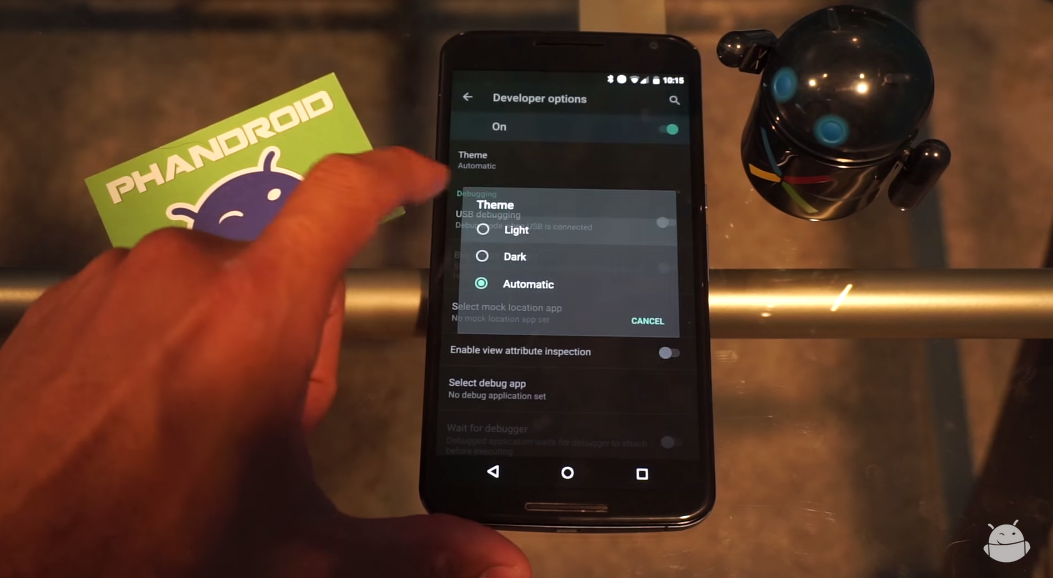
One of the cool things that popped up in the Android M developer preview was the ability to switch between a light or dark theme. It’s nothing drastic — system UI elements and menus become either light text on dark background or dark text on light background — but it’s a nice little added bit of customization for those who can’t stand one or the other.


So how do you enable it? It’s very simple, and a quick 2 minute viewing of the video above shows you exactly how. Can’t watch it? Here’s a quick rundown of what you need to do to get going:


  1. Make sure you enable the Developer Options menu. This can be done by going to Settings > About Phone. From there, scroll to the build number and tap it really fast until the phone tells you you’re a developer.

  2. Head back to Settings > Developer Options and find the Theme option.

  3. In the resulting dialog box, select between Light, Dark or Automatic.


And there you have it. We’re still a bit unsure on what the “Automatic” setting does. It’s possible this option will choose between Light or Dark depending on factors such as time of day or a reading from the ambient light sensor. We’re still testing it out, and we’ll be sure to let you know if we find anything.


Of course, it’s entirely possible that this setting does not yet do anything as this is a developer preview and things aren’t guaranteed to work 100% the way they’re meant to. In any case, give it a go if you have the Android M developer preview on your Nexus device!


The Confederate flag is being purged from app stores everywhere in light of hate crime


AmericanCivilWar_SplashScreens


When a mass shooting that seems to be motivated by racial hate happens, you can expect it to make ripples throughout nearly all the lands. That’s what’s happened in the recent mass shooting in South Carolina, where a white male (who apparently identifies as a white supremacist) killed 9 and injured more at a historically black church.


Retailers everywhere rushed to remove merchandise that showed the Confederate flag from their stores. In case you don’t know, the Confederate flag was originally created as a symbol of pride for the Confederacy during the Civil War, but has since become a symbol of hatred for those who preferred the status quo of those dark times.


But it doesn’t stop at retailers alone. Google and Apple are seemingly following suit for digital goods, with the companies purging apps and games from their respective app stores which depict the confederate flag (such as HexWar Games’ title, which uses the flag for historical accuracy).


hexwar games


On Apple’s part, they say their current policy will be to remove apps and games which use the flag in obscene and offensive ways, and will reinstate apps and games which use it for educational purposes only. We imagine Google’s policy lies along similar lines, though we have not yet heard from the company regarding their official stance.


This touchy subject isn’t bound to end here. The quick move to oust these apps has many folks crying out and wondering why goods featuring other offensive symbols, such as the Swastika, haven’t been met with a similar response.


swastika apps


The Swastika has a similar history in that it was originally used as a symbol of good (or, at least, good-willed) ideals, but was later perverted by Hitler and Nazi Germany and is particularly offensive to Jewish people (or anyone who simply detested Nazism). The difference here seems to be that there haven’t been many known hate crimes against the party which that symbol primarily offends in recent times.


Of course, the one big realization in all of this is that we don’t even know if this was a hate crime yet. It looks bad and it happened in a southern state that played a big part in American slavery, sure, but there’s no official justification for calling this a hate crime until the Department of Justice rules it as such (even though police have concluded that the attack was racially motivated).


The early reaction from retailers and technology companies is likely more about them trying to win positive PR, or at the least trying to prevent any potential negative variants.


And that’s all it is. The apps being wrongfully removed are likely to be back at some point, and we’re probably better off for all the others to simply be forgotten.


[via Engadget]


Android M introduces black status icons for light colored themes


windowlightstatusbar


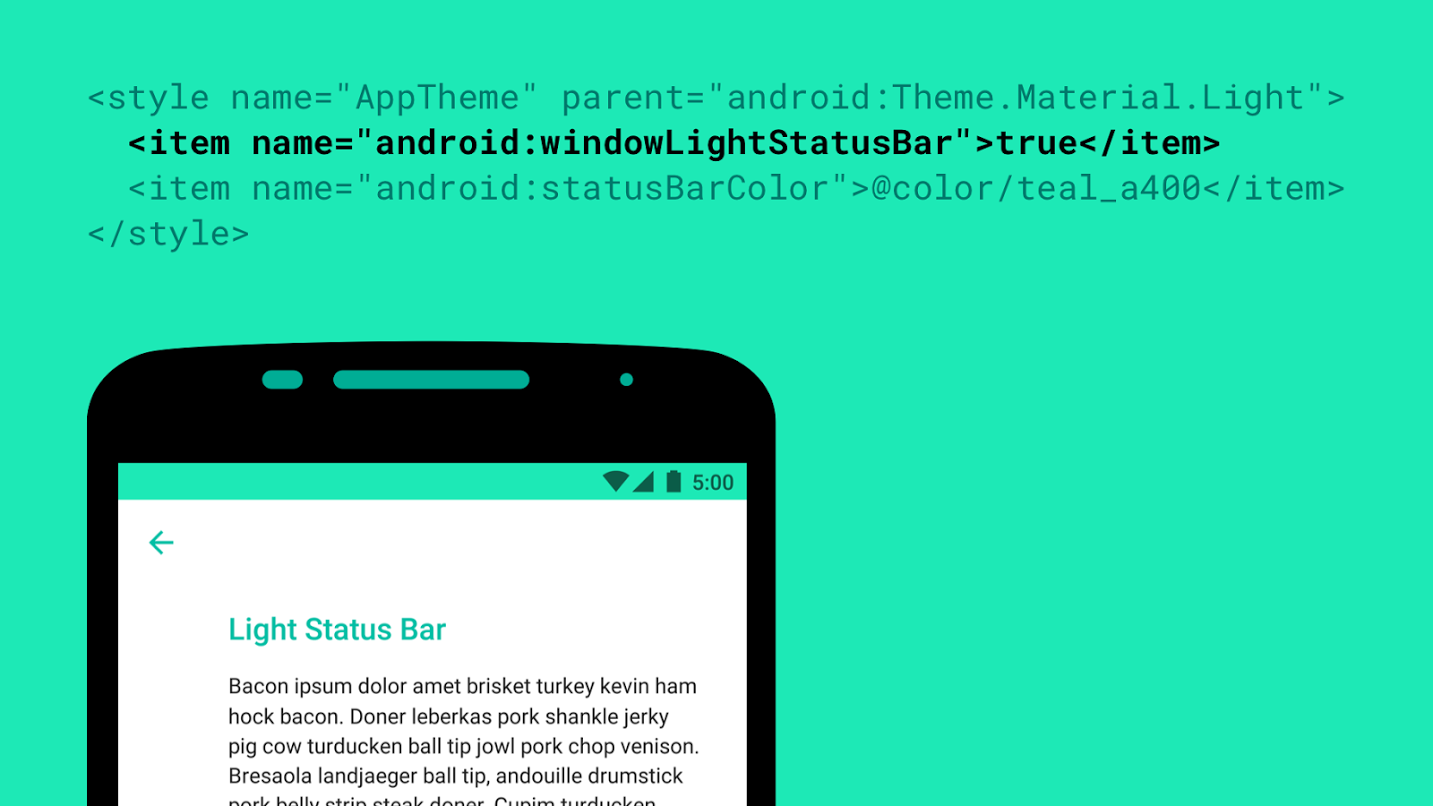
Android M will have a lot of cool new features, but one of the smaller ones Google didn’t mention was for app developers. Roman Nurik has revealed a new windowLightStatusBar flag that will tell the system to make icons and text in the status bar a translucent black color instead of the usual white.


This flag will be useful for apps which use light-colored tint for their status bar where white icons might be hard to read. It’s small, but developers who remain mindful of these small details tend to earn loyal userbases, so be sure to use it if your app needs it!


[via Google+]