Affichage des articles dont le libellé est theme. Afficher tous les articles

lundi 6 juillet 2015

Help wanted: Samsung is looking for designers to fill Galaxy Theme Store with new content


Samsung Galaxy S6 Edge Themes DSC09223


Samsung’s Theme Store is probably one of the better things that was introduced in the Samsung Galaxy S6 and S6 Edge. The ability to completely change up the look of your device’s user interface — app icons, wallpapers, settings, menus, etc. — was a breath of fresh air and something Android users have been asking for ages now. The only problem: there aren’t all that many themes to choose from at present.


Samsung Galaxy S6 Themes


But Samsung is looking to change that. Instead of allowing just any ‘ol Galaxy users to submit their own theme into the store, Samsung is looking for qualified designers looking to create themes for their Galaxy Theme Store via a new landing page. Samsung asks all potential candidates submit a portfolio of their work, along with a brief introduction, to theme.ptn@samsung.com.


This is in stark contrast to the way HTC runs their theme store on the One M9, which essentially allows any user to submit their own theme for others to download. Samsung’s method is better for quality control and should keep the Theme Store filled with only the highest caliber themes. Let’s hope they’ll update the Theme Store with categories and some kind of search function in the near future as well.


So, if you’re an Android themer looking to possibly make a little extra side money (paid themes aren’t available yet, but should be coming soon), drop Samsung an email.

[Samsung Galaxy Themes]


How to enable the Light or Dark Theme on the Android M Developer Preview [VIDEO]


android m theme options


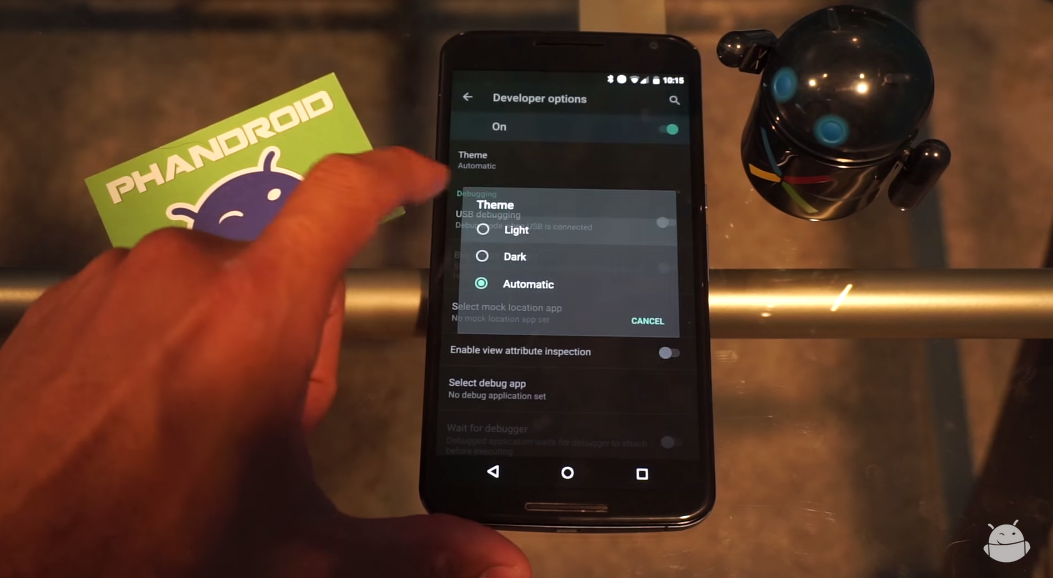
One of the cool things that popped up in the Android M developer preview was the ability to switch between a light or dark theme. It’s nothing drastic — system UI elements and menus become either light text on dark background or dark text on light background — but it’s a nice little added bit of customization for those who can’t stand one or the other.


So how do you enable it? It’s very simple, and a quick 2 minute viewing of the video above shows you exactly how. Can’t watch it? Here’s a quick rundown of what you need to do to get going:


  1. Make sure you enable the Developer Options menu. This can be done by going to Settings > About Phone. From there, scroll to the build number and tap it really fast until the phone tells you you’re a developer.

  2. Head back to Settings > Developer Options and find the Theme option.

  3. In the resulting dialog box, select between Light, Dark or Automatic.


And there you have it. We’re still a bit unsure on what the “Automatic” setting does. It’s possible this option will choose between Light or Dark depending on factors such as time of day or a reading from the ambient light sensor. We’re still testing it out, and we’ll be sure to let you know if we find anything.


Of course, it’s entirely possible that this setting does not yet do anything as this is a developer preview and things aren’t guaranteed to work 100% the way they’re meant to. In any case, give it a go if you have the Android M developer preview on your Nexus device!


Android M has a dark theme hidden in the developer options


Android M dark theme


It’s not full-on theme support, but it’s the next best thing and one of the most requested features Android die-hards have been asking for since Android started moving towards a lighter color palette. As discovered by Derek Ross, it turns out Android M will finally bring a new dark theme when it launches later this year.


Right now, it’s still extremely early and hidden away inside Android’s hidden developer settings. What’s more is it doesn’t really do much but apply a Material dark theme to the settings app, but we imagine developers can implement something similar in their own apps once M rolls out later this year. It’s not pure black, but at least it’s something.


[Images via Reddit]


Make your Samsung Galaxy S6 and S6 Edge look like AOSP Material Design with this theme


galaxy s6 material theme


There are many people out there who aren’t fans of TouchWiz and were elated to hear Samsung might go with a stock-like design for the Samsung Galaxy S6’s user interface. Unfortunately that never came to pass, but that doesn’t mean you can get something close to the real deal.


One designer has finished a Material Design stock-looking theme for the Samsung Galaxy S6 and S6 Edge, and it’s now available for free over at the Samsung Theme Store. What you’ll get is a theme that’ll make your phone resemble something like a Nexus thanks to new designs for the dialer, notification shade, icons and other system elements.


Samsung’s influence will still be quite prevalent throughout much of the user interface, naturally, but at least you can feel a bit more at home if you’ve been missing that AOSP look and feel. Be sure to head to the Samsung Theme Store on your phone and give it a try!


[via Google+]


Android M finally has theme engine support baked in, all you need is root


Android-M-round


It’s taken awhile, but with Samsung and HTC both introducing theme support in their latest flagship devices, this whole “theme thing” could be finally catching on. In case you needed further proof, look no further than to Google who has apparently added limited support for themes in Android M. This is RRO (Runtime Resource Overlay), the same software Sony uses to theme up ROMs in their Xperia devices which has since been merged with AOSP.


Like most of the more interesting M goodies, you’ll need root to take advantage of it but that’s pretty much it. With limited support for theme engines baked straight into Android M, those looking to theme their devices no longer have to look to custom ROMs to change up the look on their devices. All you need to get started is the stock ROM, a pinch of root, an app like like Layers Manager to apply some themes and you’re all set.


This is actually a great option for those that would rather use a stock ROM with only small tweaks like Xposed modules — none of those other frills that usually come with custom ROMs. Of course, while we don’t expect these themes to be quite as in depth as they are in custom ROMs (developer Andrew Dodd is working on a more advanced solution using the RRO engine), but it should be enough to appease those looking to lightly theme up their device.


According to the user who pointed this out on Reddit, he’s already tried a few themes using Layers and all were working fine and without issue. Now nothing is set in stone at the moment, but with RRO baked into Android M, it could be a hint of bigger, better things to come. For more on RRO and how it compares to something like Cyanogen’s unique theme engine, check out Syko Pompos’ post here.


Jeff McIntire contributed to this post.


[via XDA]