Affichage des articles dont le libellé est enable. Afficher tous les articles

lundi 6 juillet 2015

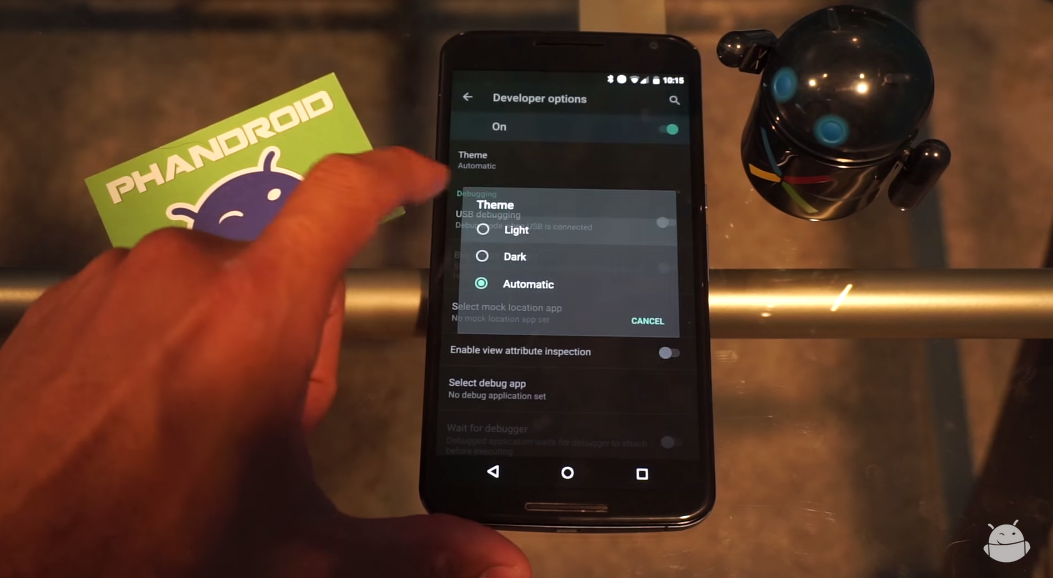
How to enable the Light or Dark Theme on the Android M Developer Preview [VIDEO]


android m theme options


One of the cool things that popped up in the Android M developer preview was the ability to switch between a light or dark theme. It’s nothing drastic — system UI elements and menus become either light text on dark background or dark text on light background — but it’s a nice little added bit of customization for those who can’t stand one or the other.


So how do you enable it? It’s very simple, and a quick 2 minute viewing of the video above shows you exactly how. Can’t watch it? Here’s a quick rundown of what you need to do to get going:


  1. Make sure you enable the Developer Options menu. This can be done by going to Settings > About Phone. From there, scroll to the build number and tap it really fast until the phone tells you you’re a developer.

  2. Head back to Settings > Developer Options and find the Theme option.

  3. In the resulting dialog box, select between Light, Dark or Automatic.


And there you have it. We’re still a bit unsure on what the “Automatic” setting does. It’s possible this option will choose between Light or Dark depending on factors such as time of day or a reading from the ambient light sensor. We’re still testing it out, and we’ll be sure to let you know if we find anything.


Of course, it’s entirely possible that this setting does not yet do anything as this is a developer preview and things aren’t guaranteed to work 100% the way they’re meant to. In any case, give it a go if you have the Android M developer preview on your Nexus device!


How to enable or disable App Permissions on the Android M Developer Preview [VIDEO]


android m app permissions


Google was met with a round of applause during their keynote yesterday when they announced Android M would give users more control over the device permissions apps can request. The new system allows you to grant or revoke access on a granular basis, so you choose whether to grant an app access to the microphone, or your camera, or your location or contacts.


Those who have flashed the Android M developer preview will be able to start controlling permissions right away, even in apps that haven’t been designed for it. Here’s how you can go about doing that.


  1. To start, head to Settings > App and find an app which you want to work with. Select it.

  2. Tap App Permissions on the App Info screen.

  3. You will see a list of permissions the app requests, and whether those permissions are toggled on or off. Tap the toggle to customize the setting.


Note that you may get a warning letting you know that some apps which don’t natively implement the new permissions might break as a result of disabling or enabling. If that happens, just use the steps above to go back and turn the permission back on. The only thing left to do is to rejoice now that you have the final say over which device functions an app is allowed to use.


Sprint Galaxy S5 4.4.2 OTA update G900PVPU1AND2 enable camera capture and bug-fixes


Sprint is pushing another software update on Samsung Galaxy S5 SM-G900P, the update will bump the software build version to G900PVPU1AND2 Android 4.4.2 KitKat. The G900PVPU1AND2 is 41MB in size and is hitting over-the-air or OTA update will resolved some issues like the camera app not loading when a voice call was active, alarm failure when deleting alarms, duplication of emails when moving them one from folder to another, and two bugs associated with the Google Search app and the S View Cover. Note that this update will probably not be rolling out to the international variant, as it seems to focus on issues found on the Sprint variant.


The changelog G900PVPU1AND2 4.4.2 KitKat Update:


– Enable camera capture during voice call
– Fixed alarm failure when deleting alarm
– Fixed email duplication, when moving an email from original folder -to another folder the email should only be viewable in the moved to folder
– Fixed Daydream when using S View Cover, when view cover is closed Daydream should not start
– Fixed device responsiveness when using S View Cover
– When customer does a search using S Finder, Google search results are removed from the list


Technical details of G900PVPU1AND2 4.4.2 KitKat Update:


Device: Samsung Galaxy S5
Model number: SM-G900P
Carrier: Sprint
Android version: 4.4.2 (Kitkat)
Baseband version: G900PVPU1AND2
Kernel version: 3.4.0-96433
dpi@SWDD5801 #1
Build number:  KOT49H.G900PVPU1AND2
PDA: G900PVPU1AND2
CSC: G900PSPT1AND2
PHONE: G900PVPU1AND2


Previous software version: G900PVPU1ANCB
About device screenshot:
G900PVPU1AND2 Sprint Galaxy S5 OTA update
So if you are rocking Sprint Samsung Galaxy S5 and haven’t received the notification message yet you can manually check it from your Galaxy S5 phone, just simply tap on Settings » About phone » Software updates menu. A usual, the roll out is in stages so you may get it on time or you might also wait for your turn and update your device on a later time. Just let everyone know how;s your first impression about the update.


Source: Samsung


The post Sprint Galaxy S5 4.4.2 OTA update G900PVPU1AND2 enable camera capture and bug-fixes appeared first on GalaxyS5Update.


Sprint Galaxy S5 4.4.2 OTA update G900PVPU1ANE5 enable WI-FI calling support


Sprint has rolled out another software on Sprint Sprint Galaxy S5 (G900P), the update is still packed in 4.4.2 KitKat and it will bumps the software build version to  G900PVPU1ANE5. The update brings the Wi-Fi calling support and there are no any other new features mentioned according to the released keynotes. The changelog is absolutely short, as the Wi-Fi calling is the only item you may see on the list.


The Wi-Fi calling hasn’t been enabled on previous 4.4.2 update build G900PVPU1AND2, due to this some users had been requesting this feature and have waited patiently and so finally Sprint have put itinto action.  So there it goes you may check this update as it’s a nice feature, and surely everyone will be happy to seeing that it actually arrive.


According to some folks who already received the new 4.4.2 G900PVPU1ANE5 says that also fixes some issues they have faced before such as the LTE.  Some difficulties on getting a reliable LTE signal at home has now being resolved as some people Galaxy S5 didn’t have all the spark bands enabled by default but some did and this update ensures all but Band 3  are enabled also.


The changelog G900PVPU1ANE5 4.4.2 KitKat Update:


– Enable WI-FI calling support


Technical details of G900PVPU1ANE5 4.4.2 KitKat Update:


Device: Samsung Galaxy S5
Model number: SM-G900P
Carrier: Sprint
Mode number: SM-G900P
Android Version: 4.4.2
Baseband version: G900PVPU1ANE5
Kernel version: 3.4.0-1750661
dpi@SWDD6020 #1
Fri May 30 21:23:48 KST 2014
Build number: KOT49H.G900PVPU1ANE5
SE for Android status
Enforcing
SEPF_SM-G900P_4.4.2_0016
Fri May 30 21:23:28 2014
Security software version
MDF v1.0 Release 3
VPN v1.4 Release 1
PDA: G900PVPU1ANE5
CSC: G900PSPT1ANE5
PHONE: G900PVPU1ANE5
G900PVPU1AND2 Sprint Galaxy S5 OTA update


The software update usually  going out in stages, so if  haven’t received the notification message right away you can manually check it from your Galaxy S5 phone, just simply tap on Settings » About phone » Software updates.


source


The post Sprint Galaxy S5 4.4.2 OTA update G900PVPU1ANE5 enable WI-FI calling support appeared first on GalaxyS5Update.