Affichage des articles dont le libellé est status. Afficher tous les articles

lundi 6 juillet 2015

Snapchat update now shows friendship status using emoji, says they will change your life


Snapchat friend emoji explained


Snapchat is quietly rolling out an update to their popular messaging application. The app now shows you the status of your friendship using “Friend Emoji,” these are little emoji that appear right along side your most frequently chatted contacts. You wont find any announcement post on their blog, with Snapchat revealing the news via the Discovery section in their app. Here’s the full skinny according to TechCrunch:


  • (Gold Heart): You’re #1 Best Friends – The person you send snaps to most sends snaps to you most too

  • (Grimace/Grit Teeth): You Have A Mutual #1 Best Friend – The person you send snaps to most is also who this person sends snaps to most

  • (Smile): One Of Your Best Friends – This is one of the people you send snaps to most

  • (Sunglasses): You Have A Mutual Best Friend – One of the people you send snaps to most is also one of the people this person sends snaps to most

  • (Smirk): You’re Their Best Friend But They’re Not Yours – You’re one of the people they send snaps to most, but they’re not one of the people you send snaps to most

  • (Fire): You Two Are On A Snapstreak – You and this person have sent snaps back and forth for the number of consecutive days shown


You can see how these little emoji might easily stir up needless drama in someone’s life. Maybe not for us adults, but in the countless teens who might be offended to find out their real-life bestie isn’t, in fact, their Snapchat bestie.


Snapchat is also introducing a new low light button (iOS only) that automatically appears in the camera portion of their app to slow down the shutter and brighten up dark photos. In addition to “Recents,” there’s also a new “Needs Love” section reminding you to send Snaps to contacts you previously messaged frequently, but haven’t messaged in awhile.


Despite its popularity, Snapchat is still one of the most convoluted applications we’ve ever used and this latest update certainly isn’t helping matters any. The app often times leaves the user guessing on what some of the basic functions are, and today’s update doesn’t help matters any.


Then again, this has probably contributed to the app’s “viral” nature and could be the reason why it appeals so much with our youth. You just wouldn’t understand.

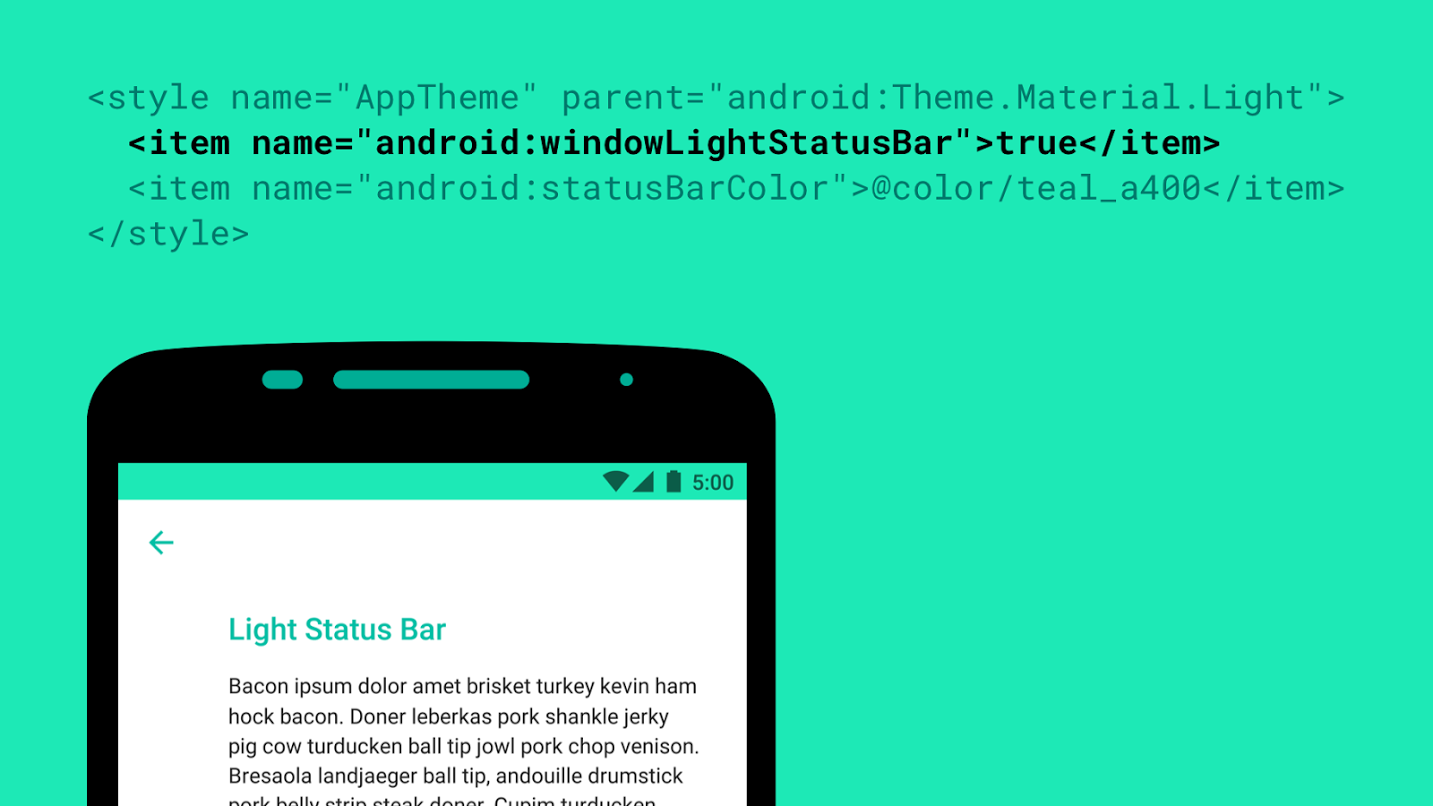


Android M introduces black status icons for light colored themes


windowlightstatusbar


Android M will have a lot of cool new features, but one of the smaller ones Google didn’t mention was for app developers. Roman Nurik has revealed a new windowLightStatusBar flag that will tell the system to make icons and text in the status bar a translucent black color instead of the usual white.


This flag will be useful for apps which use light-colored tint for their status bar where white icons might be hard to read. It’s small, but developers who remain mindful of these small details tend to earn loyal userbases, so be sure to use it if your app needs it!


[via Google+]


Check your status: Google Project Fi invites continue rolling out


If you were one of the many techies eager to try out Project Fi and jumped at the opportunity to sign up for an early invite, you’ll probably want to check your status. The sign up page is now showing an updated time frame for many Phandroid readers including myself- it appears my invite should arrive in 3 to 4 weeks.


Project Fi Status Invite


An even luckier lot of lads received their invites last week, including our own Chris Chavez, who was happy to see an invite land in his inbox outlining the Project Fi details.


You’re invited to join Project Fi


We’re excited to invite you to Project Fi. Earlier on, you requested an invite, and now we’re ready to bring you onboard. Just click the button below to sign up or head to fi.google.com/signup. If you have questions along the way, give us a call at 1-844-TALK-2-FI to get help from a Fi Expert.


5 things to know about Project Fi
Say hello to fast speeds, easy communication and simple pricing.


  1. Tap into a network of networks
    Project Fi uses new technology to give you better coverage by intelligently connecting you to the fastest network at your location whether it’s Wi-Fi or our two LTE network partners.

  2. Secure connections to fast, reliable Wi-Fi networks
    We automatically connect you to over a million Wi-Fi networks we’ve verified as fast and reliable. When we connect you to an open network, we secure your data through encryption.

  3. Wi-Fi enabled calls provide even more coverage
    When you’re on the move, calls seamlessly transition between Wi-Fi and cellular, so you can keep your conversation going.

  4. One simple plan
    Our plan starts with the Fi Basics for per month, which includes: unlimited domestic talk and text, unlimited international texts, Wi-Fi tethering, and access to coverage in 120+ countries. Then it’s per GB for data. for 1GB, for 2GB for 3GB, and so on. That’s it. With no annual contract required.

  5. Never pay for unused data
    Our plan is designed to save you money. Let’s say you go with 3 GB for and only use 1.4 GB one month. You’ll get back — you only pay for what you use.


If you’re eager for the opportunity but haven’t yet received an update, don’t worry- Google has already stated that all Project Fi requests should be fulfilled by mid summer.


This concludes your friendly PSA from Phandroid… now go check your Project Fi status, let us know when your invite will arrive in the comments, and then head over to the Project Fi Forums for even more!