Affichage des articles dont le libellé est straight. Afficher tous les articles

lundi 6 juillet 2015

SwiftKey Beta adds new slide out settings menu straight from the keyboard, throws logo on space bar for kicks


SwiftKey Hub slide out settings menu


Keyboard competition in Android is fierce. With so many virtual keyboards options out there looking to become your default, SwiftKey has long been the keyboard we trust to handle our erratic screen taps. It was nearly a year ago, SwiftKey went full-on free in the Google Play Store, offering up instead paid themes users could download to change up the look of the keyboard. It was a great move to be sure and — despite having already paid for the app years before that — one we had no problem getting behind.


But new changes headed to SwiftKey are leaving us feeling… well, not quite as enthusiastic. As detailed on their blog, the keyboard replacement is now adding “SwiftKey Hub,” their all new slide-out settings menu that essentially replaces the previous settings interface by making it available straight from the keyboard itself.


SwiftKey Hub settings menu


It’s broken up into 3 man tabs: Personalize (stats, support, SwiftKey Cloud login), SwiftKey store (themes), and Settings Menu (resize keyboard, advanced settings, etc.). We also noticed the SwiftKey logo appearing on the space bar. Ew.


SwiftKey also briefly talked about Dashlane integration for the secure storage of passwords. Dashlane uses AES-256 encryption and works with SwiftKey (Beta-only for now) to auto-insert passwords. Since all your passwords are store in Dashlane, you wont have to worry about SwiftKey having access to them. But in order for everything to work, you’ll need to also have the Dashlane Android app installed.


We’re not entirely sure if adding a slide-out settings menu makes the most sense for a keyboard, but SwiftKey says additional features will arrive at some point in the future. In the meantime, you can grab the latest beta here to try out the new settings interface for yourself, or simply wait until it goes live in the Google Play Store after it’s been tested for a bit.



You can now look up a place in Google Search and send the directions straight to your Android phone


Google Search Send Directions to Android Phone


Working that 9-5, we can’t tell you how many times we’ve had to quickly rush out the door at the end of our shift in an attempt to make it to a business before it closes. When looking up directions to a place or business, this is handled usually one of 2 ways: simply using the Maps app on our phone to search (slow), or preemptively searching for a place on our desktop then using that search history in the Maps app to find directions (slightly less slow). For whatever reason, the last method doesn’t always work out so well, with our search history not always syncing up when we need it.


Google Search send directions update


Thankfully, Google is here to streamline this process in Google Search. Starting today, you can search for a place or business in Google Search where a link at the bottom of the Maps result will allow you to shoot the location off to your Android phone. Simply type in “send directions” and add the destination location. Once sent, the Maps app will open on your phone with that specific location, allowing you quickly and easily navigate to the destination from the Maps app. It’s a small update, but one that is big on convenience. You can try it out for yourself right now at Google.com.


[Google+]


Chipotle teams up with Postmates to deliver foil-wrapped heaven straight to your door


Chipotle ride


Chipotle is arguably one of the greatest inventions of modern day times. Not the sauce, mind you. We’re talking about that fine eatery that serves up piping fresh Mexican-esque food by the pound. Until Chipotles start popping up on every street corner with a drive-thru window, they’re not exactly the most convenient place to grab a quick bite.


Anyone stuck at work or watching the kids, like us, has probably dreamed of the day Chipotle would make home deliveries. Well, that time is now. During their Q1 2015 earnings call, Chipotle officially revealed that they’ve teamed up with anything-delivery service (food, household goods, etc.) Postmates to hand deliver those wonderful custom built burritos/bowls/tacos straight to your door.


Online and mobile deliveries are already taking place in 67 different cities where Postmates currently operates, although it apparently caps delivery costs to around to depending on distance. At for a decked out burrito alone, you could be paying almost double just to have it delivered to your couch.


In either case, you may want to sign up for a Postmates, even if it’s not available in your city quite yet. With over 0,000 worth of Chipotle orders already delivered, it’s clear someone out there is buying.


[Re/code] via The New York Times]


ARC Welder lets you run Android apps straight from the Chrome web browser


AndroidPixelSideBySide2


Android apps are the best. The only thing cooler than having them run on your phone is if you could somehow bring them to your desktop. Well, you can. Using Chrome and Google’s App Runtime for Chrome (ARC for short), developers were given the ability to port their Android apps by having them run as a Chrome app. Initially there were only 4 apps available (Duolingo, Evernote, Sight Words, and Vine), and only for Chrome OS users, although a “hack” was later discovered.


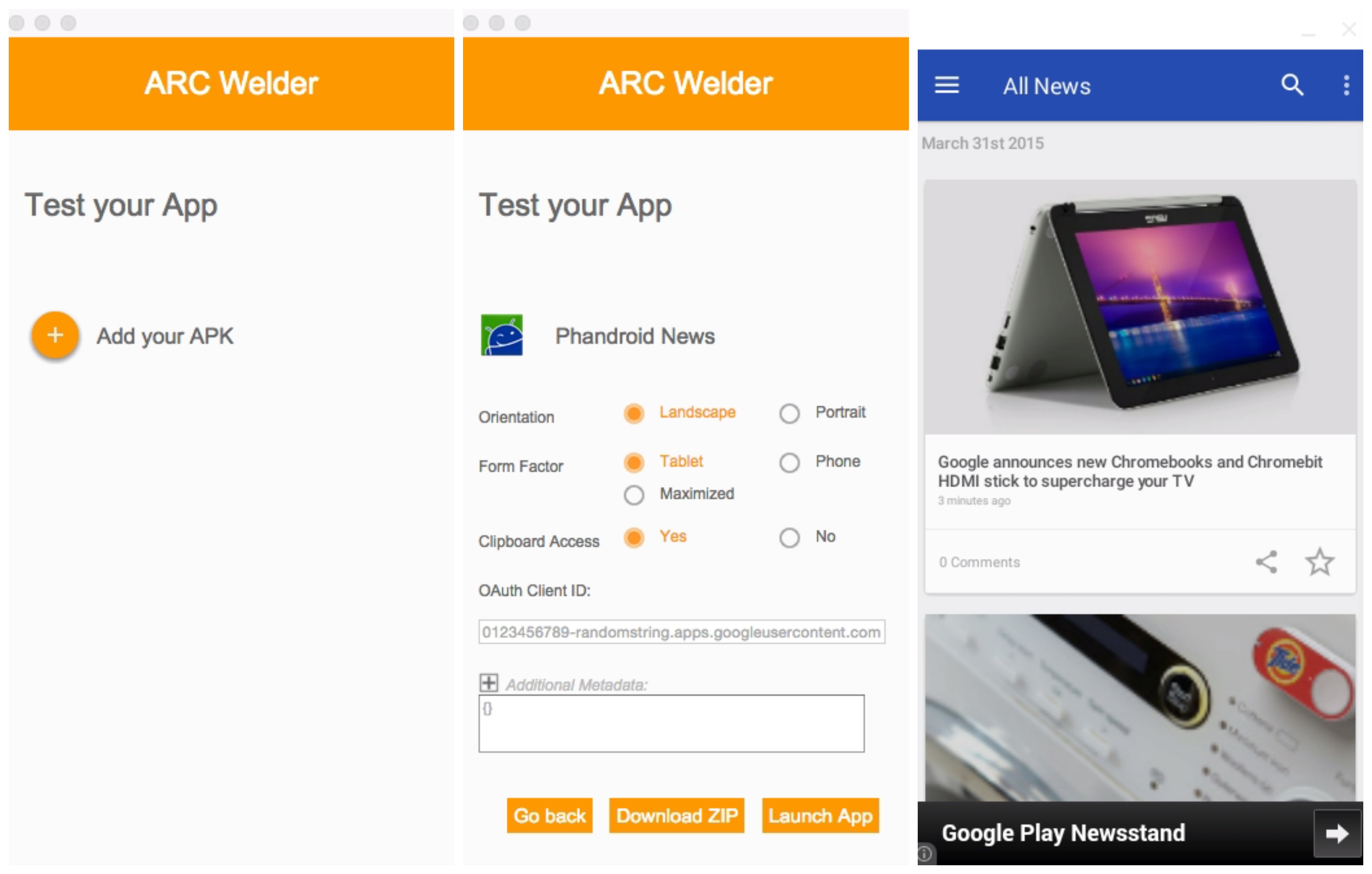
ARC Welder Chrome app


But now, Google’s new Chrome app — ARC Welder — gives developers and ordinary folk the ability to test and just play around with Android apps straight from the Chrome web browser. Set up is easy, just download the ARC Welder Chrome app and once launched, select the zip file or APK of your application you want to run. From there, you can decide if you’d like the app to run in portrait or landscape mode, tablet or phone mode, and a few other parameters.


Phandroid News app tablet landscape mode


Once you launch the app, you’ll have a mostly functional Android app running on your desktop with little fuss. Not every app plays nice with ARC, so your mileage may vary. We were able to test our own Phandroid app amongst a few others. If you guys have luck with anything else, feel free to drop a comment below. For more detailed instructions, check out the official “Getting Started with ARC” page here.


Download from Chrome Web Store: ARC Welder


LG Call app lets you dial anyone straight from your LG Watch Urbane


LG CALL


A new app for LG’s latest smartwatch — the LG Watch Urbane — has hit Google Play. It’s LG Call, and it servers a simple function: letting you call people from your wrist. You can choose from your contacts, your most recent calls, or simply dial in a full phone number in case you don’t have the number in your contacts.


It’s important to note that the app only seems to be compatible with the LG Watch Urbane right now. No competing smartwatches have support, and not even LG’s older watches — the LG G Watch R and the LG G Watch — will be able to use it.


We’re hoping this’ll change in the near future, but for now you’ll only be able to use it if you sprung for the company’s latest and greatest. Grab the download here if you have the appropriate hardware.


Google just made it easier than ever to get food delivered straight to your door


Google search food delivery option


We’ve watched as Google has consistently updated their app in recent weeks, adding features like 3rd party voice actions, and even Star Wars trivia. Today, Google announced yet another feature making its way to the search/do everything engine: the ability to order food directly from their search results.


Getting food delivered to your door is easy for the most part. Simply open the app (or go on Google.com from your web browser) and search for nearby restaurant. If they perform deliveries, you’ll see an option under the restaurants listing to “Place an order.” From there, you’ll be able to pick from one of 6 different delivery services: Seamless, Grubhub, Eat24, Delivery.com, BeyondMenu or MyPizza.com.


Once selected, you simply complete your order on their website and you’re on your way to a hot meal. Although the list may sound a bit skimpy at the moment, Google says they’re looking to add more service providers in the future, so keep a look out. And yes, this is US-only for now (sorry, rest of the world).


It’s not quite Chipotle delivery, but it’s the next best thing if peeling yourself off the couch to grab a meal sounds like too much work.


Straight Talk Unlimited Data throttling now begins at 5GB for customers who bring their own phone


straight talk 5gb offer


It’s no secret by now that Straight Talk begins throttling customers’ unlimited data once they reach a certain point. The cap used to be a hard 2.5GB until they increased it by 500MB a couple of years ago. Now it’s possible to get even more.


A new promotion for folks who bring their own phone to the company nets them 5GB of 4G LTE data, after which you’ll be slowed down to the less exciting world of 2G/3G. The change goes into effect for all their unlimited plans, though the baseline “All You Need” plan (where you only get 100MB of data period) is obviously left out.


Straight Talk’s website bills this as a “special offer,” so we’re not sure how long it will last or if it’s a permanent promotion. For what it’s worth, the change applies to both new and existing customers so if you’re already going on one of the company’s unlimited plans and you’re using a device you bought independently from Straight Talk you should automatically reap the benefits. We’ll be looking to find out more about the change in the moments to come.


Have Shazam listen for a song straight from the Google app with new 3rd party app integration


Google app voice commands 3rd party apps


Google is looking to super charge the voice command functionality on your Android device by integrating 3rd party apps with the usual “Ok Google” commands. Announced today on Google+, you can now launch applications with nothing else but your voice using the Google Search app.


Right now only a few select apps are available in Search, but many more are on the way. You can get started with Shazam by simply saying “Ok Google, Shazam this song,” to have it search for a song immediately. So it’s not so much just launching an app, but having it open and performing an action as well. For instance, speaking the command “Ok Google, open TuneIn in car mode,” will do just that. Pretty convenient if your hands are tied or your phone is just out of reach.


Google says you’ll need to have the latest version of the Google app — as well as the most up-to-date versions of these 3rd party apps installed on your device — to make sure everything is working properly. For a small list of some of the 88+ things you can do by voice with the Google app, check out their landing page here.