Affichage des articles dont le libellé est Chrome. Afficher tous les articles

lundi 6 juillet 2015

Google and Samsung get a head start on April Fools with Chrome selfies and a meat cleaver phone


can't tell if serious


Have you looked at your calendar today? If not, let me tell you what day it is: March 31st. You know what that means? Tomorrow is April 1st, the infamous April Fools day. That means companies are about to flood the internet with jokes, press releases about fake products and other cheeky shenanigans.


There’s just one problem this year: some companies can’t help but to get started a day early. Google has already unleashed a few of their own, the most cool of which is an interactive new Google Maps feature that turns your local area map into a game of Pacman. You can actually play it right now by clicking here, if you want (or stroll into the Google Maps for Android app).


google maps pacman


It’s not a joke, per se, but it’s a cool and fun little quirk that Google likely tossed in to celebrate the goofiness of tomorrow’s pseudo-holiday. It’s also a great way to promote the real-world augmented reality counterpart being featured in the latest Ingress update.


It doesn’t stop there for them. They’ve sneakily baked a feature into the latest version of Google Chrome that will enable a new “Chrome Selfie” feature once the calendar turns.


Phandroid chrome selfie


Steve is blown away by that dreamy Samsung user interface concept! The idea is that you take a selfie with your reaction of whatever site you’re viewing, and you can send a shot of that selfie and website off to your friends to view. It’s the one killer feature we’ve always been waiting for! Not. You can give it a try right now by changing the timezone on your calendar to GMT +10.


It isn’t just Google’s US arm having a good time, either. Those in Japan have already gotten their fun in, with Google Japan teasing a new “hornpipe” input feature that allows you to input text in Japanese without having to type or even speak anything. Just blow!


And then there’s Samsung, whose Samsung Galaxy Blade Edge smartphone promises to serve dual purpose as a butcher’s knife. It’ll feature built-in thermometer styli, a fold-up handle for easy conversion and, you guessed it, a fire proof display.


samsung galaxy blade edge joke


Oh, and food porn. Finally, we’re able to record our meat chopping experience from the perspective of the destructive tool that makes it all happen, and then easily take a photo of the finished product afterward!


Sad to say it, folks, but this is only the beginning. The Next 24-48 hours will spawn an even greater number of jokes. Some will be funny. Some will even make us wish they were actual ideas and products. And then there will be the bunch that will outright make us cry, cringe and wish this day never existed, all the while actual announcements have to be questioned for their legitimacy in a sea of ridiculous satire. This is April Fools. Prepare yourselves.


The latest Chrome Beta adds support for push notifications from websites


Phandroid Chrome


Google loves the web. They want everyone to do everything inside of the Chrome browser. We’ve seen them add more and more features to Chrome that allow websites to act like apps. Chrome in Android 5.0 treats tabs like apps when you press the “Recents” button. Websites can even change the color of the status bar. Google’s next step is to allow websites to send notifications through Chrome.


In the latest build of Chrome Beta (42) they’ve including two new APIs that allow sites to push native notifications to users even if the website is not currently opened. Here’s the tech-speak behind how it works:


After the user has granted permission, a developer can use the new Push API to remotely wake up their service worker using Google Cloud Messaging. Once awake, the service worker may run JavaScript for a short period but in this release it is required at minimum to show a user-visible notification. Each notification includes a ‘Site Settings’ button, allowing users to easily disable notifications for a site.


Screen Shot 2015-03-04 at 2.35.05 PM copy


This is a really big deal. As mobile sites and browsers get better there is less reason to download apps. Some mobile sites are already better than their app counterparts (*ahem* Facebook), but we stick with apps because they offer a native experience. If websites start adopting these new APIs it could change the way we use apps.


Another notable feature in Chrome Beta 42 is promoted home screen shortcuts. If Chrome detects you visit the same site a lot you will see a pop-up suggesting you add a shortcut to the site to your home screen. Once again, this is a direct shot at apps. Google will be actively urging users to treat websites like apps by placing them on the home screen. More info about Chrome Beta 42 can be found on the Chromium Blog.


ARC Welder lets you run Android apps straight from the Chrome web browser


AndroidPixelSideBySide2


Android apps are the best. The only thing cooler than having them run on your phone is if you could somehow bring them to your desktop. Well, you can. Using Chrome and Google’s App Runtime for Chrome (ARC for short), developers were given the ability to port their Android apps by having them run as a Chrome app. Initially there were only 4 apps available (Duolingo, Evernote, Sight Words, and Vine), and only for Chrome OS users, although a “hack” was later discovered.


ARC Welder Chrome app


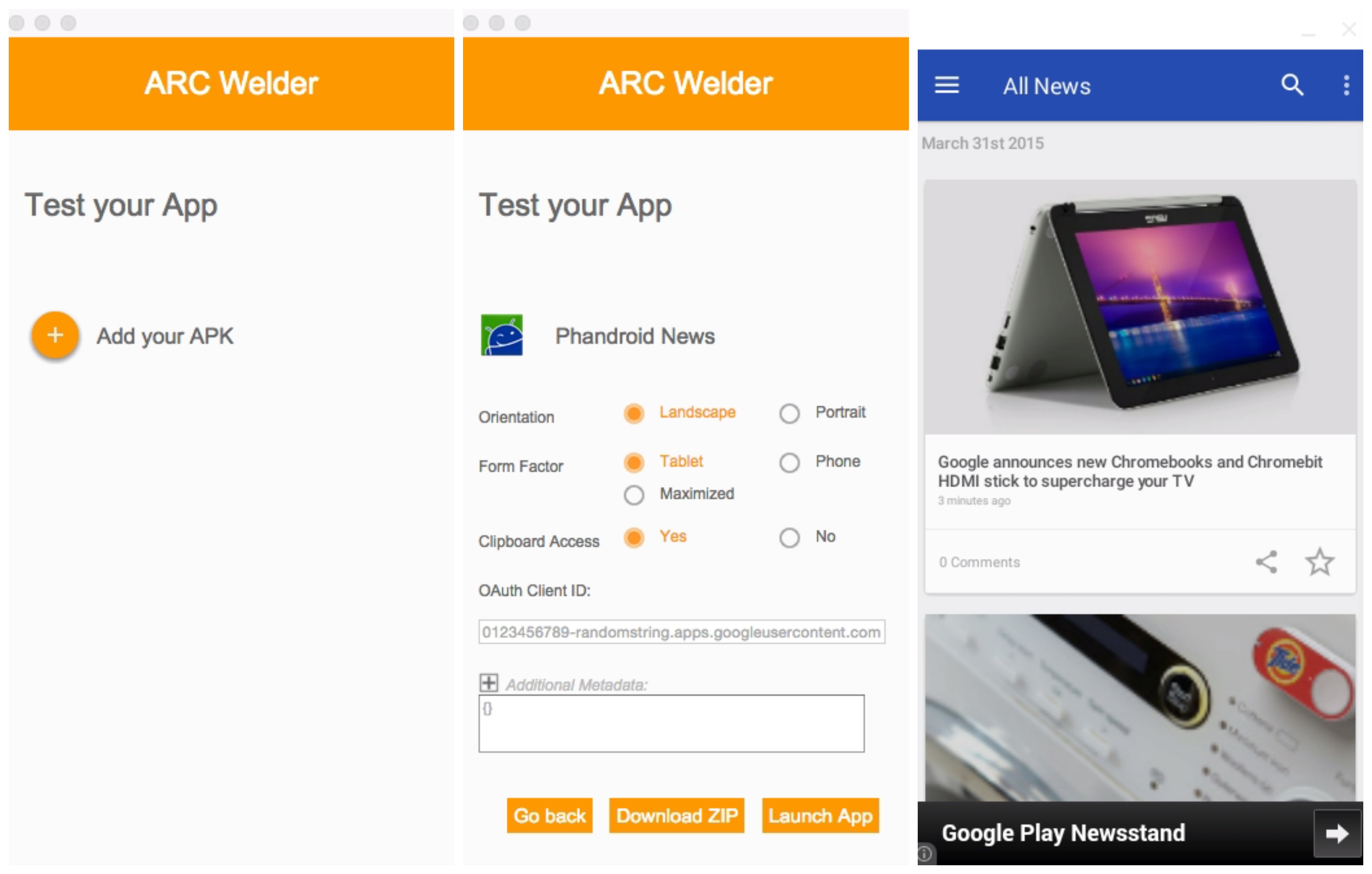
But now, Google’s new Chrome app — ARC Welder — gives developers and ordinary folk the ability to test and just play around with Android apps straight from the Chrome web browser. Set up is easy, just download the ARC Welder Chrome app and once launched, select the zip file or APK of your application you want to run. From there, you can decide if you’d like the app to run in portrait or landscape mode, tablet or phone mode, and a few other parameters.


Phandroid News app tablet landscape mode


Once you launch the app, you’ll have a mostly functional Android app running on your desktop with little fuss. Not every app plays nice with ARC, so your mileage may vary. We were able to test our own Phandroid app amongst a few others. If you guys have luck with anything else, feel free to drop a comment below. For more detailed instructions, check out the official “Getting Started with ARC” page here.


Download from Chrome Web Store: ARC Welder


Chrome for Android 42 adds website notifications


chrome logo


Those who prefer to fool around with the beta release of Chrome have already been treated to these features, but for everyone else some great new features have arrived to Google’s mobile web browser. Chrome for Android 42 is out, and it brings a big new feature.


On tap is a new system that allows properly-coded websites to send notifications straight to your phone whenever new content is available. This sort of functionality is typically only available from native applications, so the ability to get them through your web browser without having to install anything else is a pretty cool feature.


Other changes include an improved function for adding your favorite sites to your home-screen, as well as your typical bug fixes and performance improvements. It’s all waiting for you at Google Play so give it a go as soon as possible.


[via Google]