Affichage des articles dont le libellé est some. Afficher tous les articles

lundi 6 juillet 2015

Samsung planned a huge TouchWiz revamp at some point, and it looked awesome [VIDEO]


samsung-new-ui


Last year, @evleaks treated us to leaked concepts of a TouchWiz revamp Samsung purportedly planned to introduce on their latest flagship handsets, but once the Samsung Galaxy S5 launched we were saddened to see the same ol’ TouchWiz. The Samsung Galaxy S6, while a bit better looking, still didn’t look nearly as good as the leaks.


But the leaks were real, and Samsung really did toy around with the possibility of creating this awesome user interface for use on their smartphones. That much was revealed by one of the designers they tasked with dreaming up the concept, Gerald Mark Soto.


Gerald Mark Soto was responsible for engineering the animations, though it was Perception‘s vision he used to create it. Perception is a design firm credited for the futuristic user interfaces seen in films such as Robocop, Iron Man 2, The Avengers, Men in Black and more, and they are indeed listing Samsung as one of the big partners they have worked with (or may still be working with).


You can see their work in the footage above and below. The user interface featured lush graphics and smooth, cool animations that make using a Samsung smartphone seem like the most blissful experience ever.


We’re not sure why Samsung decided not to go through with this project, though there are a couple of possibilities:


  • Technology constraints. As good as all this looked, it would demand some pretty good hardware. The TouchWiz of yesteryear already struggled to maintain smoothness throughout usage even on Samsung’s most powerful hardware, so it’s possible Samsung couldn’t replicate the concept without issues. There’s also the issue of how such an involved user interface could impact battery life.

  • Differing visions. We’d find it hard to imagine that top brass within Samsung’s ranks wouldn’t like Soto’s work, but it’s possible they simply didn’t feel it was a good fit for their smartphone right now.

  • It simply isn’t ready. Stuff like this is bound to take a lot of time, especially if Samsung has to build it from the ground up. The fact that the animator released the concept doesn’t bode well for the chances of this particular version of the concept to ever see the light of day, but that doesn’t mean Samsung isn’t still cooking up something big.


TouchWiz has long been chastised for being too bloated and doing too much to detract from the overall Android experience, but if it looked anything like the concepts above we wouldn’t mind using it on a daily basis. How do you feel about it?

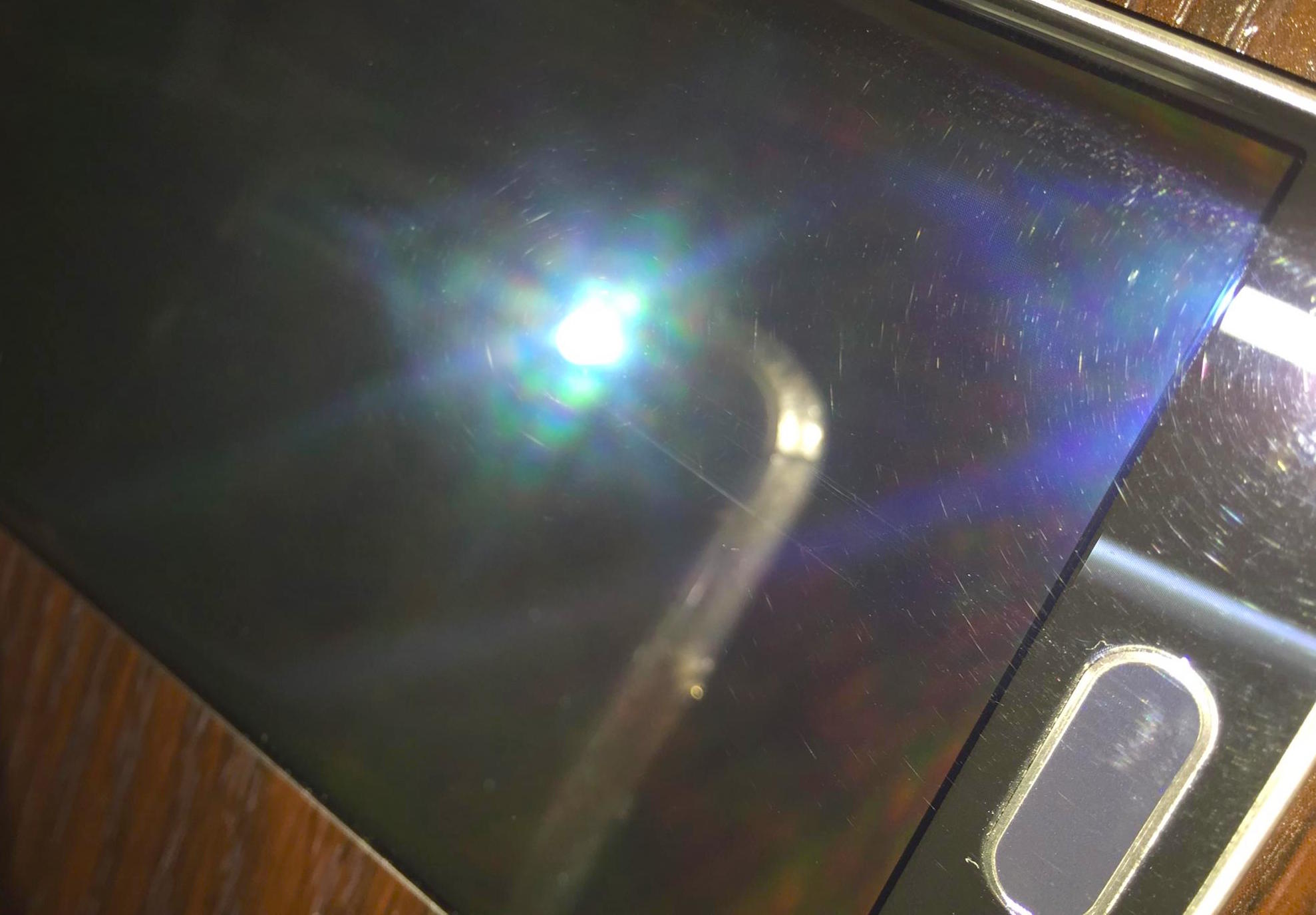


Some Samsung Galaxy S6 Edge units shipping with tiny scratches all over the display


samsung galaxy s6 edge scratches defect 2


When manufacturers churn out hundreds of thousands of devices in order to meet demand, occasionally a bad egg or two makes it past quality control. It’s not uncommon to have one, maybe even a few defective devices slip out when your phone is as popular as say, the Samsung Galaxy S6. So it’s not too surprising to find that some brand new Samsung Galaxy S6 Edge customers have discovered some oddities with their shiny new devices, fresh out of the box.


It’s not #bendgate (thankfully), but as highlighted by XDA Developers, a handful of forum members have discovered what appears to be tiny scratches all over their “new” Galaxy S6 Edge displays. It’s a pattern not too unlike the swirl marks you might find on your car’s clear coat. It’s not clear how they got there, or how wide spread the issue is at the moment, but it’s definitely something you wouldn’t expect to find when unwrapping a 0+ piece of tech. The uploader also makes mention of dead pixels being present when the display is turned on.


Keep in mind out-of-the-box defects like this aren’t unique the Galaxy S6 Edge. Even the folks at iFixit found a scratched display on their freshly unwrapped HTC One M9 (complete with a dead pixel). Like any out-of-the-box defects, issues like this should be taken up with the retailer from whence it came, which happens to be T-Mobile who began shipping out the Samsung Galaxy S6 ahead of its April 10th launch date. There was a single report of an international model also arriving in this same condition, but that could be more isolated.


We should note: this defect seems to only affect the Samsung Galaxy S6 Edge — not the regular flat Samsung Galaxy S6. In any case, now would be a good time to check your device out under a lamp or direct sunlight. Anyone find something similar on their Samsung Galaxy S6 Edge unit?


[XDA]


T-Mobile Galaxy S6 and S6 Edge shipments starting to pop up for some lucky pre-orderers


Sasmung Galaxy S6 Calendar Clock app icon DSC08966


Did you happen to pre-order a Samsung Galaxy S6 or Samsung Galaxy S6 Edge from T-Mobile this past Friday? If so, be sure to start checking your doorsteps: some lucky souls are starting to receive their shipment early.


One lucky XDA user posted shots of the unit he was lucky to receive as early as 8am Saturday morning. Early shipments aren’t unheard of, especially when it comes to T-Mobile. The company typically sends them out as soon as they can, though Samsung’s wishes of a global April 10th launch might mean this is simply an error.


Either way, if there is even the tiniest chance that your device could go out sooner than expected then you won’t want to miss it, so keep your eye on your doorstep leading up to the big day (and that goes for the rest of you non-Magenta users, too).


HTC plans to steal some of Samsung’s thunder, commits to April 10th US release date for HTC One M9


HTC One M9 DSC08366


The HTC One M9 has already been launched in Taiwan, but the company has been a bit hushy about release dates for other regions. Thankfully the questions are over for those of us in the United States: the HTC One M9 will be available starting April 10th (which coincidentally happens to be the day Samsung is launching the Samsung Galaxy S6 and S6 Edge).


That news was revealed during a Q&A session with HTC’s Jason McKenzie this morning as he took questions regarding the company’s groundbreaking new “Uh-Oh Protection” plan.


Details are scarce, but McKenzie was clear in saying that availability would only “start” April 10th. Whether that be at retail or through one or more carriers at the same time is yet to be determined, but it’s important to know that they’re not promising every carrier and store will have it on that day.


What he did promise is that the phone will eventually make its way to all major carriers in the United States, which we identify to be Verizon, AT&T, T-Mobile, Sprint and US Cellular.


Other interesting notes from the Q&A:


  • Uh-Oh Protection is available no matter which carrier or retailer you buy your device from

  • Phones with root or custom ROMs are eligible to be replaced under Uh-Oh Protection

  • Uh-Oh Protection does not cover lost or stolen devices

  • The 0 credit to buy the next HTC One you get for going 12 months without an accident is not dependent on trading your HTC One M9 in — you can keep your old phone and still use your credit for a new one (or trade the phone in and stack the credit on top of that)

  • Uh-Oh Protection will be available for buyers of the HTC One M8, but only if you buy your HTC One M8 after the HTC One M9 has launched.


Let us know if you’ll be planning to pick one up once they finally hit store shelves.


Nova Launcher gets some Material Design love in latest beta


nova


One of the most popular 3rd-party launchers is getting some Material Design love today. Alpha testers have been using the Material Design version of Nova Launcher for a little while now, and it’s ready to graduate to public beta. There are plenty of new Material goodies for Nova fans to enjoy.


First and foremost is the brand new look and feel of Material Design. You might not notice it immediately on your home screen (depending on your set up), but diving into the menus and settings will show a brand new look. A long-press on empty home screen space will bring up a more modern dialog instead of the old 2.x style pop-up. You’ll also notice a new red and white theme in the settings with smooth Material animations.


nova search


A new feature that I really like can be found in the app drawer. When the app drawer is opened you can swipe down from the top to bring up a search bar and list of recently installed or updated apps. This is super handy for trying to find apps quickly. Another new feature is the awesome app icon layout editor (seen above). You can also now adjust icon size and font size independently for desktop, drawer, dock, and folders.


All of these new #materinova features will eventually come to the stable version of Nova Launcher. If you don’t want to wait for that you can opt-in for Nova Launcher Betas from Google Play by following these steps. Check out the full changelog for below.


  1. Join the Nova Launcher Beta G+ Community (This is not optional)

  2. After joining, Opt-in for Nova Launcher

  3. When a new beta update is available you will get it through the Play Store


Nova Launcher beta
Nova Launcher beta
Nova Launcher beta
Nova Launcher beta
Nova Launcher beta
Nova Launcher beta
Nova Launcher beta
Nova Launcher beta

#materinova.14 public beta 1


  • Full Material Design

  • Google Search from the search bar shows as an overlay

  • Edit Shortcut dialog, and quick menu, tinted based on colors of the icon

  • New icon

  • New Nova Action icons

  • Rebased on top of Launcher3

  • Individual icon layout settings (size, font, etc) in Desktop, Drawer, Dock, Folder

  • Max icon size boosted to 150%

  • Widget Search

  • Pull to search (pull down in the drawer to open app or widget search)

  • Widgets given their own drawer, removed from App Drawer

  • Ability to change Page Indicator color

  • Drawer Tab Bar completely optional

  • Support for Android for Work managed profiles (Lollipop)

  • Workaround Expand Notifications Nova Action not working on Samsung Lollipop

  • Requires Android 4.1 or higher (Dropped support for Android 4.0 ICS)

  • Unlimited desktop pages (previously limited to 9)

  • Add/remove of desktop pages by dropping icons on the blank page, or removing all icons from a page

  • Add blank desktop pages (for gestures or live wallpapers) from overview

  • Improved bulk edit of folders (Folder > Menu > Select Apps)

  • Added shadows to unread badges

  • Unread Badge size scales with icon size

  • Allow reordering drawer folders by drag/drop within window

  • Added Roboto-Medium font option

  • Improve handling of apps installed to sdcard


The new ZTE Nubia Z9 has the thinnest bezel we’ve ever seen (and some impressive specs, too)


zte nubia z9 hero


The ZTE Nubia Z9 was announced this morning, and while we don’t often get excited for a ZTE launch this one woke us up quite effectively. The first thing you’ll notice is that the device has an insanely thin bezel, with ZTE claiming they were able to get it down to just 0.8mm on the left and right edges.


zte nubia fit family


Those edges are also more than just edges, as they’re outfitted with ZTE’s FiT feature, which stands for Frame Interaction Technology. It’ll allow you to perform a number of gestures by stroking the left or right bezel with your fingers, such as switching between apps, adjusting brightness or launching the camera. You can see an illustration of some of those gestures in the graphic above.


zte nubia z9 1


The best part about all this is that the device doesn’t impress on the back of a cool gimmick alone — it also has some pretty baller hardware beneath its chassis. Here’s what you can expect in that regard (note that there are two different versions that differ by RAM and internal storage):


  • 5.2-inch 1080p display with 2.5D curved glass

  • Octa-core 64-bit Qualcomm Snapdragon 810

  • 3GB RAM and 32GB storage for Classic, 4GB RAM and 32GB storage for Elite

  • 16MP Sony IMX234 camera sensor with optical image stabilization, 8MP front sensor

  • Wi-Fi ac, Bluetooth 4.1, NFC and MHL 3.0

  • Nubia UI 3.0 and Android 5.0 Lollipop

  • 2,900mAh battery

  • 147.38 x 68.34 x 8.94mm


The device lands first in China sometime soon, as pre-sales have already commenced. You’ll be able to snap it up for 3999 Yuan for the Classic version or 449 Yuan for the Elite version, though if you’re importing you may have to incur additional costs to make that happen. Truth be told we wouldn’t mind seeing this thing spread to other regions before too long.


[ZTE via GizChina]


Android 5.1 for the HTC One M9 leaked, here’s a quick look at some of the changes


HTC One M9 Android 5.1 Sense 7


Lately, we’ve been seeing OEMs like Samsung make a big push to update their flagships devices to Android 5.1 — the latest version of Lollipop as it currently exists. Although we’ve yet to see the update from HTC, their recent track record leaves us optimistic.


If you’ve been curious to take a look at what HTC has been working on, Android developer and ROM modder LlabtooFeR is giving us a sneak peek inside an early Android 5.1 software build for the One M9 (2.7.401.1) and a few of the new changes therein.


We’re not sure where they got the idea from, but it looks like HTC will be giving users the ability to tweak the color temperature of their phone’s display. It’s something you’d typically only find on a TV or monitor, but a nice power user tweak that we think many users will appreciate. Also making its way to the One M9 as a part of Android 5.1 is multi-user support which you can find in the screenshots above. Smaller tweaks include new UI animations and improved sound controls that allow the user to enable Do Not Disturb mode but still allow alarms through.


Unless you have a carrier branded HTC One M9 in the US, we don’t think you’ll have to wait much longer before the update starts rolling out. In the meantime, you can either wait for the update to hit your HTC One M9 in the coming weeks/months or root your phone and flash LlabtooFeR’s latest ROM right now from the link down below.


[LlabtooFeR | via AndroidBeat]


Huawei gives some Honor 6 owners a chance to beta test Android 5.1 Lollipop before official rollout


Huawei Honor 6 Lollipop


It’s not the first OEM that comes to mind when you think of software updates, but Huawei has been making a better effort at supporting some of their flagships with newer versions of Android. A few weeks back they kicked off a new community forum where members could test out new software updates and even try out devices before they’re released to the public. Earlier this month, the allowed community member to test drive Android Lollipop on the Huawei Mate 2 and now they’re doing it again, this time with the Huawei Honor 6.


Huawei UK announced the news on their Facebook page, letting Honor 6 owners in Europe know they could test drive the new update which will bring the Honor 6 up to Android 5.1 along with EMUI 3.1 (Huawei’s custom user interface). When the Honor 6 launched in August of last year, it was running Android 4.4.2 KitKat so this new update is sure to make users happy (well, once it officially rolls out).


To get started, you’ll first need to sign up for Huawei’s “Honor Club” and drop them an email here with the subject ‘’Beta Test Honor 6” along with the IMEI number on your device and a short statement on why you should be the one to test the new update. Huawei will be hand-selecting 100 applicants in the UK, Germany, and France up until June 30th and you’ll need to remain in contact with Huawei to report any bugs.


Once again, this is beta software, so weirdness and general instability are almost certain. If that hasn’t scared you away then godspeed. Applicants will be notified by next week if they were selected to test the new software update. Cheers.


[Facebook]