Affichage des articles dont le libellé est after. Afficher tous les articles

lundi 6 juillet 2015

It’s not a placebo effect: this is why your Nexus 6 feels so fast after the Android 5.1 update


nexus 6 overview


Android 5.0 Lollipop is great, but for those on the Nexus 6 there’s no secret there were some troubling performance issues that a phone of its stature shouldn’t experience. We thought much of the issues were due to the infancy of the ART runtime and possibly due to problematic device encryption. We expected much of that to be cleared up with Android 5.1’s arrival.


It was, at least according to some early impressions around the Phandroid office. But what changed to bring about that performance boost, exactly? Google wasn’t keen to go into detail, but renowned kernel developer Francisco Franco gave us a good bit of insight.


Alongside general improvements to the ART runtime as a whole, Google apparently unlocked the device’s CPU to run at full quad-core mode at all times in order to handle task scheduling more efficiently. What this means is that “Job B” no longer has to wait on “Job A” to finish on a certain core before carrying out its task. It can simply jump onto another of three other cores to allow everything else ample time and room to work. Think of it as a one-lane street merging into a multi-lane highway.


Taking things a step further, Google was able to reduce the lag and improve battery life at the same time thanks to disabling a Qualcomm driver that would needlessly boost individual CPU cores whenever tasks migrate from one core to another. Franco says he’d already made these tweaks in his version of the kernel, so kudos to Google for seeing things similarly and following suit.


So if you notice increased performance and improved battery life after upgrading to Android 5.1, it’s not a placebo effect — Google made some significant changes, and the great thing is we haven’t even scratched the surface of what we know to be different in this latest version. Be sure to try Android 5.1 on for size on your Nexus device of choice using one of the available OTA links.


PSA: North American Nexus 6s have a tad bit of Verizon bloatware after Android 5.1 (even if you’re with a different carrier)


Nexus_6_Midnight_Blue


You might have heard that the Nexus 6 (in America, at least) is now starting to receive Android 5.1 Lollipop. You can even grab the OTA file right now and begin flashing it if it hasn’t already hit your phone. Most users will immediately notice a nice performance boost thanks to a large heap of bugs squashed by Google and co.


But those who dig even deeper might find something a bit unsettling: there’s a Verizon Backup app pre-installed. It can’t be uninstalled. It can’t even be disabled. And it’s there no matter which carrier you bought your Nexus through or who you have it activated with. It wasn’t on any of the firmware versions prior to Android 5.1, which makes sense considering Verizon’s Nexus 6 has just gone up for sale and it comes with Android 5.1 out of the box.


nexus 6 verizon backup screenshot


“The horror,” you might exclaim. “Big Red is evil,” you’ll shout. Before you grab those pitchforks and torches, though, there are a few things to note:


  • As Google mentioned when the Nexus 6 was announced, every single North American unit is the exact same hardware and share the exact same firmware in order to allow people to use it on whichever carrier they wish.

  • Verizon is not the only carrier to have one of these system apps included with the Nexus 6’s firmware. Sprint has an app called SprintDM that facilitates device provisions and activations for anyone who wants to use the Nexus 6 on their network, and it’s been there since the launch of the Nexus 6.

  • The Verizon Backup app can’t be disabled or uninstalled, sure, but it’s a mere 32KB in size, doesn’t exist in your app drawer and — as far as we know — does nothing to adversely affect your user experience. You’ll find that you can now add a “Verizon Backup” account under the standard accounts menu in settings, but it’s just as easy to ignore as anything else in that menu.


So we know this behavior isn’t new, but what we’re still trying to figure out is why Verizon’s Backup has to be included as a system app in the first place. SprintDM’s presence makes sense because it’s a necessary component to get the Nexus 6 automatically activated on the company’s network (which, in turn, is necessary since it’s possible to use any Nexus 6 on any network).


The only plausible explanation that comes to mind is that Verizon Backup requires some sort of low-level system access to work properly for those who need to use it, and Verizon doesn’t want to chance someone either not having the proper background service or accidentally uninstalling/disabling the app.


That’s just a guess, though — we won’t truly know until we can hear it from the horse’s mouth. We’ve reached out to some of our contacts to see if we can get an answer to all this, but in the meantime be sure not to freak out if you notice the app taunting you in your list of installed apps. It’s harmless, and you’ll probably forget it’s even there by the time the day is over.


[Update: before and after!] HTC pushes out a much-needed update to improve the HTC One M9’s camera


UPDATE: see before and after photos that show improvements


htc-one-m9-rear-angle


One of the biggest knocks on the HTC One M9 despite its stylish good looks, powerful hardware and blissful software experience was its camera — it just wasn’t up to snuff despite being a 20 megapixel shooter. You can read our concerns regarding that in our HTC One M9 review.


But guess what? HTC’s been listening, and they’re just about ready to push the first software upgrade to fix that. The company has confirmed that a forthcoming upgrade (build 1.32.531.33, about 88MB in size for our T-Mobile unit) that specifically addresses the camera is currently in testing and should be ready for folks to download and install within a matter of days:


  • AT&T and T-Mobile: The update is in final testing, and is expected to roll out in a week’s time.

  • Sprint: The update is ready to go and will roll out beginning tomorrow.

  • Verizon: The upgrade will be pre-loaded on Verizon’s devices when they go on sale tomorrow.


We’re not yet sure how much of a difference this will make for the camera experience, but for it to get its own software upgrade we’re expecting big things. We’ve already gotten our hands on it and will look to test out the new improvements in the moments to come. Stay tuned for some before and after shots, and get ready for it to hit your phone in the days to come!


PSA: Here’s what happens when you delete Google+ photos from Drive after new integration


Google Photos to Drive


Earlier today Google announced that they were taking a huge step toward finally emancipating their users from Google+’s shackles. They were doing this by finally integrating Google+ photos into Google Drive. It’s a slow move, one that will take a few weeks before you see all your current photos and albums appear in Drive (but is instant should you upload anything new from here on out).


Android users were excited because this meant that soon, all of their photos backed up from their Android device to Google+ (Google’s officially supported photo backup method) would be easily accessible — and more importantly, manageable — from Google Drive folder on the web. That, or your desktop if you have the application installed on your computer.


While this may sound pretty cut and dry, it’s important that everyone understand how photo deletion will work from here on out. Since the Drive folder is essentially mirroring all the photos and videos stored on your Google+ account, deleting photos/videos from Drive will delete them from Google+. The same goes for when you delete a photo from your Google+ Photos, it’ll no longer be found in your Drive’s Google Photos folder. Make sense?


With all your Google+ photos making their way to Google Drive in the coming weeks (where they should be), we wanted to shed a little light on this in case anyone was thinking it was time to clear out everything stored on Google+ (or vice versa). Cheers.


[Google Drive Help]


5 months after release, Android Lollipop is on just 5.4% of devices


april-android-versions


It’s time once again to check in on Android distribution numbers. Google has released the stats for this month. As expected, Android Lollipop is on slightly more devices. Last month Lollipop was on 3.3% of devices, and now it’s up to 5.4%. We should see this number increase a lot more next month after the Samsung Galaxy S6 and HTC One M9 have been available longer.


For those of you paying extra close attention you can see that Android 5.1 is only on 0.4% of devices. KitKat and Jelly Bean are still leading the way with over 80% of the pie. It’s no surprise that Android updates take a while to reach devices, but these charts don’t always tell the whole story. “Lollipop” is really Google’s own version of Android, just like TouchWiz or Sense. It’s not fair to expect other manufacturers to be on the same level as Nexus devices.


Hopefully next month we see more devices experiencing the sweet taste of Lollipop. Is your device running Lollipop yet?


[via Google]


Bloomberg: Microsoft didn’t invest in Cyanogen after all


cyanogenmod new logo


After a surprising report that Microsoft was set to be a minority investor in Cyanogen’s latest round of funding, Bloomberg reports that didn’t actually end up happening. As of now Microsoft has no financial ties to Cyanogen, though the two are said to have at least negotiated a deal.


Still, Cyanogen has enough interest from other big players that they’re supposedly set to secure 0 million in funding, a move that could value their company at more than half a billion dollars once it’s all said and done.


The timing of the Microsoft rumor was magnified by these infamous words uttered by Cyanogen’s CEO: “we want to take Android from Google.” Not sure what the company meant at the time, everyone had feared they’d look to build a fork of Android reliant on Microsoft’s services.


Cyanogen later clarified that they meant they wanted to allow companies to be able to use Android without having to adhere to Google’s tricky usage licenses and agreements. In case you’re not aware, Android is free to download for anyone who’s interested — they put the source out there clear as day — but most of Android’s best features aren’t accessible unless you agree to load up Google’s entire ecosystem of services, apps and goods.


It’s not a big issue for most big companies, but for the smaller guys who might not be able to secure a proper license from Google without a good deal of financial hardship it’s seen as an absolutely nightmarish situation. It’s Cyanogen’s hope that they’ll be able to build an open ecosystem that everyone can enjoy no matter where they download it, why they download it and what they’re planning to use it for.


LG G4 teaser shows off impressive photo samples, likely after editing in Lightroom [VIDEO]


LG G4 teaser camera samples


It’s been said that for an Android manufacturer to beat the iPhone, they first have to beat its camera. It’s true. On a software level, Android is constantly evolving, adding intuitive features that leave iOS behind in the dust. While that’s all good and dandy for some of us, software features don’t often sell a phone. When shopping around for their next smartphone, we’re seeing consumers place a higher priority on a phone’s camera capabilities (you can thank social networks for sparking this trend).


With both the HTC One M9 and Samsung Galaxy S6 readily available for purchase, it’s clear LG has to do something to keep our wallets closed just a little longer. Despite a massive LG G4 leak last week, LG continues teasing the device, highlighting some of the phone’s standout features ahead of launch through a series of teaser videos.


We’ve already seen a brief teaser showing off some of the G4’s upcoming camera hardware — more notably its new f/1.8 lens — but as my mother always told me, the proof is in the pudding. For all those curious to see actual output, LG has enlisted the help of professional photographer Colby Brown to tout the phone’s photo taking abilities.


The 2 minute video shows off a variety of actual photos taken with the LG G4, showing rich vibrant colors with samples that easily rival full-sized DSLRs. What LG doesn’t mention is how much time and effort was spent in post editing to get the photos to look just right.


In the video, you can clearly see Mr. Brown using Lightroom 4 (photo editing software) to view the images, so it’s not exactly like they’re trying to hide it. Not only that, without actual photo samples, 1080p video makes it tough to see other aspects of the image. Things like noise or fine details — all the other things that make up a quality photo. So it’s hard to judge by these photos alone.


LG G4 RAW support camera app


One thing LG forgot to mention — but was revealed in last week’s leak — was the stock camera app will also provide an option to shoot in RAW. Something the Galaxy S6 doesn’t provide, not even with its “Pro” shooting mode. Because the video runs by the sample images rather quickly, we took some snapshots and put them in a gallery for your viewing pleasure. Check ’em out.


Screen Shot 2015-04-21 at 12.47.04 PM
Screen Shot 2015-04-21 at 12.47.17 PM
Screen Shot 2015-04-21 at 12.47.24 PM
Screen Shot 2015-04-21 at 12.48.47 PM
Screen Shot 2015-04-21 at 12.48.56 PM
Screen Shot 2015-04-21 at 12.49.08 PM
Screen Shot 2015-04-21 at 12.49.51 PM
Screen Shot 2015-04-21 at 12.50.12 PM
Screen Shot 2015-04-21 at 12.50.22 PM
Screen Shot 2015-04-21 at 12.50.28 PM
Screen Shot 2015-04-21 at 12.50.32 PM

You may have seen a similar ad campaign from Apple called “Shot on iPhone 6″ which shows off various photographs of breathtaking landscapes taken with the phone. Sure they look amazing, but the truth of the matter is most people will never travel to the Alps or jungles of Venezuela to take a photo. Instead, it’s the real world things like kids running around a naturally lit living room, or food in a restaurant I’d be more interested in seeing. What do you guys think? Will the LG G4’s camera live up to the hype?


After just 6 months T-Mobile stops selling the Sony Xperia Z3


sony-xperia-z3


Sony is once again struggling to sell handsets in the U.S. After just six months on store shelves T-Mobile has discontinued the Sony Xperia Z3. It was looking like the Z3 may have been leading a resurgence when Verizon got in on the action, but apparently that has not been the case. Despite releasing some of the most beautiful Android devices ever made there is just not a demand for Sony phones.


In the past Sony has been terrible with timely updates, and though they’ve improved in recent years, they’re running behind with Lollipop. Android users don’t trust Sony to provide the latest software on time. It’s really a shame, because Sony does make some of the most stunning devices, and their software is clean and lightweight.


The future for Sony phones is not looking bright. We’ve seen leaked renders and photos of the Sony Xperia Z4, and it’s almost identical to the Xperia Z3. If consumers aren’t interested in the Z3 they’re not even going to realize the Z4 is a different phone. How do you feel about Sony phones? Have you ever owned a Sony phone?


Google Map Maker submissions temporarily suspended after peeing robot incident


google maps android pissing on apple


This is why we can’t have nice things, folks. Google has announced that they will be temporarily suspending Google Map Maker submissions following a recent incident. That incident, if you missed it, saw one rogue map editor uploading malicious maps.


One of the maps was a photo of an Android robot peeing on the Apple logo, and it was visible to anyone who knew the coordinates to type in over at Google Maps. It was a bit funny, but it was just as immature and came with the consequence we’re faced with today.


The natural step for Google was to begin manually reviewing each map submission, but the company’s backlog of reviews has gotten so large that they’ve been unable to handle new submissions in a timely manner. As such, they’ll instead opt to suspend submissions altogether while they improve the automated parts of their review process.


Unfortunately they don’t have a timeline for when the feature will return, though that did assure us that this is a temporary situation. “Temporary” could be as little as a day and as long as a decade, of course, so without an estimate it’s hard to know if we’ll see it return anytime soon. On the bright side, the guy who made these submissions’ say his end goal was to get Google to strengthen their map review process. We’d say his mission was aced with flying colors.


[via Google]


SEGA removes After Burner Climax and Jet Set Radio from the Google Play Store


jet set radio


It was last week SEGA announced that they’d be removing a few key titles from across various mobile app stores as a result of some sort of quality control guidelines. According to SEGA, these titles — which they wouldn’t call out by name — no longer met their “standards” and would be pulled with the possibility of returning in the future.


Today, SEGA made good on that promise as we’re finally seeing the first few titles disappear from the Play Store. Surprisingly, it wasn’t as bad as we thought. Looks like it was only After Burner Climax and Jet Set Radio SEGA gave the axe (at least for now), with the rest sitting pretty on Google’s virtual store shelves. iOS users weren’t so lucky however, and saw classics like every Super Monkey Ball title, Virtual Fighter 2, Streets of Rage, and more.


Both of the titles carried a price tag which wasn’t too bad considering they were full games with no in-app purchases. While it’s a shame to see them go, glossing over their Play Store ratings showed incompatibility with numerous Android devices. Seems SEGA didn’t want to put too invest any more time (or money) in getting these titles up to speed. It’s a shame, these were some of the better ones.


Anyone who had paid for and downloaded the games on a previous device should be able to still find them in your Google Play Store app for re-downloading whenever you like. For everyone else, well… you missed out.


[SEGA titles on Google Play]


LastPass wants you to change your master password after security breach


lastpass2


It’s not a major breach, but after LastPass “discovered and blocked suspicious activity” on their network last Friday, they’re requiring everyone update their master passwords. Announced on their blog and in email sent to users, LastPass says they didn’t find any evidence that actual stored passwords were stolen, but they did notice user email addresses, authentication hashes, password reminders, and server per user salts were “compromised.” LastPass said in a blog post:


“We are confident that our encryption measures are sufficient to protect the vast majority of users. LastPass strengthens the authentication hash with a random salt and 100,000 rounds of server-side PBKDF2-SHA256, in addition to the rounds performed client-side. This additional strengthening makes it difficult to attack the stolen hashes with any significant speed.”


In order to ensure hackers aren’t attempting to access your account, LastPass is now requiring that any and all users logging in from a new device or IP verify their accounts by email. That is, those that don’t already have multi-factor authentication enabled (and you should and you and you can learn more about that here). Lastly, anyone using weak, dictionary-based passwords or using the same password as their master on other sites… yeah, don’t do that. Update.


[LastPass]


Pushbullet listens to feedback, fixes annoying share menu after user backlash


Pushbullet


On yesterday’s Mobile Roar podcast we talked briefly about the latest Pushbullet update and how it somehow broke the one feature many of us use it for in the first place: easy sharing to our Android devices.


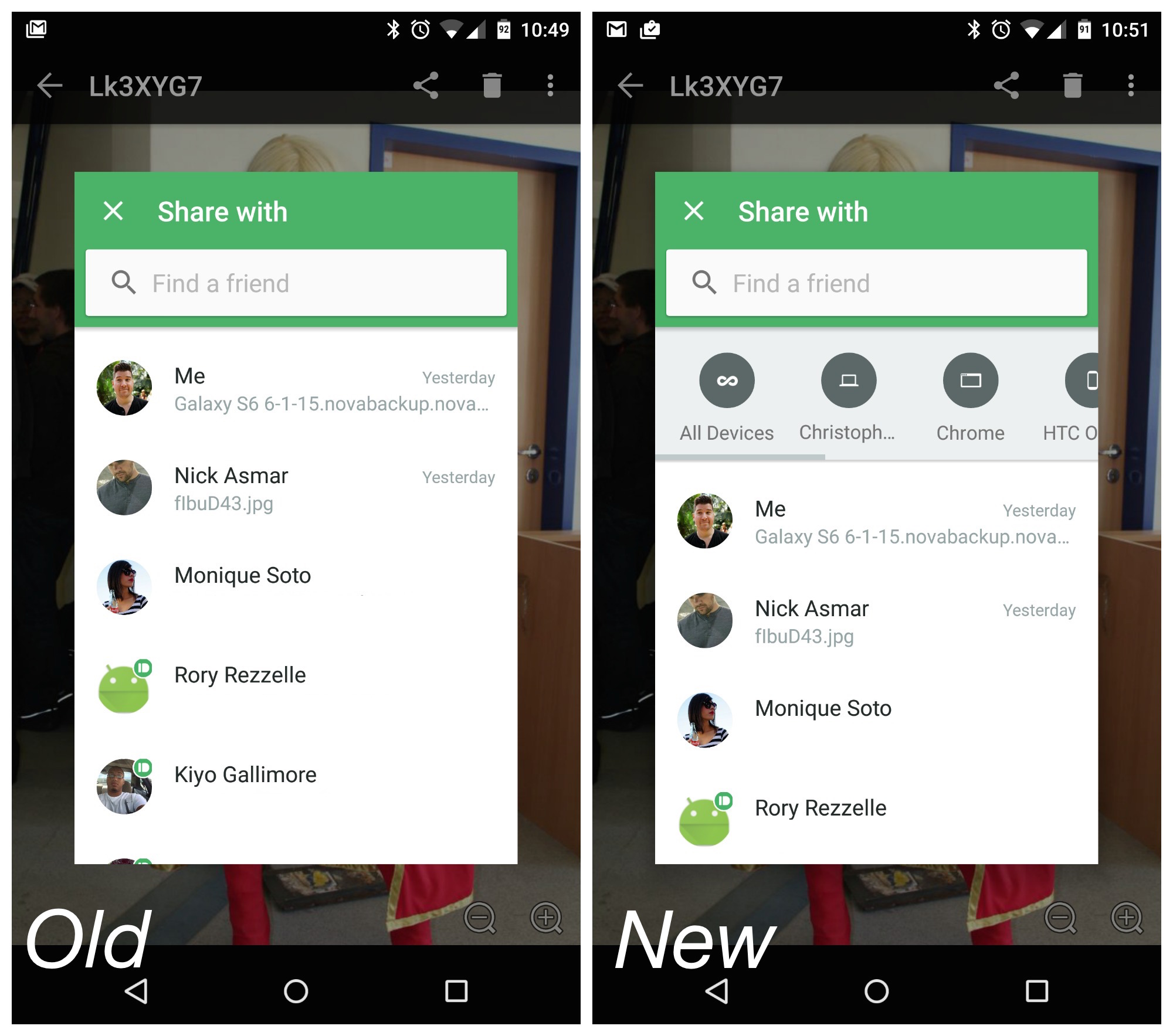
Pushbullet is seemingly going through a weird transitional phase where the app now mimics a messaging app more than anything. But that’s not even what bothered us. When sharing links, photos, or files to your devices, the app required an extra button press (I know, GASP!) to pull up your devices. You’d pick Pushbullet from the Android share menu, then select yourself, then select one of your devices. It wasn’t so much an annoyance as it was less convenient and convenience is exactly what Pushbullet has been selling this entire time.


Pushbullet update Android


Listening to feedback from users — just like us — who weren’t pleased with the new update, Pushbullet announced on their blog that they’ve updated the Android app with a new bar that displays all your devices. They’ve also made a few changes to their Windows and browser extensions based on feedback as well. Can’t remember the last time we’ve seen an app developer address so many user concerns so quickly, but there you have it. You can find an update to Pushbullet waiting for you on the Google Play Store right now.


[Pushbullet]