Affichage des articles dont le libellé est overtheair. Afficher tous les articles

lundi 6 juillet 2015

T-Mobile will officially push out Lollipop for the LG G3 over-the-air on Tuesday, April 7th


lg g3 lollipop


For those that missed it, Lollipop is already available for T-Mobile’s LG G3but only through their PC updating tool. Which is odd, given these things are typically pushed out in the form of an over-the-air the update and downloaded straight to your device.


No matter, T-Mobile’s resident device guru Desmond Smith has shared with us the exact date we can expect Android 5.0.1 Lollipop to hit the phone over-the-air, no computer necessary.


According to Smith, T-Mobile will be pushing out the update on Tuesday, April 7th. So, if perhaps LG’s updater wasn’t working out for you, or you didn’t want to bother with manually flashing the OTA file, rest assured the update is less than a week away.


[Twitter]


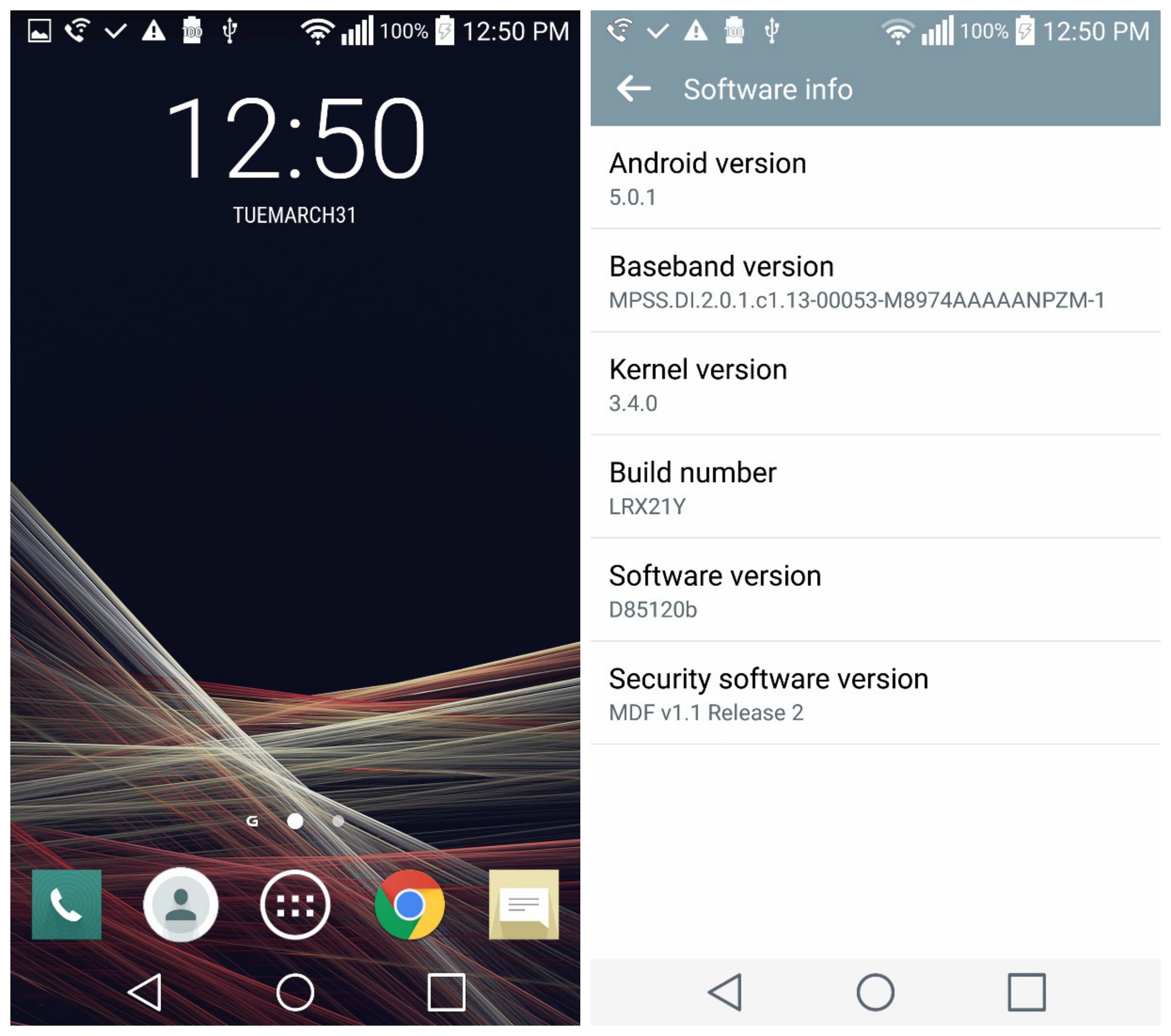
T-Mobile’s Lollipop update for the LG G3 now available, but not rolling out over-the-air


LG-G3-Software


After the Lollipop update for the LG G3 entered into T-Mobile’s “testing phase” early last week, we knew it was only a matter of time before it officially began hitting devices. Sure enough, Android 5.0.1 is now finally ready for the T-Mobile LG G3, but not in the way many of you are used to.


The update isn’t pushing out over-the-air, so you can’t update from just your phone alone. Instead, you’ll need to update the T-Mobile LG G3 via LG’s Mobile Support Tool (download it here). This means you’ll have to download LG’s updating software to your desktop computer and like an animal, connect your device via USB in order to apply the update.


LG G3 Lollipop Android 5.0.1 update


We’re not sure how long the update will only be available in this way, but it’s kinda neat that a manufacturer is giving users the option to update early with this method rather than waiting around for a carrier to push out new software to their device. Again, it’s entirely possible the update — which at the time of writing, still hasn’t been green lit by T-Mobile — will be rolling out to G3s in the coming hours/days/weeks. So, if this process is too much for you, just sit tight. Lollipop will be here soon enough.


[T-Mobile Support]


Moto E (2nd Gen) now receiving Android 5.1 update over-the-air


Motorola Moto E 2nd Gen 2015 DSC09134


We knew Android 5.1 was headed to the Motorola Moto E 2015. Motorola said as much back when they published the release notes for the update last week. It now appears that update is rolling out to users as some are now reportedly receiving Android 5.1 on their second generation Moto E (XT1527).


In case you were wondering what is new, there’s not a whole lot. Mostly smaller tweaks and bug fixes despite weighing in at 258.8MB. Here’s all the new changes you can look forward to once the device officially receives Android 5.1 Lollipop, software version 23.11.15:


Notifications & Interruptions


  • Block interruptions until your next alarm. This choice will show only when you have an alarm set within the next 12 hours. It will prevent you from missing an alarm when you choose ‘No interruptions’.

  • You can choose to enter a scheduled downtime early. For example, if you are going to bed early and change your notification settings, you can choose “Until your downtime ends”. This option will be visible when within 4 hours of the scheduled start of your downtime.

  • Adds icons to the volume settings panel that match those that will show in the status bar (None, Priority).

  • You can now alter notification volume controls while media is playing. With the volume controls showing, a tap on the bell icon will bring up notification volume controls.


Heads-up Notifications – In addition to dismissing a heads-up notification, you can now swipe it up to remove it from your screen. It will remain in your notifications tray and you can dismiss it later.


Quick Settings – You can quickly select different Wi-Fi access points or different paired Bluetooth devices with a new pull-down menu on each tile. Conditional settings tiles that only show if you use the feature – like “Invert Colors” or “Hotspot” – can now be hidden via a long-press on the tile.


Camera – Reduces noise in low-light shots and improves responsiveness of the viewfinder with the front-facing camera (selfie).


Device Protection – Lost or stolen devices will remain locked until you sign in with your Google account, even if reset to factory settings. Note that you must have a Google account on the device to automatically enable this feature and set a PIN, password or pattern screen lock.


Performance – Improvements in the Android Runtime (ART) lead to faster application launch times.


Lockscreen – If you have enabled Ambient Display, the minimum swipe distance has increased to reduce accidental interactions.
Bug Fixes


Issues fixed in this release include:


  • Clock in the status bar isn’t updating and alarms are not going off

  • Can’t delete SMS messages when the SIM card is full

  • No ringer audio while making an outgoing call

  • Calculator floating point calculations

  • Chrome crashes on launch

  • Frequent restarts while watching Netflix

  • Wi-Fi will not automatically reconnect to your home Wi-Fi

  • Wi-Fi not connecting after being idle all night

  • Wi-Fi connection issues with multiple routers in one location

  • Bluetooth discovery is not triggered when you refresh settings

  • CPU wakelocks that contribute to heavier battery drain

  • Connection and synchronization issues with MS Exchange servers

  • Incorrect default APN

  • Can’t unlock the SIM with a PIN/PUK code

  • Can’t play ‘pinned’ content

  • General stability improvements


From the look of the chatter on XDA, it hasn’t hit all models yet. This is typical of just about any Android rollout, so sit tight and it should be there momentarily. Anybody else get the update yet?


[Motorola]


While waiting for Android 5.1.1, the Nexus 9 receives over-the-air update to 5.0.2 Lollipop


Nexus 9 DSC07273


It’s not the software update Nexus 9 owners were expecting, but Google’s 9-inch tablet is now receiving a small (23.3MB) update to 5.0.2. It’s definitely surprising. A few days ago the Nexus 9 was the only Nexus Tablet that didn’t have Android 5.1.1 factory images posted by Google. This seemed to hint at something dire, but later a Googler mentioned on Google+ that Android 5.1.1 was, in fact, soon headed to the tablet, only delayed because of a few last minute bugs.


Buggy software isn’t fun and Lollipop has been plagued with them since the initial 5.0 rollout. So, waiting a little longer for a bug-free update was definitely in everyone’s best interest, no matter how frustrating. We know the Nexus 9 feels like the black sheep of the Nexus family and before you get too upset, it’s entirely possible 5.0.2 is simply a necessary pit stop on the road to to 5.1.1. If nothing else, this could mean that Android 5.1 update is even closer than ever.