Affichage des articles dont le libellé est rolls. Afficher tous les articles

lundi 6 juillet 2015

Twitter rolls out revamped “Quote Tweet” feature, coming soon to Android


twitter quote retweet 2


Twitter has always been somewhat against quoted Tweets when it comes to sharing, and for good reason. The original tweet often takes up too many characters for the person who’s sharing to make any sort of comment of their own.
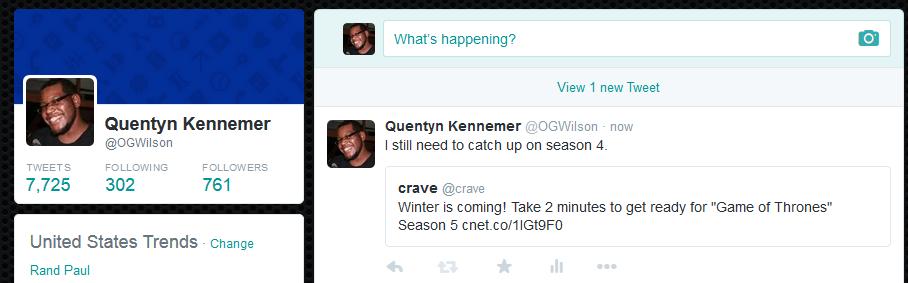

twitter quote retweet 1


Thankfully they’re introducing an all new system that allows users to embed a Tweet within a tweet. You get all 140 of your own characters to write, and the Tweet you’re quoting / commenting on is shown right below.


Only, there’s one catch for us Android users — we can’t use it yet. It’s rolling out to the web and iOS versions already, but Android has been put on the infamous waiting list. We’re hoping the wait won’t be too long, but in the meantime you can check out Twitter’s quick set of instructions right here to get familiar with the system ahead of its arrival (and give it a try on the web version of Twitter if you aren’t above that sort of thing these days).


[via Twitter]


Instagram rolls out new photo editing tools for Android first, coming soon to iOS


Instagram 6.19.0 update color fade


Well, I’ll be… Never thought I’d see the day an app update would hit Android users before those on iOS, especially an app as big as Instagram. I have to admit… it feels kinda good.


In any case, an update to Instagram — available now on Android and coming soon to iOS — is bringing a few new photo editing tools to the social network. The 2 new options include the ability to alter the tint of shadows in an image (Color), and lighten up shadows for a retro film look (Fade). While Color intensity can’t be adjusted, Fade can, allowing users to add a little or a whole lot.


In another small, but huge addition, Instagram is finally giving users the option to subscribe to their favorite ‘grammers. Simply hit up someone’s profile page, click the 3-dot menu and select “Turn on Post Notifications” and you’ll receive a notification on your phone every time that person uploads a new photo (previously, I had to use an IFTTT recipe to accomplish this). This is extremely useful for those that follow a boat load of people on Instagram and often times miss out on photos from their favorite users. This option is available right now for both Android and iOS users.


With every passing update, Instagram is slowing finding itself poised to tackle hardcore photo editing apps like VSCO Cam who have typically offered users a far greater set of tools and higher quality uploads. Now, if Instagram could only drop the square requirement, increase the resolution of their photos, and fix the poor upload quality on Android devices — they just might be able to sway over photo enthusiasts.


You can find Instagram 6.19.0 on Google Play right now.