Affichage des articles dont le libellé est Hangouts. Afficher tous les articles

lundi 6 juillet 2015

You can now send Hangouts messages by saying “OK Google, send a Hangouts message”


ok google hangouts message


Yes, folks, this is finally happening. It is now possible to send a Hangouts message through Google Search’s “OK Google” command on your phone or tablet. Simply say “OK Google, send a Hangouts message,” and a dialog box will popup to let you enter your recipient’s name and the message. This information can be inputted via voice dictation or traditional text entry methods, both of which can, of course, be accessed through your keyboard.


Once everything looks good simply send it off and you will have sent that ever-so-important message without actually having to venture into the Hangouts app. It’s a small change, but one that’s sure to make life easier for those who use Hangouts as their primary form of communication.


The feature seems to require server-side activation so even if you’re on the latest Google Search and Google Hangouts update you might not have access to it just yet. In that case it might simply require a degree of patience. For those lucky enough to already have the feature, go nuts!


[via Reddit]


Here’s an early look at the completely redesigned Hangouts 4.0


Google Hangouts banner


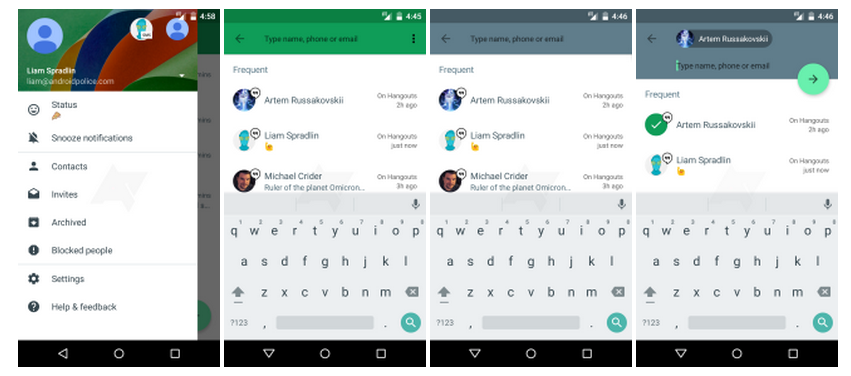
We’ve heard murmurings that Google was finally about to bring the Hangouts app into the 21st century with a Material Design makeover, and it appears we’re very close. A new leak gives us our clearest look yet at the redesigned app, which seems to be getting new coats of paint from head to toe.


hangouts 4 2


So what’s on tap? Everything is as you’d imagine. Google follows their Material Design standard to a T throughout the app, complete with beautiful drop shadows, slide-out drawers and that all-important floating action button (otherwise affectionately known as FAB). It’s not that Google has never used Material Design in Hangouts, but they seemed to only use it in some areas while neglecting all the rest.


hangouts 4 1


One new actual feature in the mobile app is the ability to change your status, which was a feature that was previously only available from the desktop version of Hangouts. Otherwise, you’re getting the same Hangouts experience you’ve come to know and love, only with a much better (and more consistent) design.


Even with as full of a look as we’ve gotten here, there stands to reason that there are some surprises we might not yet know about. There is also a chance that some things could be added or removed ahead of the big update. Still, it’s nice to get a good early look at what to expect. Now let’s just hope it doesn’t take long for Google to deliver the goods.


Hangouts 4.0 for iOS brings new UI, lets you send multiple photos at once – so where’s the Android update?


Hangouts 4.0 iOS


It’s probably not the Hangouts update Android users have been expecting, but Hangouts 4.0 rolled out today for iOS users and brings a slick new user interface and a few other tricks along with it.


Most notably, an all new attachment UI that looks similar to other popular messaging apps, with photos that replace the keyboard for easy sending. What’s more is you can now send multiple photos at once, something anyone that’s spent a lot of time with the app will appreciate. With Google Photos now backing up all your photos and videos for free (the Android version of the app pools these in with your on-device photos), this is something that should really come handy.


While we have yet to hear a peep out of Google, we’re crossing our fingers that an Android version isn’t too far behind. With “Update Wednesday” soon approaching, it could be no more than a few days away although we wont get our hopes up. Maybe Google will finally allow Android users to send video clips — like they already do on iOS — as well?


[iTunes]


Google Hangouts has been pre-installed over 1 billion times


Google Hangouts icon


When an application crosses a billion installs on the Google Play Store, it always sounds like a big deal. It’s an illustrious club that few belong to. Apps like Facebook, WhatsApp and more recently, Facebook Messenger, have all joined the 1 billion downloads club and that’s saying something. Most of those apps had to be physically downloaded (not all the time, but mostly) by Android users before they could hit that milestone.


Then there are a handful of Google apps that are also apart of this club. Apps like Gmail, YouTube, Google Maps, and Google Search. You know, the apps that stand in the back of the room with their embroidered blazers, smoking their pipes, telling stories about how they easily joined up because of their family name. These are the apps that already come pre-installed on your Android device before you even take it out of the box. It should come as little surprise to anyone that another app from Google’s software suite is joining that list, with Google Hangouts now crossing the 1 billion downloads mark.


If nothing else, this milestone — which, by the way, means nothing — points a spotlight directly on an app that is in bad need of an overhaul. With more than a billion “installs,” we think it’s time Google finally gives Hangouts a little TLC. Giving the app a new coat of paint with Material design and bringing it up to speed with its iOS counterpart (which has the ability to send video clips) would be a nice start. Can you think of anything else you’d like to see in a Hangouts refresh?