Affichage des articles dont le libellé est Auto. Afficher tous les articles

lundi 6 juillet 2015

Android Auto app lands on the Google Play Store, compatible with all Lollipop devices


Android Auto big


Android Auto compatible head units have already begun shipping, but don’t expect to just plug in any old Android device and hope everything will just work. A new Android Auto app has been added into the Play Store enabling this functionality on Lollipop+ devices. The app brings a simple driver friendly UI, all powered by your Android device and mirrored onto the head unit.


Here’s what you’ll find in the Android Auto app:


  • Navigation with Google Maps – Free turn-by-turn navigation with lane guidance, live traffic conditions, points of interest, and more

  • Hands-free phone and messaging – Make calls and send messages without taking your hands off the wheel

  • Info and assistance – Get weather, traffic, commute information and more organized into simple cards

  • Bring your music – Listen to your music and playlists in the car with your built-in stereo system
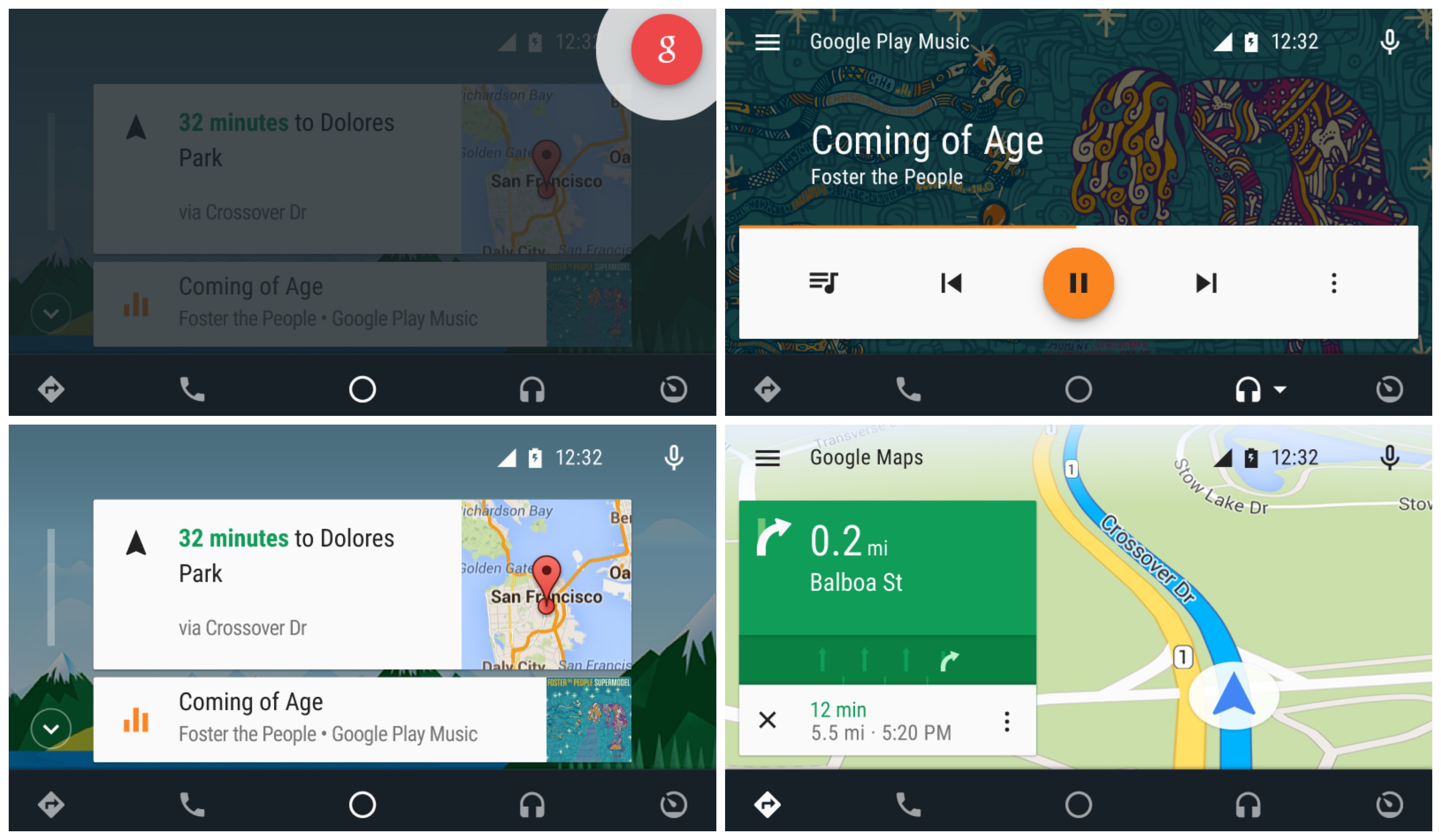

Android Auto app collage


Chances are, you don’t have a compatible automobile or head unit just yet, so you may want to bookmark the app for future use. We wonder how long it’ll be before Google begins preloading this onto devices with their current app suite. Check out Google’s promo video below.


You can buy Pioneer’s Android Auto units right now


pioneer android auto IMG_7835


Yep, Pioneer’s the first to bat with Android Auto products officially available. The line of in-dash units revealed at this past CES is available for boatloads of cash, depending on what you need out of your vehicle’s in-dash system.


There’s just one problem: Android Auto isn’t actually out yet. It’s a fine audio unit on its own, mind you, and for those with Apple CarPlay that functionality is readily available. But those hoping to be able to add Android Auto functionality to their car without having to buy a brand new vehicle will have to wait for an update (though Google tells us that will happen quite soon).


These things don’t come cheap:


The main differences between them seem to be in areas of navigation. The cheapest option doesn’t support standalone GPS navigation, while the latter two do. The most expensive option offers a more robust suite of navigation features over its cheaper counterpart.


All units seem to enjoy the same audio, connectivity and media support (DVD and CD), though, so if navigation isn’t your thing then you’re better off going with the cheaper of the three. They’ll slot into any standard 4-inch Double-DIN dash bay so make sure your car has enough room for it and order one in anticipation of Android Auto’s arrival at some point down the line.


AutoMate turns your Android phone into an Android Auto dashboard


AutoMate


Android Auto is one of the coolest things Google is doing right now, but it’s also one of the most difficult things to try for yourself. In order to use Android Auto you need a phone running Lollipop and an expensive aftermarket head unit for your car. Why should we have to buy a display to put in our vehicles when we already carry a display around with us everywhere?


Many people have complained about the fact that Android phones can’t display the Android Auto interface. All you would need is a simple car mount and it would work just the same. That’s exactly what you can do with a new app called AutoMate. The app is not official, so there are a few kinks (it launches Maps and music apps externally).


AutoMate gives you easy access to Google Maps navigation, phone, music, and favorite apps for driving. It’s a nice, clean, distraction-free interface to use while you should be concentrating on the road. To give AutoMate a try you’ll need to join the Google+ beta community and then opt-in to test the app from Google Play. Drive safely!


[via Lifehacker]


Google starts showing auto insurance comparisons in search results


Google_Auto_Insurance


At its core Google has always been about putting people in touch with information. It started with searching the web, and has since ballooned to many other things. The latest is a handy tool for comparing auto insurance. If you live in California you should start seeing comparison tools when searching for auto insurance. They’ve also made the tools accessible on a new website.


All you have to do is enter your zip code, car details, and some other information to get results. You’ll see a list of quotes from a variety of insurance companies. From there you can head to the provider’s website and finish your purchase. Right now the service is only available in California, but it will be rolling out to other states soon. With all the different commercials and ads from auto insurance companies it’s nice to have a place to compare them all.


[via Google]


Hyundai is the first car manufacturer to offer Android Auto in a production vehicle, starting with the 2015 Sonatas


hyundai sonata 2015


It’s been possible to get Android Auto in your car for a couple of months now, but we’re still waiting on the first car to offer the smart vehicle system as standard. Wait no more: Hyundai has announced that they’re taking those honors with the 2015 Sonata.


The best part is that you can get the goods even if you already own the 2015 Sonata. Official Hyundai dealers can help you get the update as soon as today if you stop in, though if you don’t mind waiting you can apply it via a simple software update over USB later this summer.


HYUNDAI IS THE FIRST AUTOMAKER TO LAUNCH ANDROID AUTO (PRNewsFoto/Hyundai Motor America)

HYUNDAI IS THE FIRST AUTOMAKER TO LAUNCH ANDROID AUTO (PRNewsFoto/Hyundai Motor America)


Android Auto requires a phone with Android 5.0 Lollipop for the deepest level of integration, so if you don’t already have it then you should look into options — official or otherwise — for updating whichever phone you have. Here’s a quick summary of everything Android Auto does to help make your time on the road safe:


  • The Google Now card-based experience provides suggested locations and travel times based on the user’s searches, calendar entries and home and office locations, as well as weather information and “now playing” information for music streamed via the phone

  • App software (navigation, streaming music, etc.) is automatically updated because the apps live on the phone

  • Natural voice recognition with Google voice actions

  • Owners can easily bring their personal reminders, suggested destinations, calendar appointments and music preferences with them when they get in their car

  • Android Auto automatically pairs with the for phone calls through Bluetooth when connected for the first time via USB

  • Android Auto has familiar interfaces that are easy to use and have almost no learning curve


Let’s hope others will follow suit soon enough.


[via Business Wire]


GM will bring Android Auto to Cadillac starting in 2016 cars


android auto in car 2


Android Auto is spreading to more and more devices, and another fleet of vehicles is confirmed to be in on the fun. GM has announced that Android Auto would head to their Cadillac cars starting with the 2016 run, which launches at some point this summer.


The upgrades will come as part of an enhanced CUE — or Cadillac User Experience — update that will feature new functionality and improved performance. Of course, you’ll need to make sure you have a phone with Lollipop by the time the cars arrive as Android Auto is only available on Android 5.0 or higher.


[via GM]