Affichage des articles dont le libellé est Sensor. Afficher tous les articles

lundi 6 juillet 2015

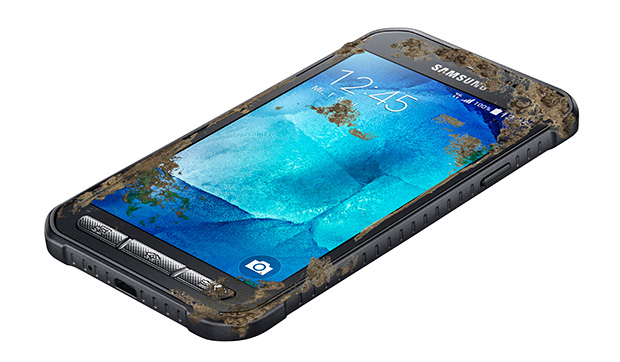
Samsung Galaxy S6 Active might trade fingerprint scanner/heart rate sensor for micro SD card slot


xcover-3-


The Samsung Galaxy S6 Active might look something like the recently announced Samsung Xcover 3 (above)


The Samsung Galaxy S6 is chock-full of amazing hardware features (wireless charging, fingerprint scanner, DDR4 RAM), but when we found out some of the Galaxy S5’s best features wouldn’t be making a return — water resistance, micro SD card, and removable battery — we have to admit, we were a little bummed out.


When it came to water resistance, we had a feeling that Samsung would bring this feature back for an all new Samsung Galaxy S6 Active. Not too long later, a few leaks started making the rounds, hinting to the S6 Active’s existence and we were excited to see what else the phone bring. Today, a Reddit user claims to have had a sit down meeting with Samsung rep out of Europe (along with picture proof). When asked about Samsung Galaxy S6 Active, the Samsung rep was willing to divulge a few details about the device. First off, Samsung could be ditching the fingerprint reader/heart rate sensor for the S6 Active. While that sounds like an odd move (given the S6 Active will likely be marketed towards those who are active), he mentioned the phone will feature an SD card slot.


He also went on to mention that the camera might be “less good” than the regular S6’s and that we can look forward to a mid-summer release date. We should note, he did mention the device was still under development and that any of these hardware features could change down the road, so there might still be hope for that fingerprint reader on the retail-ready version.


With a rumored 3,500mAh battery and now a micro SD card slot, anyone else thinking about picking up the Samsung Galaxy S6 Active over the regular version?


Official: OnePlus 2 will come feature a fingerprint sensor that’s faster than Apple’s TouchID


OnePlus 2 fingerprint sensor scanner reveal 1


Okay, so this mornings OnePlus 2 leak was more than likely a fake, but that doesn’t mean it didn’t get one thing right: the phone’s upcoming fingerprint scanner. We’re sure it was just a lucky guess, what with all the OEMs finally jumping on the fingerprint bandwagon (and native support coming in Android M).


It’s not too surprising but confirmed today by OnePlus themselves, it seems the upcoming OnePlus 2 will, in fact, come equipped with some sort of fingerprint reader. Because there’s so many different types of fingerprint reading hardware out there (some that suck more than others), OnePlus assures us that theirs is one of the latest and most advanced fingerprint sensors around. According to them, it’s even faster at unlocking devices than Apple’s TouchID and can store up to 5 fingerprint profiles.


This latest OnePlus 2 announcement is just one of many more to come. The smartphone startup has a history of slowly revealing key aspects of their flagship’s hardware as they get closer to the full reveal at their press event on July 27th. The event will be one of the first ever to not only be streamed online, but offers a virtual reality experience for those of you lucky enough to have a VR headset at your disposal. If you don’t, don’t worry. OnePlus is supplying those too.


[OnePlus]


Galaxy S5 G900F Update G900FXXU1ANG9, fingerprint sensor fixes


There is a new update for Samsung Galaxy S5 SM-G900F dubbed with firmware build number G900FXXU1ANG9. The update is still based in Android 4.4.2 and now seen rolling out in The Netherlands and Southeast Europe region. The new 4.4.2 G900FXXU1ANG9 has the same changelog value to the 4.4.2 G900FXXU1ANG2 which have been also rolled out in Europe and Asian countries earlier. The said G900FXXU1ANG9 update brings some improvements to the fingerprint sensor which has been reportedly has a serious problem when swiping down the screen.


There are also some improvements to speed and battery life performance but rather check it out by yourself once you took the update. The update can now be seen via over-the-air OTA update which is only available for those who owns the unbranded Galaxy S5 SM-N900F in The Netherlands and South east Europe at this time being.


Technical Details of G900FXXU1ANG9:


Here are the build info of the 4.4.2 update build version G900FXXU1ANG9 for Samsung Galaxy S5 SM-G900F:


Model number: SM-G900F
Android version: 4.4.2
Baseband version: G900FXXU1ANG2
Kernel version: 3.0.4-2089850
Build number: KOT49H.G900FXXU1ANG9
AP: G900FXXU1ANG9
CSC: G900FOXX1ANG5
MODEM: G900FXXU1ANG2
Build Date: July 2014
Release Date: August 2014


G900FXXU1ANG9 Galaxy S5


You may check this updated list to see if it’s also available in your country as I will update this list daily.

Galaxy S5 SM-G900F 4.4.2 G900FXXU1ANG9 Firmware Update List


Updated list of Android 4.4.2 Firmware Build number G900FXXU1ANG9, for International Samsung Galaxy S5 SM-G900F - released on August 2014.


Country/CarrierAvailability
AlbaniaYes!
Albania (Vodafone)
Austria
Austria (3 Hutchison)
Austria (A1)
BelgiumYes!
Belgium (Proximus)
Bosnia and HerzegovinaYes!
BulgariaYes!
Bulgaria (Glubol)Yes!
Bulgaria (MTL)
Bulgaria MTEL
Croatia Yes!
Croatia (O2)Yes!
Croatia (Vipnet)
Cyprus
Cyprus (Cytamobile Vodafone)Yes!
Cyprus (Vodafone)
Czech Republic
Czech Republic (O2C)Yes!
Czech Republic (Vodafone)
DenmarkYes!
Estonia
Faroe islandsYes!
FinlandYes!
FranceYes!
France (Bouygues)
France (Orange)Yes!
France (SFR)
Germany
Germany (O2)
Germany (T-Mobile)
Germany (Vodafone)
Greece Yes!
Greece (Vodafone)
Hungary Yes!
Hungary (Telenor)
Hungary (Vodafone)
IcelandYes!
Ireland
Ireland (3)
Ireland (Meteor)Yes!
Ireland (O2)
Ireland (Vodafone)
Israel (Cellcom)
ItalyYes!
Italy (TIM)
Italy (Vodafone)
Italy (Wind)
KosovoYes!
Latvia
Lithuania
LuxembourgYes!
Macedonia/FYROMYes!
MoldovaYes!
MontenegroYes!
NetherlandsYes!
Netherlands (Vodafone)
New ZealandYes!
New Zealand (Vodafone)Yes!
NorwayYes!
Norway (Telenor)
Poland
Poland (Orange)
Poland (Play)
Poland (PLUS)
Portugal (TPH)
Portugal (Vodafone)
RomaniaYes!
Romania (Cosmote)
Romania (Orange)
Romania (Vodafone)
Russian Federation
Serbia Yes!
Serbia (Telekom)
Serbia (Telenor)
Serbia (VIP)Yes!
SlovakiaYes!
SloveniaYes!
Slovenia (Mobitel)
Slovenia (Si.mobil)
Southeast EuropeYes!
SpainYes!
Spain (Vodafone)
SwedenYes!
Sweden (3)Yes!
Switzerland
Switzerland (Swisscom)
United Kingdom
United Kingdom (EVERY)
United Kingdom (H3G)
United Kingdom (O2)Yes!
United Kingdom (Vodafone)
x I will just update this list on daily basis and add up more countries...


How to Upgrade the Galaxy S5 SM-G900F to the latest 4.4.2 Software Update


Samsung always advises us to prepare the following important notes to consider before performing the software update.  I have also added some useful insights why you should follow this procedures to keep your  phone in safe.


Recharge the phone’s battery – You should make sure your device is fully recharged before performing the software update. Do not also remove the battery during the software update is in progress. A power failures may cause damaged to your device that might results as we so-called “soft-bricks”. If this happens your device may just stuck on Samsung logo or welcome screen and can’t reboot normally.


Backup important data – You should back-up your important files, including contacts, emails, messages, photos, videos, apps and other stuff. Like I said while during software update process is interrupted there is a possibility that your data stored from your device internal SD card may lose or deleted when a sudden unexpected failure happened and it forces you to perform a factory data reset which basically wipes your phone’s memory.


Galaxy S5 has no root – Your device should not been modified or rooted, there is a certain circumstances that a modified and rooted Galaxy S5 SM-G900F may not accept any official software update anymore or it can accept an update but it might harm your device once the update has made. Learn about the new Samsung KNOX security suite. Most known error that says ‘firmware upgrade encountered an issue, please select recovery mode in kies and try again‘ or “Your device has been modified Software update are not available” you should try to avoid that from happening.


Update to  G900FXXU1ANG9 4.4.2 via Over-The-Air (OTA)


Samsung Galaxy S5 OTA Update This is usually how the carrier branded or locked Samsung Galaxy S5, performs a software update.  This method is Firmware Update through over the air or called as OTA update, which usually a notification message will directly sent to you from your network provider or Samsung and notifies you that there is a new update available for download.  If you did not received any notification messages you can manually check fro the update instead.  Doing this you may only tap on your Galaxy S5 SM-G900F Settings>>About Device, tap Software Update.


  • Find “Software update”

  • Slide your finger down the display starting from the top edge of your mobile phone.

  • Tap the settings icon.

  • Tap About device.

  • Tap Software update.


It will automatically tells you that a new update is available or your software is up to date when there is none yet. You can simply tap install now when you want to perform an update or install later.


Update to G900FXXU1ANG9 Through Kies


Samsung Galaxy S5 Kies Software update download


The second method is a firmware update through Samsung Kies. You may head-over to your  local Samsung support page from where you can download Samsung Kies from there, and install it in your Windows or Mac computer. Choose the new Kies 3 which supports the Galaxy S5 SM-G900F and other Samsung devices running with Android 4.4.2 and up OS .  Once you installed Kies 3, all you need is connect your Samsung Galaxy S5 SM-G900F to the computer using the USB cable, then simply run and follow Kies on-screen software update instructions.


If you already received this update, just do shed us some info on how the G900FXXU1ANG9 4.4.2 software update performs on your Samsung Galaxy S5 SM-G900F.


The post Galaxy S5 G900F Update G900FXXU1ANG9, fingerprint sensor fixes appeared first on GalaxyS5Update.


Galaxy S5 G900F Update G900FXXU1ANG2 Improved Fingerprint Sensor


New firmware  update on Samsung Galaxy S5 SM-G900F that bumps to firmware build number G900FXXU1ANG2. The G900XXU1ANG2 is still packed in Android 4.4.2 KitKat but it brings a lot more smoother and snappier user experience.  Some noticeable changes is the fingerprint sensor which as  lot better now and show less errors than before. You can also see the new unlock pattern which the  color one has changed while it also has new lock screen previews that tells you what effect you choose when you select lock screen effect.


The G900FXXU1ANG2 is now available in select countries, such as Philippines and Sri Lanka, as we spotted on Kies. This is a similar software update we have seen earlier in Singapore with build number G900FDXU1ANG1 but might as well and sooner available on other countries.  So you better check for this update now, again it’s only available for select countries and the roll out might be in stages.


G900FXXU1ANG2 Firmware Info:


Here are the build info of the 4.4.2 update build version G900FXXU1ANG2 Galaxy S5 SM-G900F:


Android version: 4.4.2 (KitKat OS)
Baseband version: G900FXXU1ANG2
Kernel version: 3.0.4-2091818
Build number: KOT49H.G900FXXU1ANG2
PDA: G900FXXU1ANG2
CSC: G900FOXA1ANG1
PHONE: G900FXXU1ANG2
Build Date: July 2014
Release Date: July 2014


G900FXXU1ANG2


Currently available in Philippines and Sri Lanka, but might also available to other countries in Europe these following couple of days. Below are the simple guide on how to upgrade your Samsung Galaxy S5 to Android 4.4.2 G900FXXU1ANG2.


Update: The G900FXXU1ANG2 has also available in Europe and Middle East countries. Just read on below for the updated list of  the G900FXXU1ANG2 4.4.2 update to see if you country has it too.


Galaxy S5 SM-G900F 4.4.2 G900FXXU1ANG2 Firmware Update List


Updated list of Android 4.4.2 Firmware Build number G900FXXU1ANG9, for International Samsung Galaxy S5 SM-G900F - released on July to August 2014.


Country/CarrierAvailability
x Other countries and network providers will also added soon... Note: the list may inaccurate.
AlbaniaYes!
Albania (Vodafone)Yes!
AustriaYes!
Austria (3 Hutchison)Yes!
Austria (A1)Yes!
Belgium
Belgium (Proximus)
Bosnia and HerzegovinaYes!
Bosnia and Herzegovina (BH-Telecom)Yes!
BulgariaYes!
Bulgaria (Glubol)Yes!
Bulgaria (MTL)Yes!
Bulgaria MTELYes!
Croatia (Vipnet)Yes!
Cyprus (Cytamobile Vodafone)Yes!
Cyprus (Vodafone)Yes!
Czech RepublicYes!
Czech Republic (O2C)
Czech Republic (Vodafone)Yes!
Denmark
Estonia
Faroe Islands
Finland
France
France (Bouygues)
France (Orange)
France (Vodafone)Yes!
France (SFR)
GermanyYes!
Germany (O2)Yes!
Germany (T-Mobile)
Germany (Vodafone)Yes!
Greece Yes!
Greece (Vodafone)Yes!
Hungary (Telenor)Yes!
Hungary (Vodafone)Yes!
Iceland
IndonesiaYes!
IrelandYes!
Ireland (3)Yes!
Ireland (Meteor)
Ireland (O2)
Ireland (Vodafone)
Israel (Cellcom)
ItalyYes!
Italy (TIM)
Italy (Vodafone)Yes!
Italy (Wind)
Kazakhstan Yes!
Kosovo
Latvia
Lithuania
LuxembourgYes!
Macedonia/FYROMYes!
MalaysiaYes!
Moldova
Montenegro
MoroccoYes!
Netherlands
Netherlands (Vodafone)Yes!
Norway
Norway (Telenor)Yes!
PhilippinesYes!
PolandYes!
Poland (Orange)Yes!
Poland (Play)
Poland (PLUS)Yes!
Portugal Yes!
Portugal (Vodafone)Yes!
Romania
Romania (Cosmote)
Romania (Orange)Yes!
Romania (Vodafone)Yes!
Russian Federation
Saudi ArabiaYes!
Serbia (Telekom)
Serbia (Telenor)
Serbia (VIP)
SingaporeYes!
Slovakia
Slovenia
Slovenia (Mobitel)Yes!
Slovenia (Si.mobil)Yes!
South AfricaYes!
South AfricaYes!
South East Europe
Spain
Spain (Movistar)Yes!
Spain (Vodafone)Yes!
Sweden
Sweden (3)Yes!
SwitzerlandYes!
Switzerland (Swisscom)Yes!
ThailandYes!
United Arab EmiratesYes!
United KingdomYes!
United Kingdom (EVERY)Yes!
United Kingdom (H3G)Yes!
United Kingdom (O2)Yes!
United Kingdom (Vodafone)Yes!
UzbekistanYes!
VietnamYes!


How to Upgrade the Galaxy S5 SM-G900F to the latest 4.4.2 Software Update


Samsung always advises us to prepare the following important notes to consider before performing the software update.  I have also added some useful insights why you should follow this procedures to keep your  phone in safe.


Recharge the phone’s battery – You should make sure your device is fully recharged before performing the software update. Do not also remove the battery during the software update is in progress. A power failures may cause damaged to your device that might results as we so-called “soft-bricks”. If this happens your device may just stuck on Samsung logo or welcome screen and can’t reboot normally.


Backup important data – You should back-up your important files, including contacts, emails, messages, photos, videos, apps and other stuff. Like I said while during software update process is interrupted there is a possibility that your data stored from your device internal SD card may lose or deleted when a sudden unexpected failure happened and it forces you to perform a factory data reset which basically wipes your phone’s memory.


Galaxy S5 has no root – Your device should not been modified or rooted, there is a certain circumstances that a modified and rooted Galaxy S5 SM-G900F may not accept any official software update anymore or it can accept an update but it might harm your device once the update has made. Learn about the new Samsung KNOX security suite. Most known error that says ‘firmware upgrade encountered an issue, please select recovery mode in kies and try again‘ or “Your device has been modified Software update are not available” you should try to avoid that from happening.


Update to  G900FXXU1ANG2 4.4.2 via Over-The-Air (OTA)


Samsung Galaxy S5 OTA Update This is usually how the carrier branded or locked Samsung Galaxy S5, performs a software update.  This method is Firmware Update through over the air or called as OTA update, which usually a notification message will directly sent to you from your network provider or Samsung and notifies you that there is a new update available for download.  If you did not received any notification messages you can manually check fro the update instead.  Doing this you may only tap on your Galaxy S5 SM-G900F Settings>>About Device, tap Software Update.


  • Find “Software update”

  • Slide your finger down the display starting from the top edge of your mobile phone.

  • Tap the settings icon.

  • Tap About device.

  • Tap Software update.


It will automatically tells you that a new update is available or your software is up to date when there is none yet. You can simply tap install now when you want to perform an update or install later.


Update to G900FXXU1ANG2 Through Kies


Samsung Galaxy S5 Kies Software update download


The second method is a firmware update through Samsung Kies. You may head-over to your  local Samsung support page from where you can download Samsung Kies from there, and install it in your Windows or Mac computer. Choose the new Kies 3 which supports the Galaxy S5 SM-G900F and other Samsung devices running with Android 4.4.2 and up OS .  Once you installed Kies 3, all you need is connect your Samsung Galaxy S5 SM-G900F to the computer using the USB cable, then simply run and follow Kies on-screen software update instructions.


If you already received this update, just do shed us some info on how the G900FXXU1ANG2 4.4.2 software update performs on your Samsung Galaxy S5 SM-G900F.


The post Galaxy S5 G900F Update G900FXXU1ANG2 Improved Fingerprint Sensor appeared first on GalaxyS5Update.